

Website
Need to change or cancel a booking, or want to understand when you pay? You are in the right place. Here's an overview, with links to the detailed guides.
When you pay
The payment methods available to you are shown on the payment page before you confirm your booking. They depend on the country of your payment account.
- Your card is charged when you complete Confirm & Pay, after the host accepts your request. Your booking is confirmed when the payment succeeds. While your request is pending, we may place a temporary hold on your card or charge a small verification amount (no more than CHF 1). Read more in When will I pay for my booking?
- Security deposit: if the listing has one, it is handled separately. See Security deposit.
Where to find your reservations
- Log in to your account: see Log in to your account.
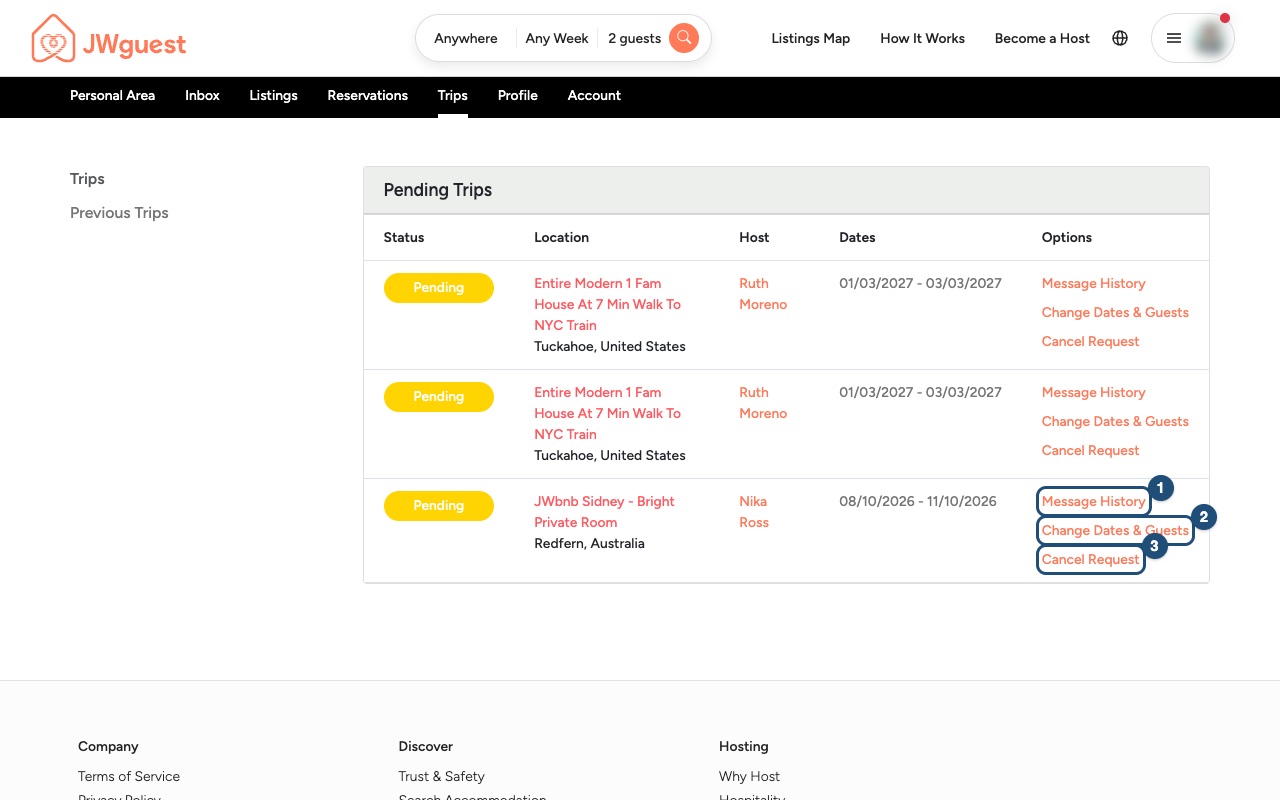
- Open Trips: in the Personal Area bar at the top, click Trips. You will see your trips with their status, dates and host.
- Use the Options column: on the right of each trip you will find Message History (1), to write to your host, and the options to change (requests not yet confirmed) or cancel.
Changing or cancelling
It's perfectly fine for plans to change. What you can do depends on whether your booking is still a request or is already confirmed:
- Request not yet confirmed: use Change Dates & Guests or Cancel Request in the Options column. Nothing has been charged yet.
- Confirmed booking: to cancel, use Cancel Request in Trips, or ask in writing at [email protected]. Your cancellation counts when you click the cancellation button or, if you wrote to us, when we confirm it by email. See Cancel your booking. To change the dates or the number of guests, write to [email protected] or use Contact us > "A booking": our team agrees the change with the host, updates your booking and applies an administration fee of 15 EUR or 15 USD (or the equivalent in your booking currency), non-refundable, also for extensions. See Change your booking dates.
Any refund follows the cancellation policy of the listing, which you see on the listing page before you book. Hosts choose Flexible, Moderate or Strict. All the details are on our Cancellation Policies page.
Need help with a specific booking? Write to us from the Contact us page and choose "A booking".
Mobile browser
Need to change or cancel a booking, or want to understand when you pay? You are in the right place. Here's an overview, with links to the detailed guides.
When you pay
The payment methods available to you are shown on the payment page before you confirm your booking. They depend on the country of your payment account.
- Your card is charged when you complete Confirm & Pay, after the host accepts your request. Your booking is confirmed when the payment succeeds. While your request is pending, we may place a temporary hold on your card or charge a small verification amount (no more than CHF 1). Read more in When will I pay for my booking?
- Security deposit: if the listing has one, it is handled separately. See Security deposit.
Where to find your reservations on your phone
- Log in to your account: tap the menu icon (three lines) at the top right and log in. See Log in to your account.
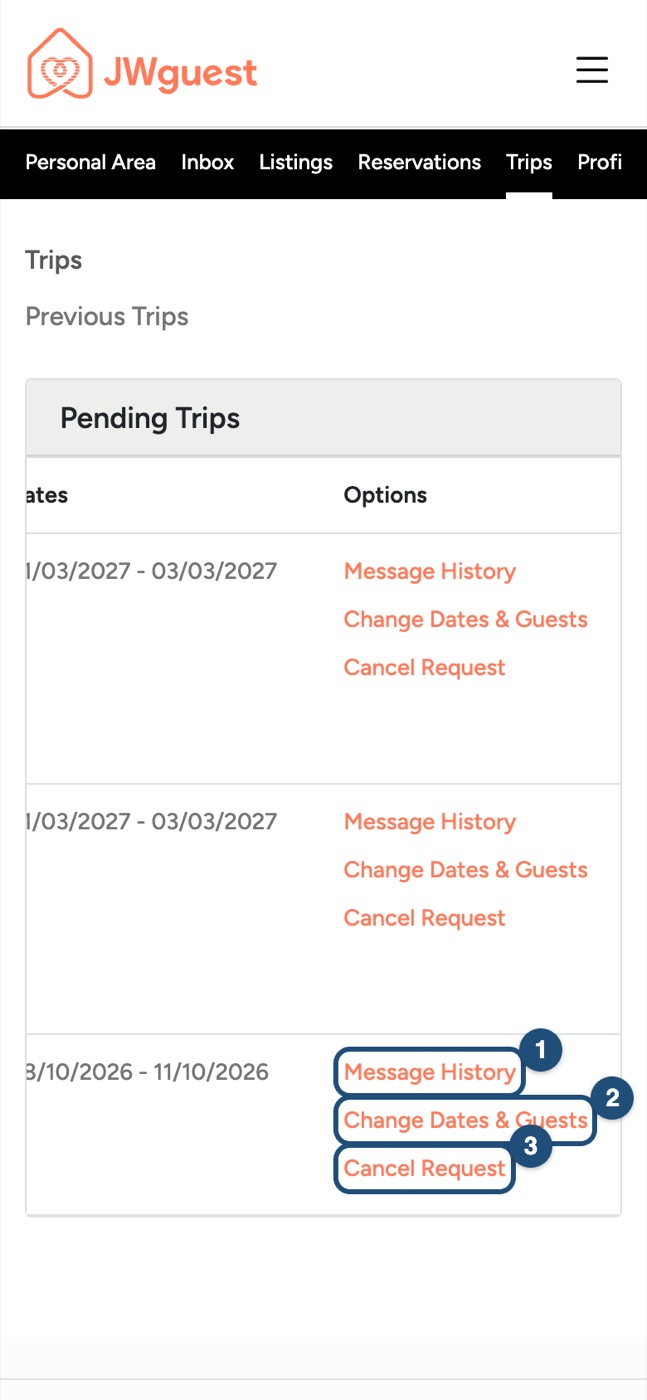
- Open Trips: in the black Personal Area bar below the header, tap Trips.
- Swipe the table to the left: the trips table is wider than your screen. Swipe it left with your finger until you see the Options column.
- Use the options: Message History (1) to write to your host, plus the options to change (requests not yet confirmed) or cancel.
Changing or cancelling
It's perfectly fine for plans to change. What you can do depends on whether your booking is still a request or is already confirmed:
- Request not yet confirmed: use Change Dates & Guests or Cancel Request in the Options column. Nothing has been charged yet.
- Confirmed booking: to cancel, use Cancel Request in Trips, or ask in writing at [email protected]. Your cancellation counts when you click the cancellation button or, if you wrote to us, when we confirm it by email. See Cancel your booking. To change the dates or the number of guests, write to [email protected] or use Contact us > "A booking": our team agrees the change with the host, updates your booking and applies an administration fee of 15 EUR or 15 USD (or the equivalent in your booking currency), non-refundable, also for extensions. See Change your booking dates.
Any refund follows the cancellation policy of the listing, which you see on the listing page before you book. Hosts choose Flexible, Moderate or Strict. All the details are on our Cancellation Policies page.
Need help with a specific booking? Write to us from the Contact us page and choose "A booking".
iOS app
Need to change or cancel a booking, or want to understand when you pay? You are in the right place. Here's an overview, with links to the detailed guides.
When you pay
The payment methods available to you are shown on the payment page before you confirm your booking. They depend on the country of your payment account.
- Your card is charged when you complete Confirm and pay, after the host accepts your request. Your booking is confirmed when the payment succeeds. While your request is pending, we may place a temporary hold on your card or charge a small verification amount (no more than CHF 1). Read more in When will I pay for my booking?
- Security deposit: if the listing has one, it is handled separately. See Security deposit.
Where to find your reservations in the app
- Log in: see Log in to your account.
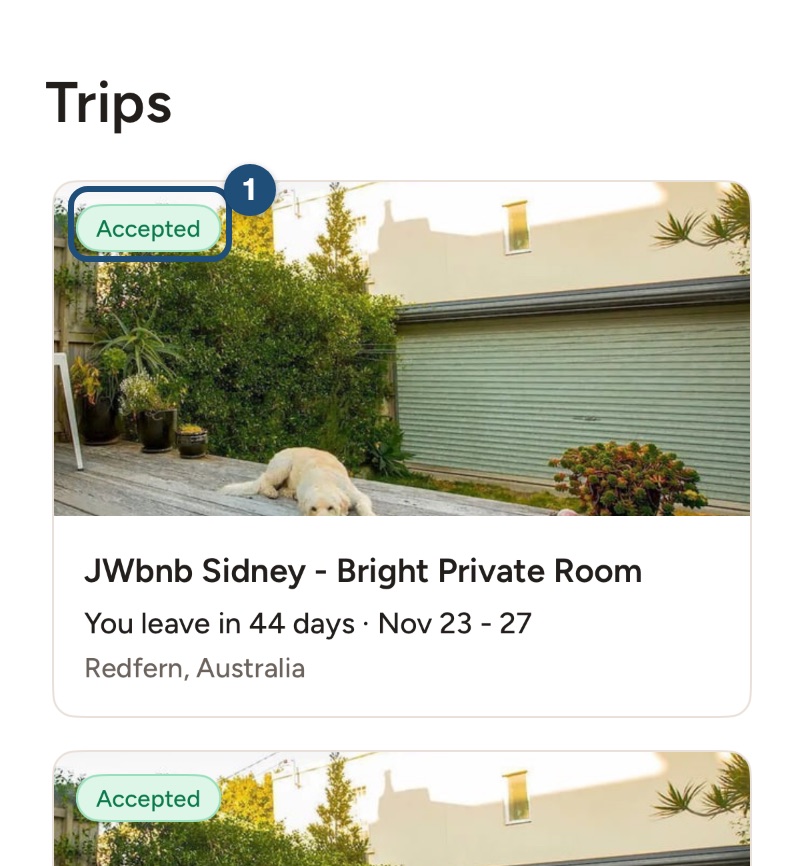
- Open Trips: tap Trips in the bar at the bottom. Each trip shows its status on the photo (1).
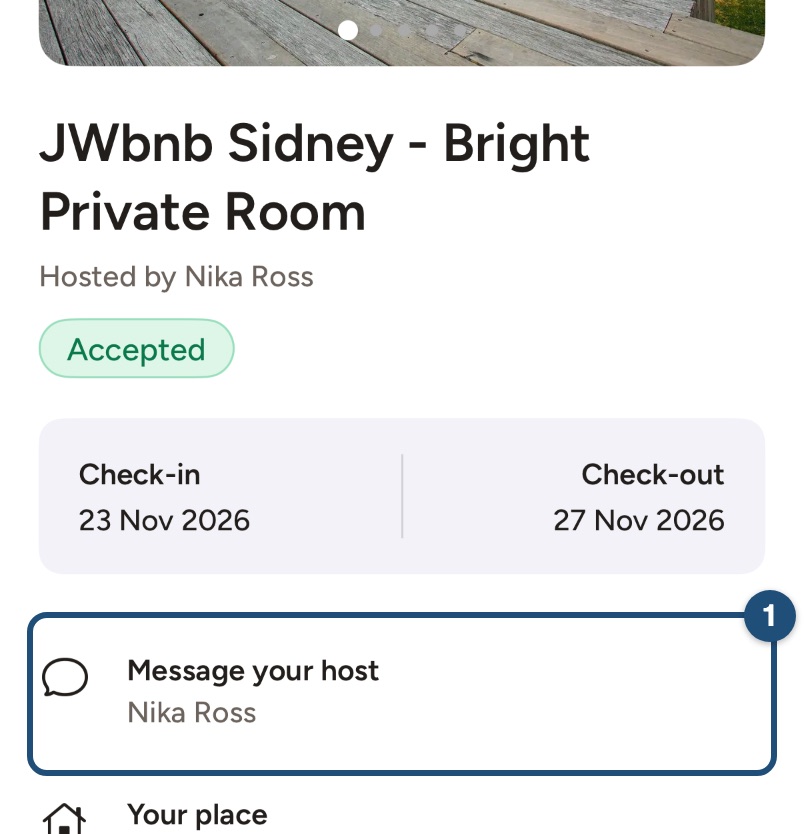
- Open a trip: tap Message your host (1) to write to your host. At the bottom of the page you can cancel, and Download booking confirmation saves your confirmation.
Changing or cancelling
It's perfectly fine for plans to change. What you can do depends on whether your booking is still a request or is already confirmed:
- Request not yet confirmed: in the conversation with your host, tap Edit dates or guests or Cancel request under the message field. Nothing has been charged yet. See Change your booking dates.
- Confirmed booking: to cancel, open the trip and tap Cancel request at the bottom, or ask in writing at [email protected]. Your cancellation counts when you confirm it in the app or, if you wrote to us, when we confirm it by email. See Cancel your booking. To change the dates or the number of guests, write to [email protected] or use Contact us > A booking: our team agrees the change with the host, updates your booking and applies an administration fee of 15 EUR or 15 USD (or the equivalent in your booking currency), non-refundable, also for extensions.
Any refund follows the cancellation policy of the listing, which you see on the listing page before you book. Hosts choose Flexible, Moderate or Strict. All the details are on our Cancellation Policies page.
Need help with a specific booking? In the app, tap Profile > Help & Support > Contact us and choose A booking.
Android app
Need to change or cancel a booking, or want to understand when you pay? You are in the right place. Here's an overview, with links to the detailed guides.
When you pay
The payment methods available to you are shown on the payment page before you confirm your booking. They depend on the country of your payment account.
- Your card is charged when you complete Confirm and pay, after the host accepts your request. Your booking is confirmed when the payment succeeds. While your request is pending, we may place a temporary hold on your card or charge a small verification amount (no more than CHF 1). Read more in When will I pay for my booking?
- Security deposit: if the listing has one, it is handled separately. See Security deposit.
Where to find your reservations in the app
- Log in: see Log in to your account.
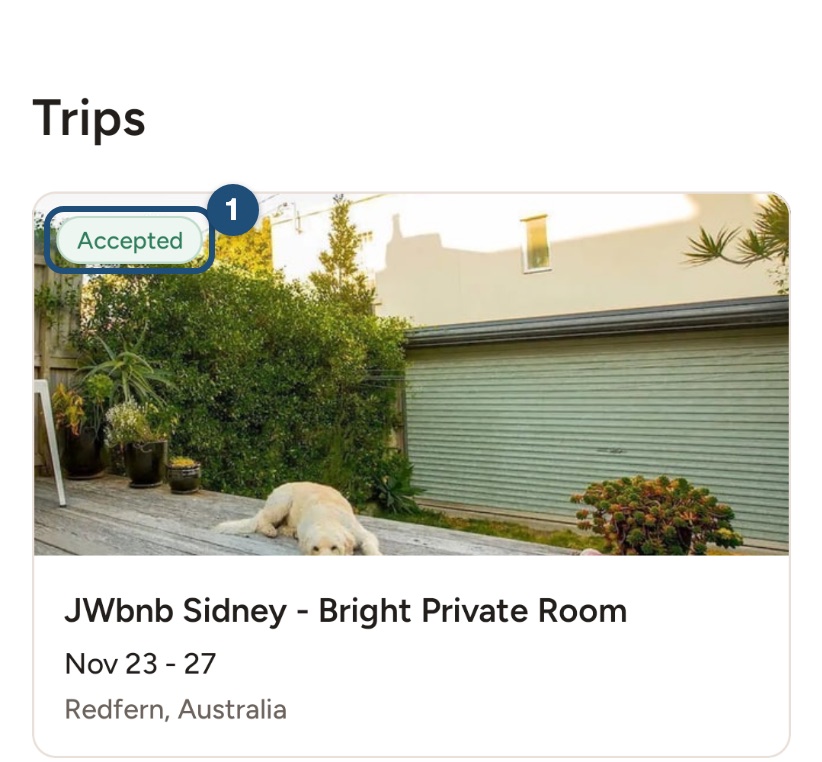
- Open Trips: tap Trips in the bar at the bottom. Each trip shows its status on the photo (1).
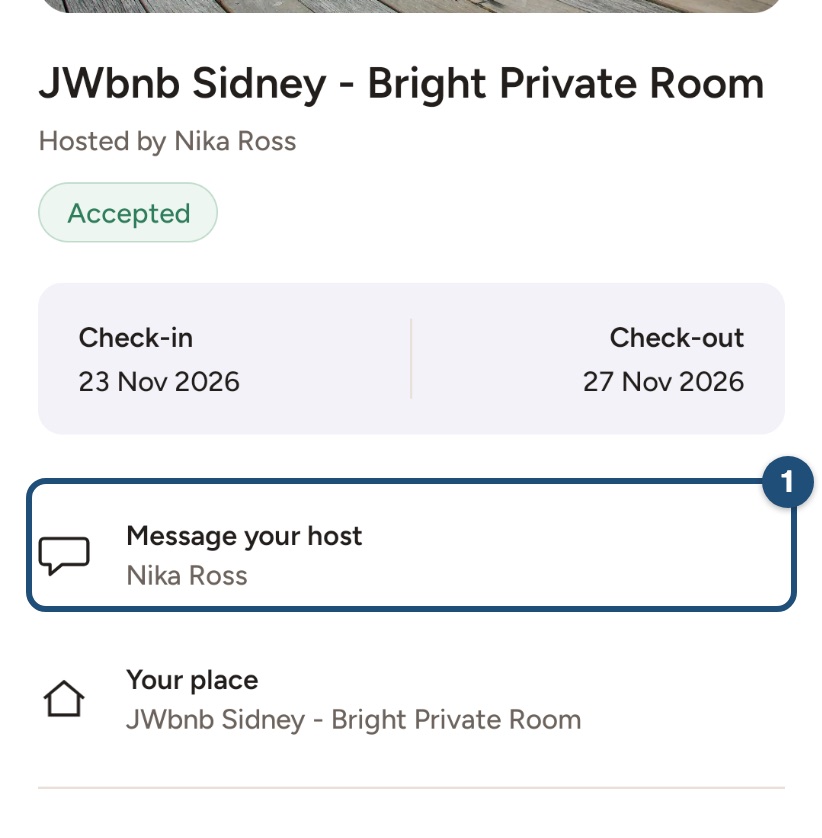
- Open a trip: tap Message your host (1) to write to your host. Further down you find the price breakdown and your payment, and at the bottom Cancel.
Changing or cancelling
It's perfectly fine for plans to change. What you can do depends on whether your booking is still a request or is already confirmed:
- Request not yet confirmed: in the conversation with your host, tap Edit dates or guests or Cancel request under the message field. Nothing has been charged yet. See Change your booking dates.
- Confirmed booking: to cancel, open the trip and tap Cancel at the bottom, or ask in writing at [email protected]. Your cancellation counts when you confirm it in the app or, if you wrote to us, when we confirm it by email. See Cancel your booking. To change the dates or the number of guests, write to [email protected] or use Contact us > A booking: our team agrees the change with the host, updates your booking and applies an administration fee of 15 EUR or 15 USD (or the equivalent in your booking currency), non-refundable, also for extensions.
Any refund follows the cancellation policy of the listing, which you see on the listing page before you book. Hosts choose Flexible, Moderate or Strict. All the details are on our Cancellation Policies page.
Need help with a specific booking? In the app, tap Profile > Help & Support > Contact us and choose A booking.