
Website
If you chose Pay part now, part later, the remaining balance is due 35 days before check-in. It is charged automatically on that date, to the card you chose when you booked. You can also pay it earlier yourself. See Pay part now, part later.
Pay the remaining balance before the due date
You don't have to wait for the automatic charge. You can pay the balance from any of these places:
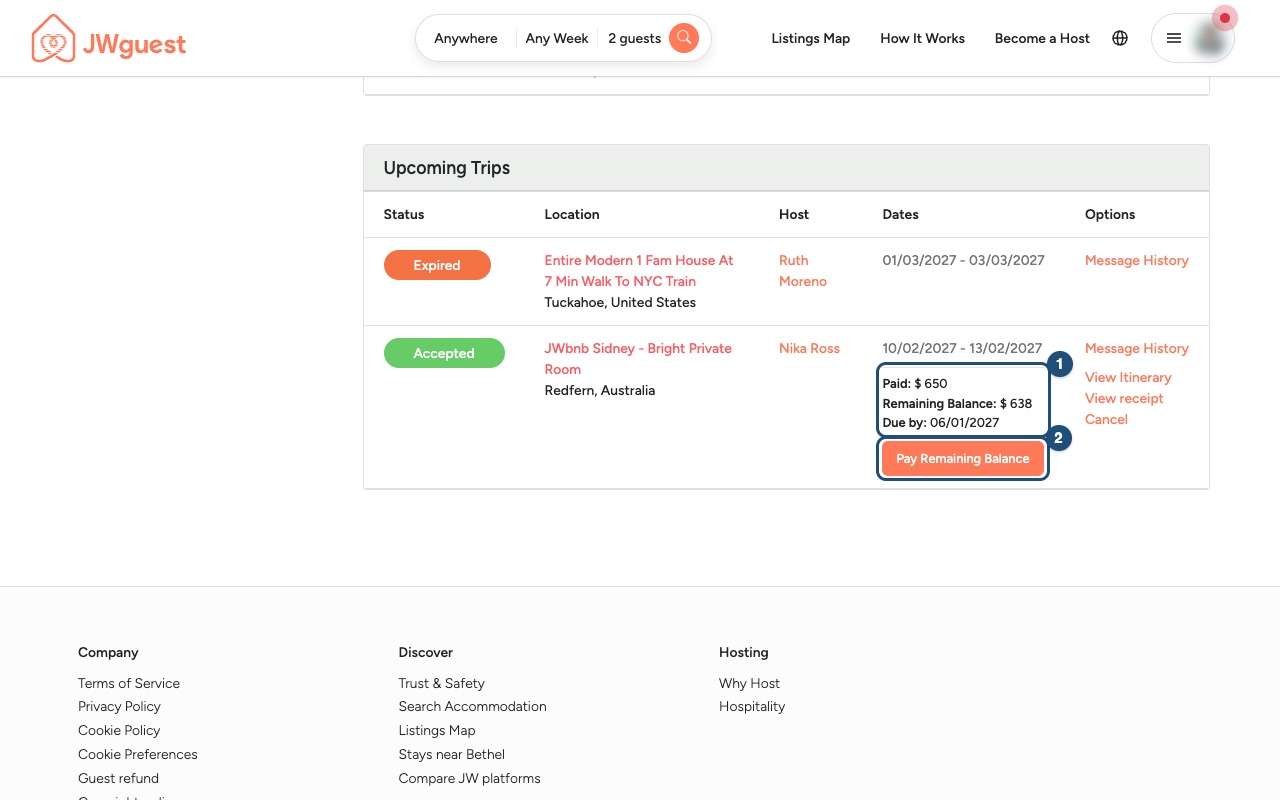
1. Open the booking: go to Trips. Under the dates of your upcoming trip you see what you have Paid, the Remaining Balance and the date it is Due by (1). Click Pay Remaining Balance (2).
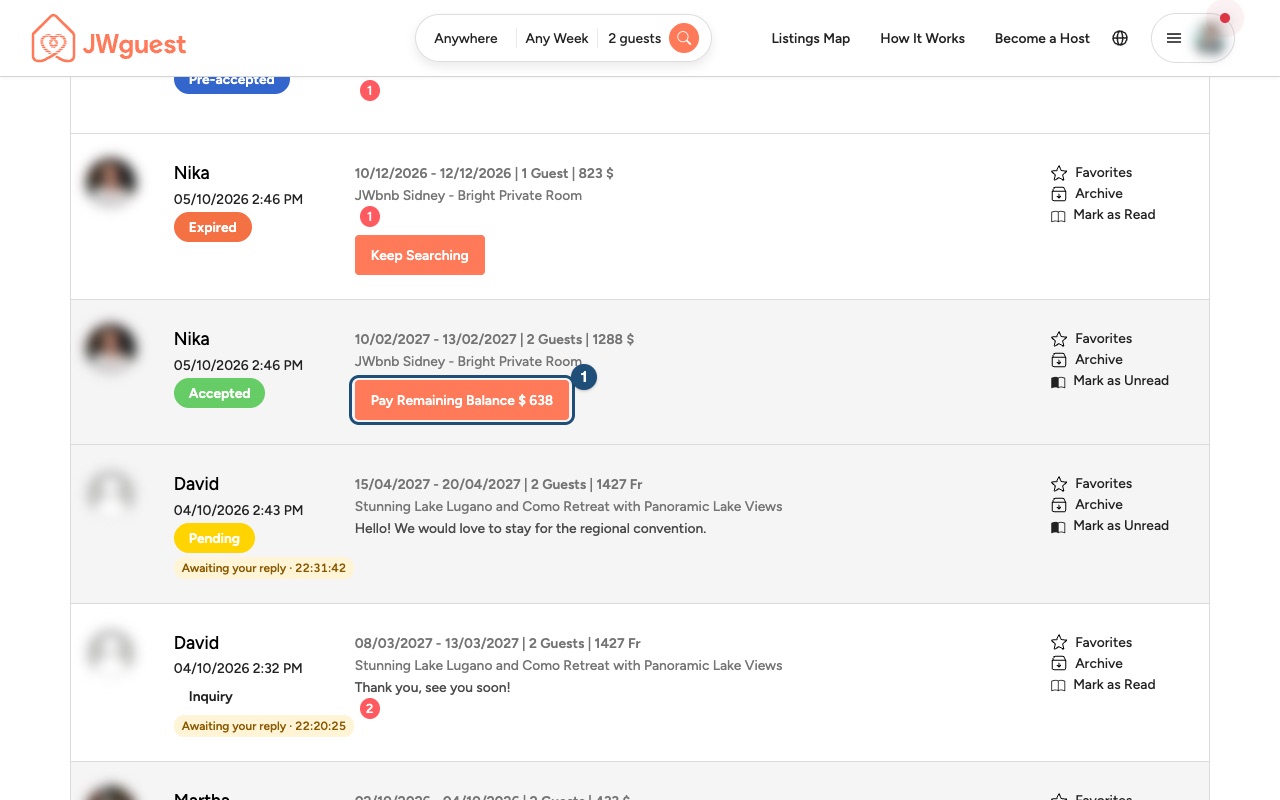
You can also click Pay Remaining Balance next to the booking in your Inbox (1), or inside the conversation with your host.
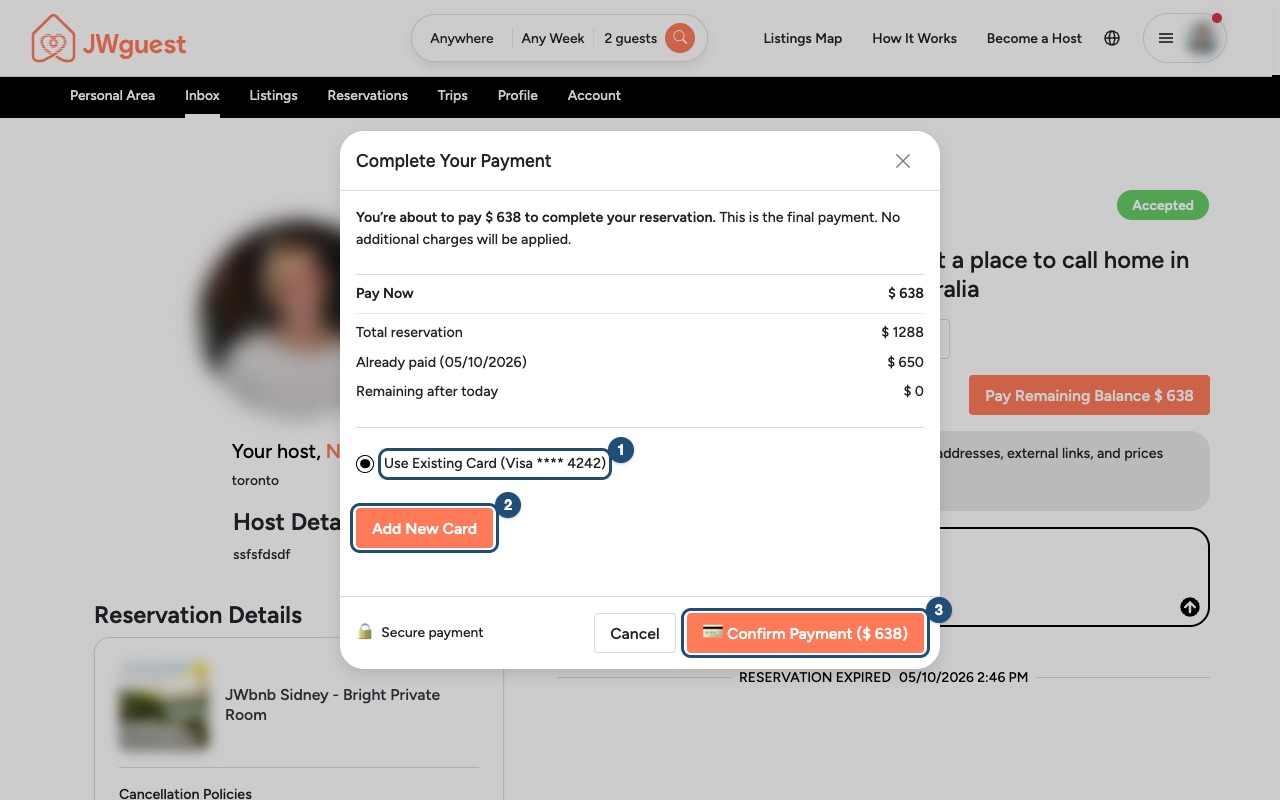
2. Choose the card and confirm: keep your saved card (1) or click Add New Card (2), then click Confirm Payment (3). Once the payment goes through, your booking is fully paid.
If the automatic payment fails
We email you straight away, and we try your card again automatically two and four days after the due date. Click Update payment details in the email and add a valid card: the remaining balance is charged as soon as the card is saved. Please do this quickly. If the balance is still unpaid 7 days after the due date, your booking may be cancelled under our Terms of Service.
Related articles: Pay part now, part later · When will I pay for my booking? · Get a receipt for your booking
Mobile browser
If you chose Pay part now, part later, the remaining balance is due 35 days before check-in. It is charged automatically on that date, to the card you chose when you booked. You can also pay it earlier yourself. See Pay part now, part later.
Pay the remaining balance before the due date
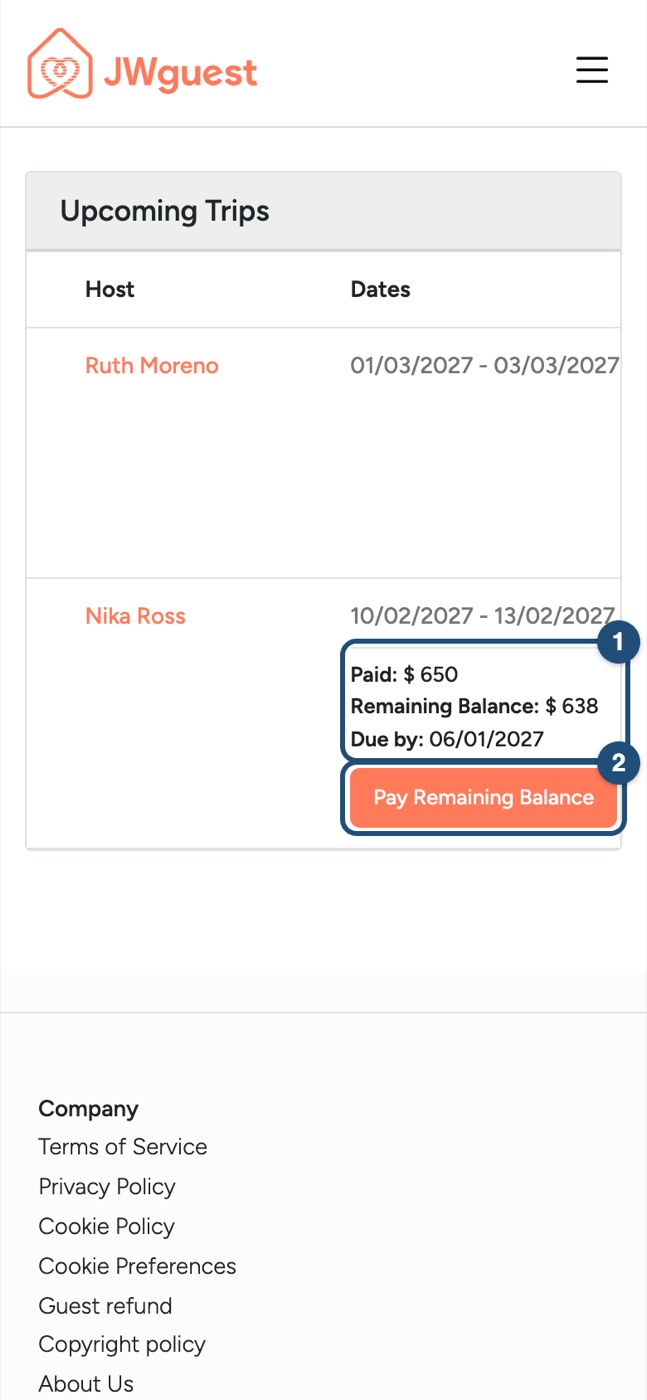
1. Open the booking: tap the menu, then Trips in the black bar. The table is wider than the screen: swipe it left to see what you have Paid, the Remaining Balance and the date it is Due by (1), then tap Pay Remaining Balance (2).
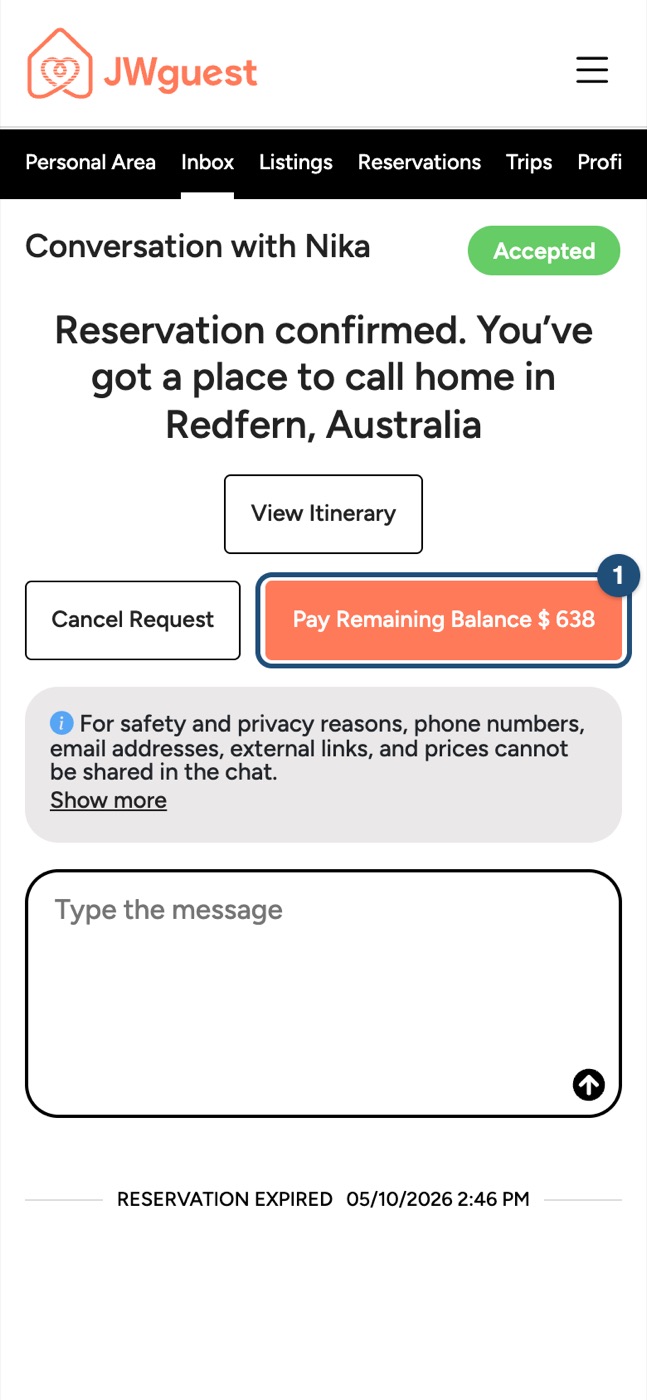
You can also tap Pay Remaining Balance inside the conversation with your host: open Inbox in the black bar, then the conversation (1).
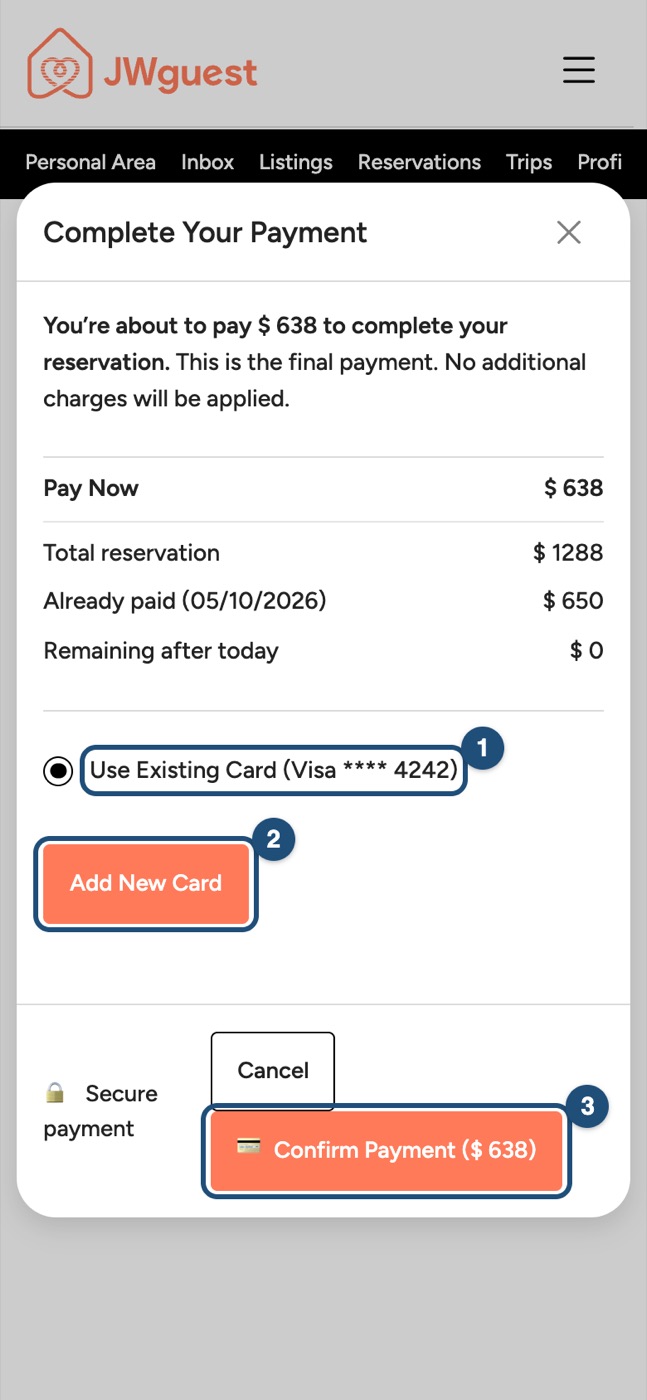
2. Choose the card and confirm: keep your saved card (1) or tap Add New Card (2), then tap Confirm Payment (3).
If the automatic payment fails
We email you straight away, and we try your card again automatically two and four days after the due date. Tap Update payment details in the email and add a valid card: the remaining balance is charged as soon as the card is saved. If the balance is still unpaid 7 days after the due date, your booking may be cancelled under our Terms of Service.
Related articles: Pay part now, part later · When will I pay for my booking? · Get a receipt for your booking
iOS app
If you chose Pay part now, part later, the remaining balance is due 35 days before check-in. See Pay part now, part later.
Pay the remaining balance before the due date
You don't need to do anything: the balance is charged automatically on its due date, to the card you chose when you booked, and we email you a reminder a few days before. You see the upcoming charge under Profile > My payments.
To pay it earlier, or with another card, log in on jwguest.com: in Trips, tap Pay Remaining Balance. The app does not offer early payment yet.
If the automatic payment fails
We email you straight away, and we try your card again automatically two and four days after the due date. Tap Update payment details in the email and add a valid card: the remaining balance is charged as soon as the card is saved. If the balance is still unpaid 7 days after the due date, your booking may be cancelled under our Terms of Service.
Related articles: Pay part now, part later · When will I pay for my booking? · Get a receipt for your booking
Android app
If you chose Pay part now, part later, the remaining balance is due 35 days before check-in. See Pay part now, part later.
Pay the remaining balance before the due date
You don't need to do anything: the balance is charged automatically on its due date, to the card you chose when you booked, and we email you a reminder a few days before. You see the upcoming charge under Profile > Your payments.
To pay it earlier, or with another card, log in on jwguest.com: in Trips, tap Pay Remaining Balance. The app does not offer early payment yet.
If the automatic payment fails
We email you straight away, and we try your card again automatically two and four days after the due date. Tap Update payment details in the email and add a valid card: the remaining balance is charged as soon as the card is saved. If the balance is still unpaid 7 days after the due date, your booking may be cancelled under our Terms of Service.
Related articles: Pay part now, part later · When will I pay for my booking? · Get a receipt for your booking