

Website
Plans can change. Here's how to cancel a confirmed booking, and what you get back.
Your request isn't confirmed yet? See Cancel a booking request.
Cancel a confirmed booking
You can cancel online or in writing.
Online:
- Go to Trips: Personal Area > Trips.
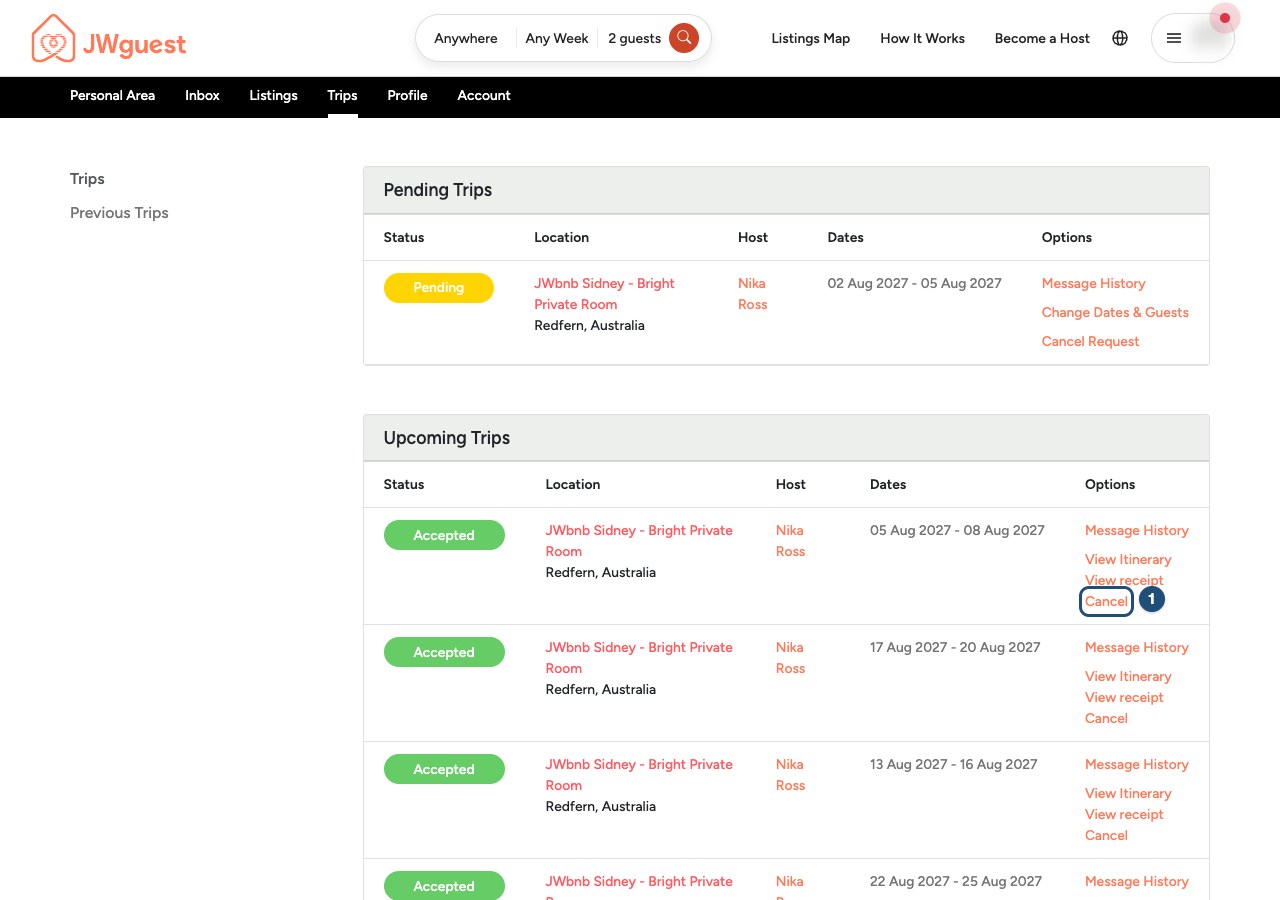
- Click Cancel (1) in the Options column of your trip.
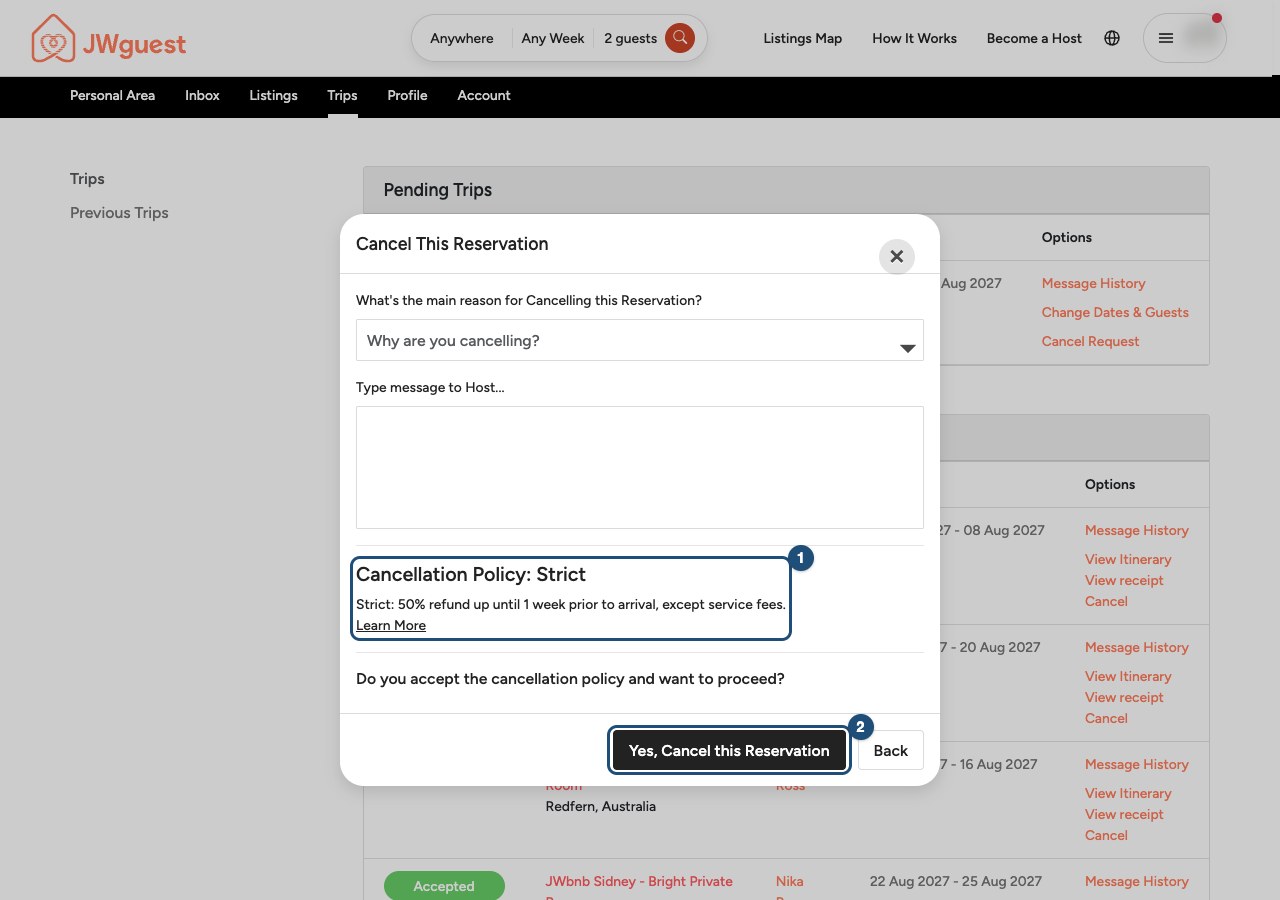
- Confirm: the Cancel This Reservation window shows the cancellation policy of the listing (1). Click Yes, Cancel this Reservation (2) to cancel, or Back to keep your booking.
In writing: email [email protected] with your booking details and your request to cancel. We review every request within 24 working hours.
How much is refunded
The refund depends on the cancellation policy of the listing, which is shown on the listing page and in your booking. Times are counted from the listing's local check-in time (3:00 PM if not specified).
| Policy | Refund of the nights |
|---|---|
| Flexible | Full refund if you cancel at least 24 hours before check-in. |
| Moderate | Full refund if you cancel at least 7 days before check-in. |
| Strict | 50% refund if you cancel at least 7 days before check-in. |
All the details and examples are on the Cancellation Policies page. Only our Guest Refund Policy can override the listing's cancellation policy.
Good to know:
- Service Fee: non-refundable when you cancel. If the host cancels, you get a full refund, Service Fee included. See Service fee for guests and If your host cancels your booking.
- Cleaning fee: refunded if your booking is cancelled before check-in; not refunded after check-in.
- Local stay taxes: where they were charged, they are refunded when you cancel.
- Extra-guest fees: refunded under the same rules as the nights.
- No-show or leaving early: the listing's cancellation policy decides whether anything is refunded. Under Moderate and Strict, nights you don't use are not refunded.
Something wrong with the place when you arrive? See Report a problem during your stay.
Always check the listing's cancellation policy and our Terms of Service before you book.
Related articles: Cancel a booking request · Change your booking dates · If your host cancels your booking · Report a problem during your stay
Mobile browser
Plans can change. Here's how to cancel a confirmed booking from your phone, and what you get back.
Your request isn't confirmed yet? See Cancel a booking request.
Cancel a confirmed booking
You can cancel online or in writing.
Online:
- Go to Trips: tap Trips in the Personal Area bar.
- Swipe the table left to reach the Options column, and tap Cancel.
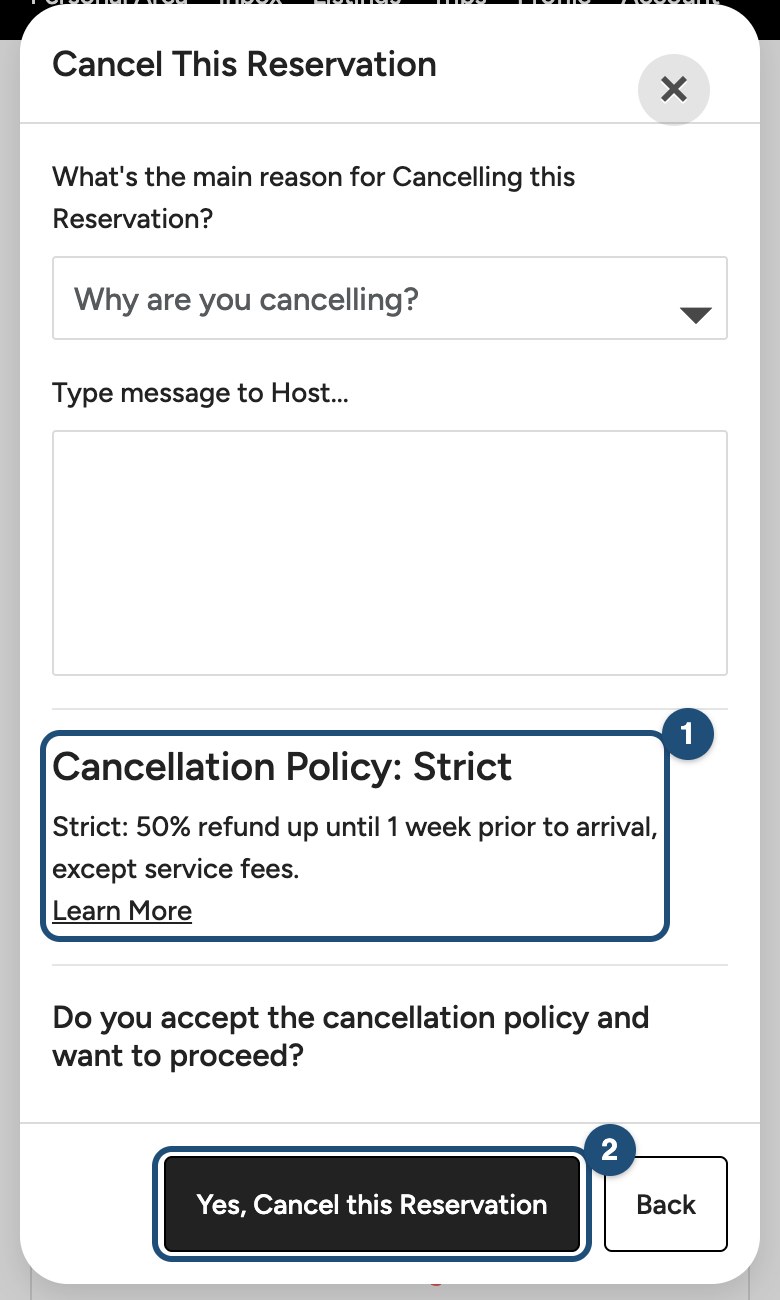
- Confirm: the Cancel This Reservation window shows the cancellation policy of the listing (1). Tap Yes, Cancel this Reservation (2) to cancel, or Back to keep your booking.
In writing: email [email protected] with your booking details and your request to cancel. We review every request within 24 working hours.
How much is refunded
The refund depends on the cancellation policy of the listing, which is shown on the listing page and in your booking. Times are counted from the listing's local check-in time (3:00 PM if not specified).
- Flexible: full refund if you cancel at least 24 hours before check-in.
- Moderate: full refund if you cancel at least 7 days before check-in.
- Strict: 50% refund if you cancel at least 7 days before check-in.
All the details and examples are on the Cancellation Policies page. Only our Guest Refund Policy can override the listing's cancellation policy.
Good to know:
- Service Fee: non-refundable when you cancel. If the host cancels, you get a full refund, Service Fee included. See Service fee for guests and If your host cancels your booking.
- Cleaning fee: refunded if your booking is cancelled before check-in; not refunded after check-in.
- Local stay taxes: where they were charged, they are refunded when you cancel.
- Extra-guest fees: refunded under the same rules as the nights.
- No-show or leaving early: the listing's cancellation policy decides whether anything is refunded. Under Moderate and Strict, nights you don't use are not refunded.
Something wrong with the place when you arrive? See Report a problem during your stay.
Always check the listing's cancellation policy and our Terms of Service before you book.
Related articles: Cancel a booking request · Change your booking dates · If your host cancels your booking · Report a problem during your stay
iOS app
Plans can change. Here's how to cancel a confirmed booking in the app, and what you get back.
Cancel a confirmed booking
The listing's cancellation policy decides the refund (see below). Your request isn't confirmed yet? See Cancel a booking request.
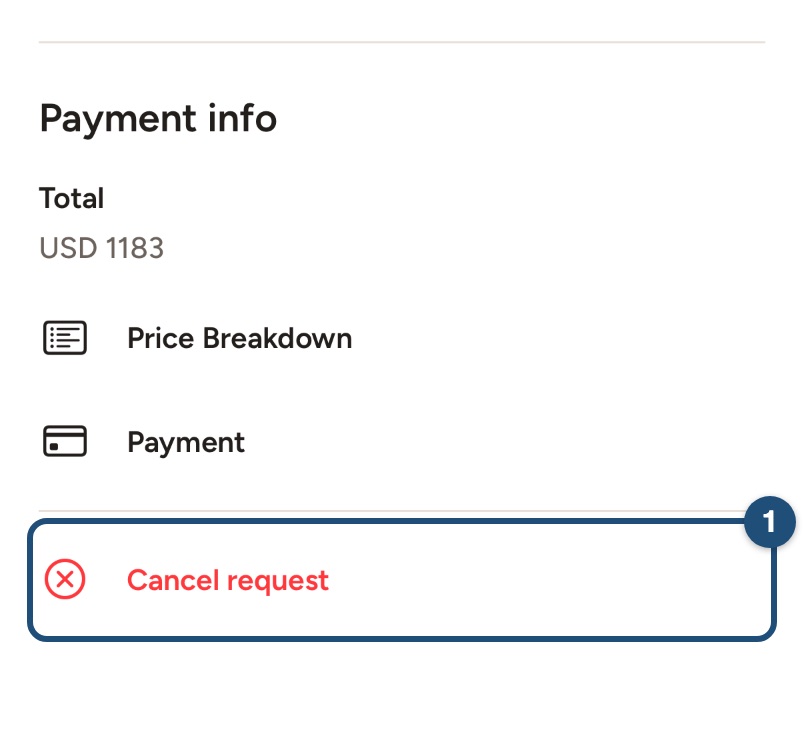
Open the trip: tap Trips in the bar at the bottom and tap the trip you want to cancel. Scroll to the bottom and tap Cancel Reservation (1).
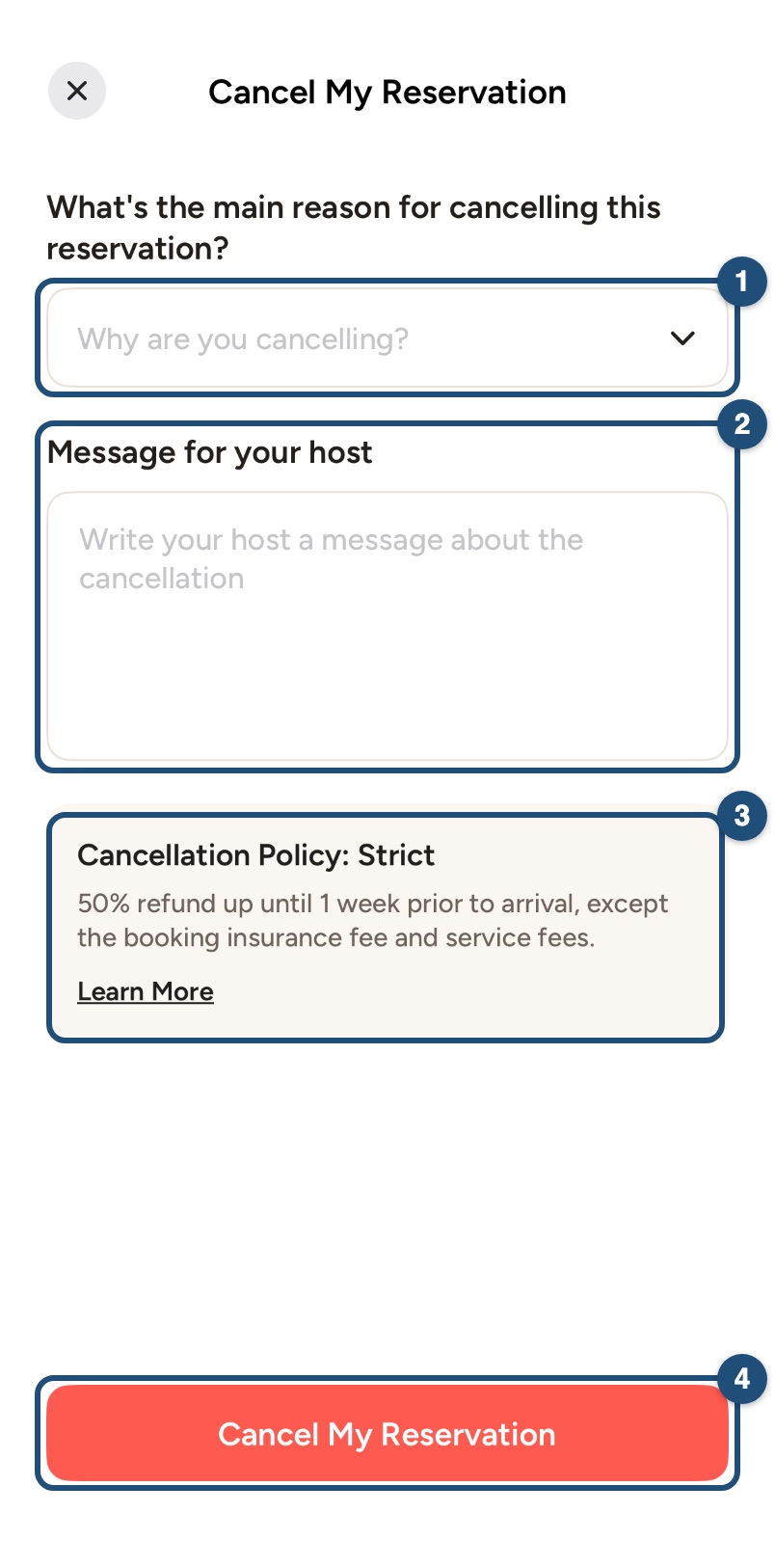
Tell us why: choose the main reason (1) and write a Message for your host (required) (2). The cancellation policy of your booking is shown below (3): tap Learn More to read it in full. Then tap Cancel My Reservation (4) and confirm.
In writing: you can also email [email protected] with your booking details and your request to cancel. We review every request within 24 working hours.
How much is refunded
The refund depends on the cancellation policy of the listing, which is shown on the listing page and in your booking. Times are counted from the listing's local check-in time (3:00 PM if not specified).
- Flexible: full refund if you cancel at least 24 hours before check-in.
- Moderate: full refund if you cancel at least 7 days before check-in.
- Strict: 50% refund if you cancel at least 7 days before check-in.
All the details and examples are on the Cancellation Policies page. Only our Guest Refund Policy can override the listing's cancellation policy.
Good to know:
- Service Fee: non-refundable when you cancel. If the host cancels, you get a full refund, Service Fee included. See Service fee for guests and If your host cancels your booking.
- Cleaning fee: refunded if your booking is cancelled before check-in; not refunded after check-in.
- Local stay taxes: where they were charged, they are refunded when you cancel.
- Extra-guest fees: refunded under the same rules as the nights.
- No-show or leaving early: the listing's cancellation policy decides whether anything is refunded. Under Moderate and Strict, nights you don't use are not refunded.
Something wrong with the place when you arrive? See Report a problem during your stay.
Always check the listing's cancellation policy and our Terms of Service before you book.
Related articles: Cancel a booking request · Change your booking dates · If your host cancels your booking · Report a problem during your stay
Android app
Plans can change. Here's how to cancel a confirmed booking in the app, and what you get back.
Cancel a confirmed booking
The listing's cancellation policy decides the refund (see below). Your request isn't confirmed yet? See Cancel a booking request.
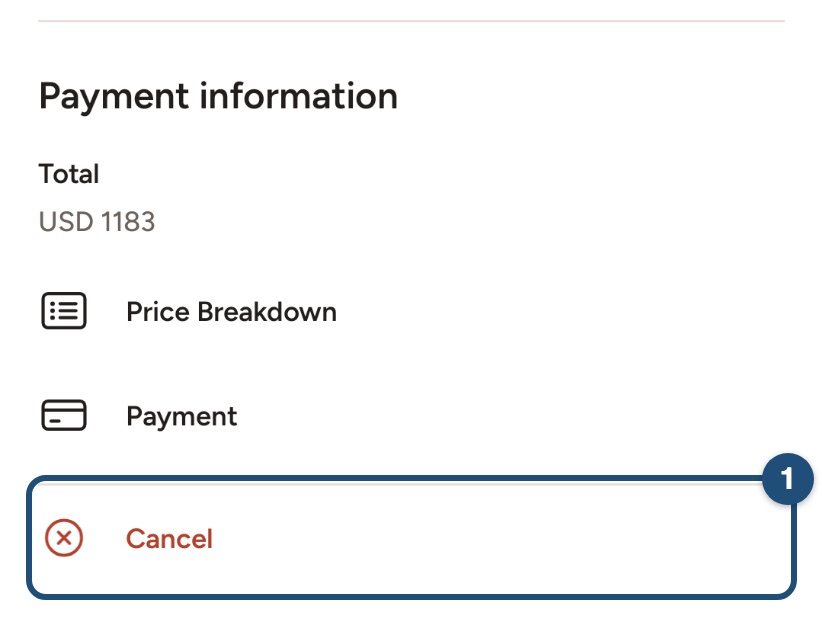
Open the trip: tap Trips in the bar at the bottom and tap the trip you want to cancel. Scroll to the bottom and tap Cancel (1).
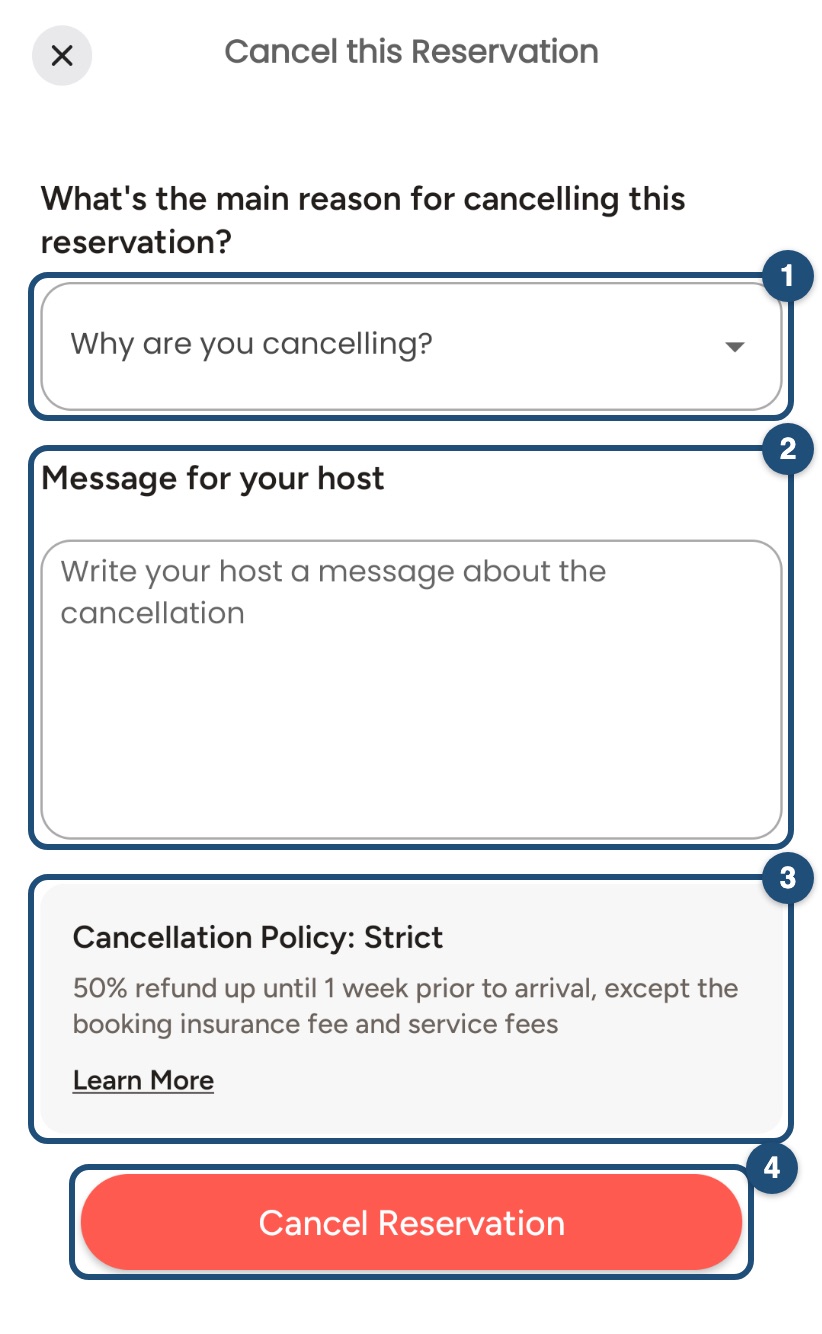
Tell us why: choose the main reason (1) and write a Message for your host (2). The cancellation policy of your booking is shown below (3): tap Learn More to read it in full. Then tap Cancel Reservation (4) and confirm.
In writing: you can also email [email protected] with your booking details and your request to cancel. We review every request within 24 working hours.
How much is refunded
The refund depends on the cancellation policy of the listing, which is shown on the listing page and in your booking. Times are counted from the listing's local check-in time (3:00 PM if not specified).
- Flexible: full refund if you cancel at least 24 hours before check-in.
- Moderate: full refund if you cancel at least 7 days before check-in.
- Strict: 50% refund if you cancel at least 7 days before check-in.
All the details and examples are on the Cancellation Policies page. Only our Guest Refund Policy can override the listing's cancellation policy.
Good to know:
- Service Fee: non-refundable when you cancel. If the host cancels, you get a full refund, Service Fee included. See Service fee for guests and If your host cancels your booking.
- Cleaning fee: refunded if your booking is cancelled before check-in; not refunded after check-in.
- Local stay taxes: where they were charged, they are refunded when you cancel.
- Extra-guest fees: refunded under the same rules as the nights.
- No-show or leaving early: the listing's cancellation policy decides whether anything is refunded. Under Moderate and Strict, nights you don't use are not refunded.
Something wrong with the place when you arrive? See Report a problem during your stay.
Always check the listing's cancellation policy and our Terms of Service before you book.
Related articles: Cancel a booking request · Change your booking dates · If your host cancels your booking · Report a problem during your stay