

Website
Want to stay a few more nights? How you add them depends on whether your booking is already confirmed.
Your request isn't confirmed yet
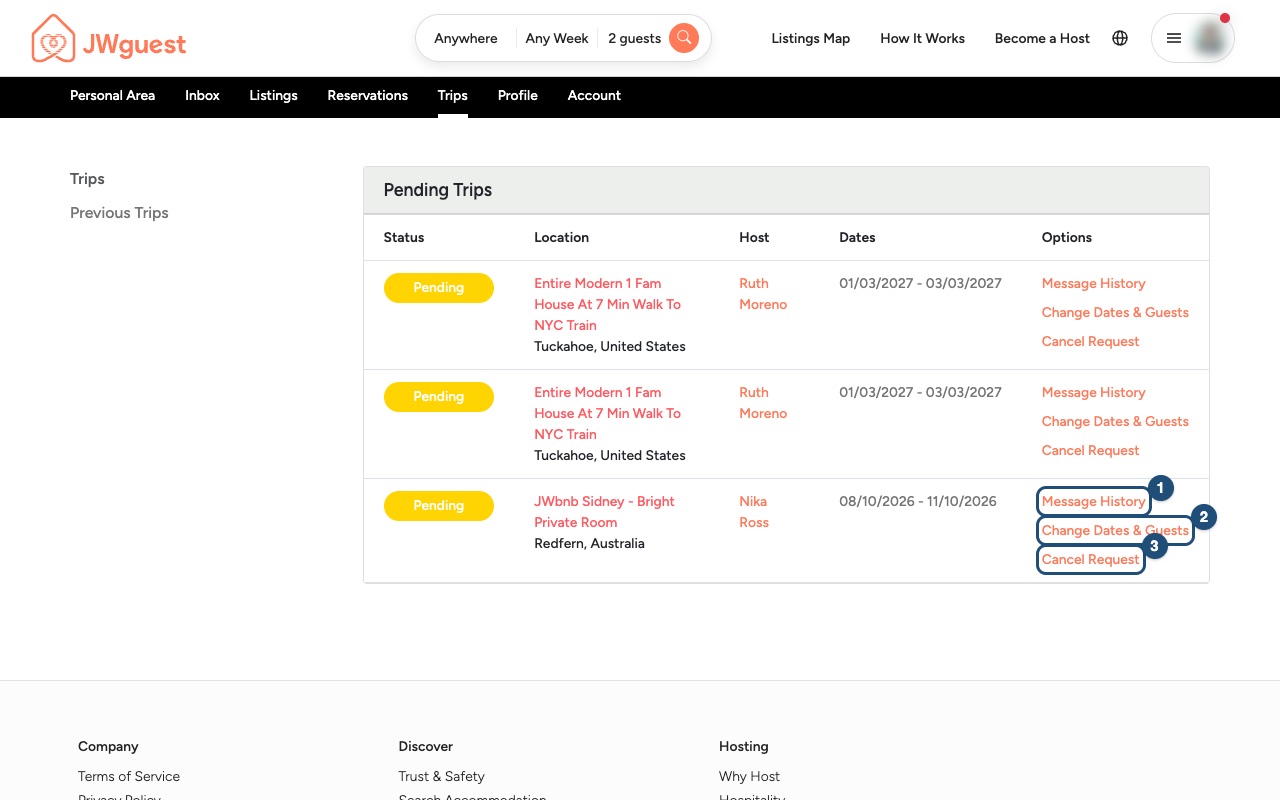
While your host hasn't accepted, or before you have done Confirm & Pay, you can change the dates yourself, free of charge: in Trips, click Change Dates & Guests (2) in the Options column, choose the new check-out date and send. See Change your booking dates.
The price is calculated again for the new dates. If your host had already accepted, the request goes back to them for approval, and a special offer or SFTS discount on the old dates no longer applies.
Your booking is confirmed
- Ask your host first: in the Personal Area bar, click Trips, then Message History (1) next to your booking. Ask whether the extra nights are free and what they will cost.
- Write to us: email [email protected], or use the Contact us page and choose "A booking". Include your booking details and the new check-out date. You can't change a confirmed booking yourself: our team does it for you.
- We agree it with the host and update your booking: our team confirms the extra nights with your host, changes your booking in the system and charges the extra nights through the platform. Please do not pay the host directly. When we process the extension, our team adds a non-refundable administration fee of 15 EUR or 15 USD (or the equivalent in your booking currency), as for every change of dates.
Ask as early as you can: the host may have another guest arriving.
Or book the extra nights separately
If the home is free right after your stay, you can also book the extra nights as a new booking that starts on your check-out day: a check-out day can be booked by the next guest, even if that guest is you. It is a separate booking, with its own request to the host, its own cleaning fee and its own service fee, so compare the price with an extension first.
If you're the host
A guest asks you for more nights? Before the booking is paid, you can propose the new dates yourself with Edit dates or guests in the conversation; the guest then confirms and pays the new total. Once the booking is paid, it can't be changed from the conversation: agree the extra nights with the guest and write to [email protected] with the booking code, and our team updates it. Never accept payment for extra nights outside JWguest.
Related articles: Change your booking dates · Cancel your booking · What does your booking status mean?
Mobile browser
Want to stay a few more nights? How you add them from your phone depends on whether your booking is already confirmed.
Your request isn't confirmed yet
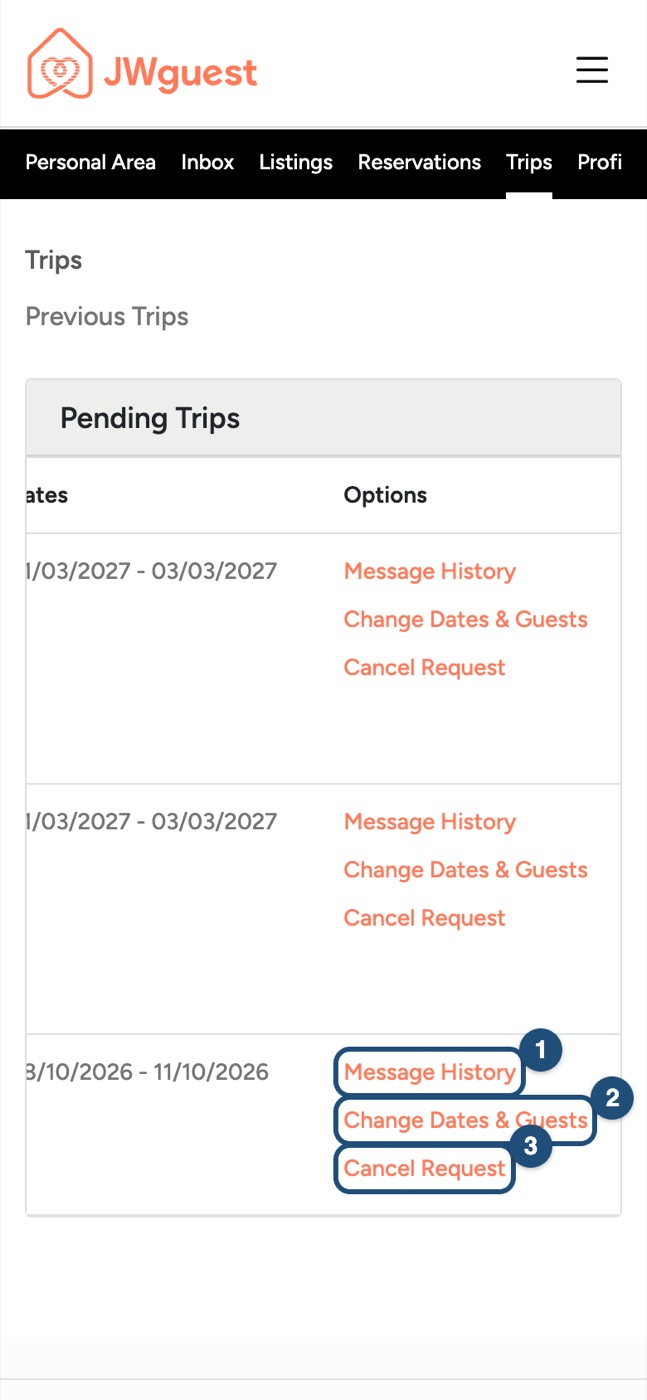
While your host hasn't accepted, or before you have done Confirm & Pay, you can change the dates yourself, free of charge: in Trips, swipe the table left and tap Change Dates & Guests (2). See Change your booking dates.
The price is calculated again for the new dates. If your host had already accepted, the request goes back to them for approval, and a special offer or SFTS discount on the old dates no longer applies.
Your booking is confirmed
- Ask your host first: tap Trips in the black Personal Area bar. Swipe the table left until you see the Options column, then tap Message History (1). Ask whether the extra nights are free and what they will cost.
- Write to us: email [email protected], or use the Contact us page and choose "A booking". Include your booking details and the new check-out date. You can't change a confirmed booking yourself: our team does it for you.
- We agree it with the host and update your booking: our team confirms the extra nights with your host, changes your booking in the system and charges the extra nights through the platform. Please do not pay the host directly. When we process the extension, our team adds a non-refundable administration fee of 15 EUR or 15 USD (or the equivalent in your booking currency), as for every change of dates.
Ask as early as you can: the host may have another guest arriving.
Or book the extra nights separately
If the home is free right after your stay, you can also book the extra nights as a new booking that starts on your check-out day: a check-out day can be booked by the next guest, even if that guest is you. It is a separate booking, with its own request to the host, its own cleaning fee and its own service fee, so compare the price with an extension first.
If you're the host
A guest asks you for more nights? Before the booking is paid, you can propose the new dates yourself with Edit dates or guests in the conversation; the guest then confirms and pays the new total. Once the booking is paid, it can't be changed from the conversation: agree the extra nights with the guest and write to [email protected] with the booking code, and our team updates it. Never accept payment for extra nights outside JWguest.
Related articles: Change your booking dates · Cancel your booking · What does your booking status mean?
iOS app
Want to stay a few more nights? How you add them in the app depends on whether your booking is already confirmed.
Your request isn't confirmed yet
While your host hasn't accepted, or before you have done Confirm & Pay, you can change the dates yourself, free of charge: open the conversation of your request in Inbox and tap Edit dates or guests. See Change your booking dates.
The price is calculated again for the new dates. If your host had already accepted, the request goes back to them for approval, and a special offer or SFTS discount on the old dates no longer applies.
Your booking is confirmed
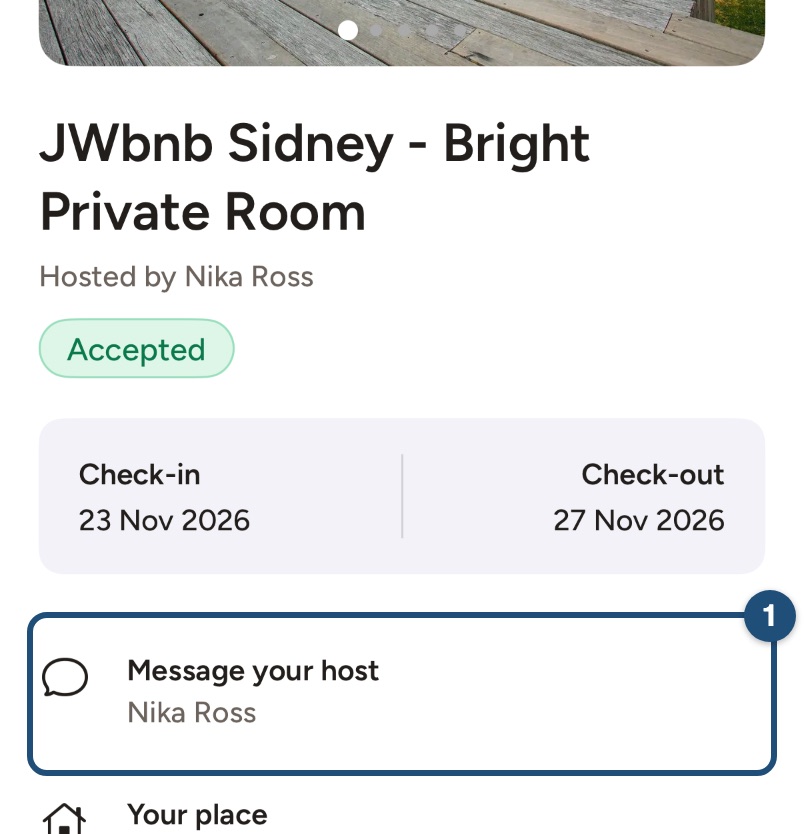
- Ask your host first: tap Trips in the bar at the bottom, open your trip and tap Message your host (1). Ask whether the extra nights are free and what they will cost.
- Write to us: email [email protected], or in the app tap Profile > Help & Support. Include your booking details and the new check-out date. You can't change a confirmed booking yourself: our team does it for you.
- We agree it with the host and update your booking: our team confirms the extra nights with your host, changes your booking in the system and charges the extra nights through the platform. Please do not pay the host directly. When we process the extension, our team adds a non-refundable administration fee of 15 EUR or 15 USD (or the equivalent in your booking currency), as for every change of dates.
Ask as early as you can: the host may have another guest arriving.
Or book the extra nights separately
If the home is free right after your stay, you can also book the extra nights as a new booking that starts on your check-out day: a check-out day can be booked by the next guest, even if that guest is you. It is a separate booking, with its own request to the host, its own cleaning fee and its own service fee, so compare the price with an extension first.
If you're the host
A guest asks you for more nights? Before the booking is paid, you can propose the new dates yourself with Change dates in the conversation; the guest then confirms and pays the new total. Once the booking is paid, it can't be changed from the conversation: agree the extra nights with the guest and write to [email protected] with the booking code, and our team updates it. Never accept payment for extra nights outside JWguest.
Related articles: Change your booking dates · Cancel your booking · What does your booking status mean?
Android app
Want to stay a few more nights? How you add them in the app depends on whether your booking is already confirmed.
Your request isn't confirmed yet
While your host hasn't accepted, or before you have done Confirm & Pay, you can change the dates yourself, free of charge: open the conversation of your request in Inbox and tap Edit dates or guests. See Change your booking dates.
The price is calculated again for the new dates. If your host had already accepted, the request goes back to them for approval, and a special offer or SFTS discount on the old dates no longer applies.
Your booking is confirmed
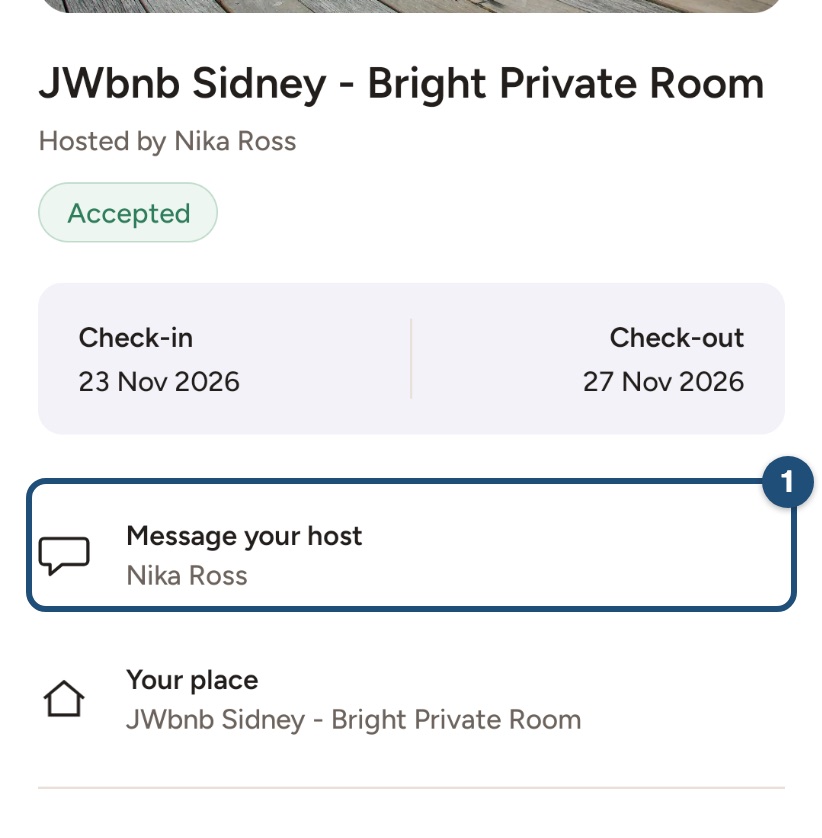
- Ask your host first: tap Trips in the bar at the bottom, open your trip and tap Message your host (1). Ask whether the extra nights are free and what they will cost.
- Write to us: email [email protected], or in the app tap Profile > Help & Support. Include your booking details and the new check-out date. You can't change a confirmed booking yourself: our team does it for you.
- We agree it with the host and update your booking: our team confirms the extra nights with your host, changes your booking in the system and charges the extra nights through the platform. Please do not pay the host directly. When we process the extension, our team adds a non-refundable administration fee of 15 EUR or 15 USD (or the equivalent in your booking currency), as for every change of dates.
Ask as early as you can: the host may have another guest arriving.
Or book the extra nights separately
If the home is free right after your stay, you can also book the extra nights as a new booking that starts on your check-out day: a check-out day can be booked by the next guest, even if that guest is you. It is a separate booking, with its own request to the host, its own cleaning fee and its own service fee, so compare the price with an extension first.
If you're the host
A guest asks you for more nights? Before the booking is paid, you can propose the new dates yourself with Change dates in the conversation; the guest then confirms and pays the new total. Once the booking is paid, it can't be changed from the conversation: agree the extra nights with the guest and write to [email protected] with the booking code, and our team updates it. Never accept payment for extra nights outside JWguest.
Related articles: Change your booking dates · Cancel your booking · What does your booking status mean?