

Website
Need different dates? Here's how to change a request or a confirmed booking.
Change a request that is not yet confirmed
If the host has not yet accepted, or you have not yet confirmed and paid, you can change the dates and the number of guests yourself:
- Go to Trips: in the Personal Area bar, click Trips.
- Click Change Dates & Guests (2) in the Options column of your trip.
- Enter the new dates or number of guests and confirm. The host receives the updated request.
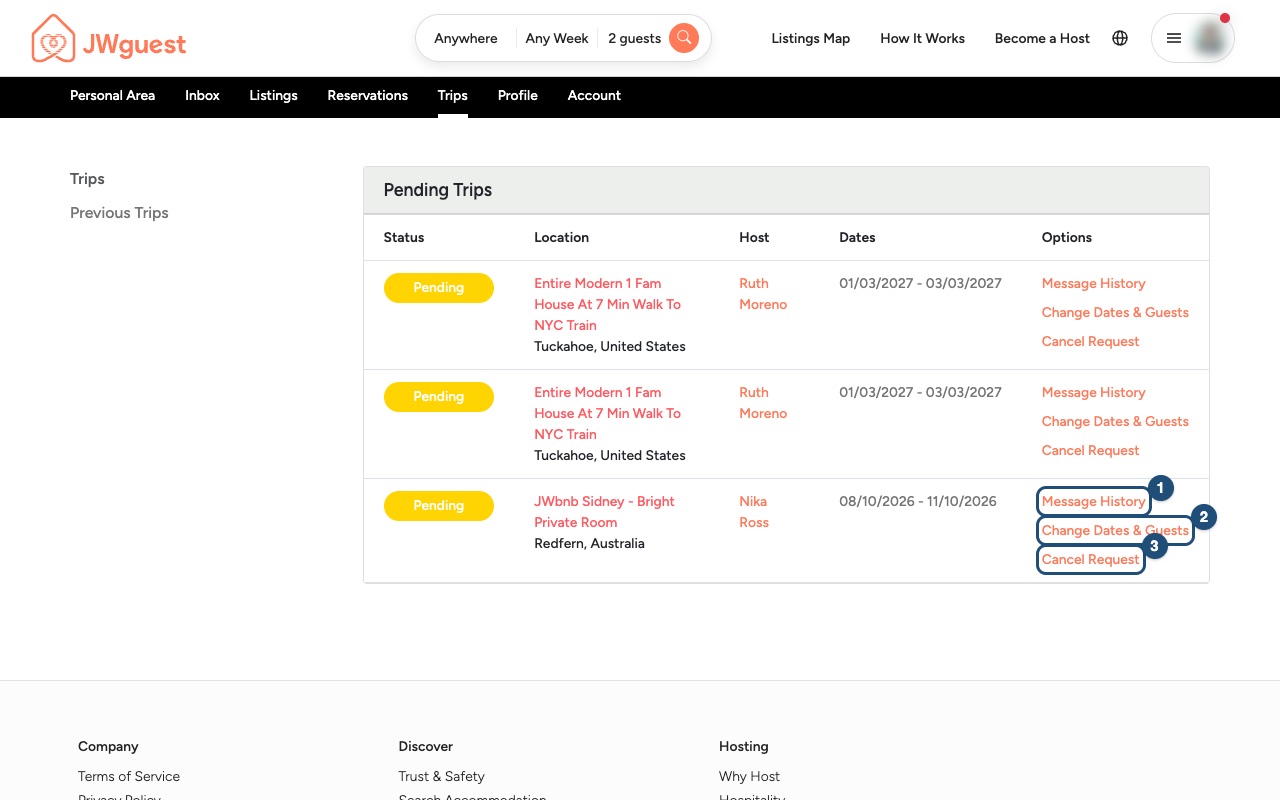
If your host has already pre-accepted your request, changing the dates sends it back to them for approval, and a special offer or SFTS discount on the old dates no longer applies.
Change a confirmed booking
Once a booking is confirmed, you can't change the dates or the number of guests yourself: our team does it for you.
- Write to us: email [email protected], or use the Contact us page and choose "A booking". Include your booking details and the new dates or number of guests you would like. Our team replies within 24 working hours.
- We agree it with the host: we check with your host that the new dates or guests are possible, and at what price.
- We update your booking: our team changes the booking in the system and confirms the change to you by email.
To add nights to a confirmed booking, see Add nights to your booking. If the new dates are not available, you can keep your booking or cancel it under the listing's cancellation policy. See Cancel your booking.
Refunds when the stay gets shorter
If the change reduces the number of nights, the refund for the nights removed follows the listing's cancellation policy, just like a partial cancellation:
- Flexible: full refund up to 24 hours before check-in.
- Moderate: full refund up to 7 days before check-in.
- Strict: 50% refund up to 7 days before check-in.
See all the details on the Cancellation Policies page.
Changing dates during your stay
Talk to your host directly. If you want to stay longer, see Add nights to your booking.
Always check the listing's cancellation policy and our Terms of Service before you book.
Mobile browser
Need different dates? Here's how to change a request or a confirmed booking from your phone.
Change a request that is not yet confirmed
- Go to Trips: in the black Personal Area bar below the header, tap Trips.
- Swipe the table to the left: the trips table is wider than your screen. Swipe it left until you see the Options column.
- Tap Change Dates & Guests (2).
- Enter the new dates or number of guests and confirm. The host receives the updated request.
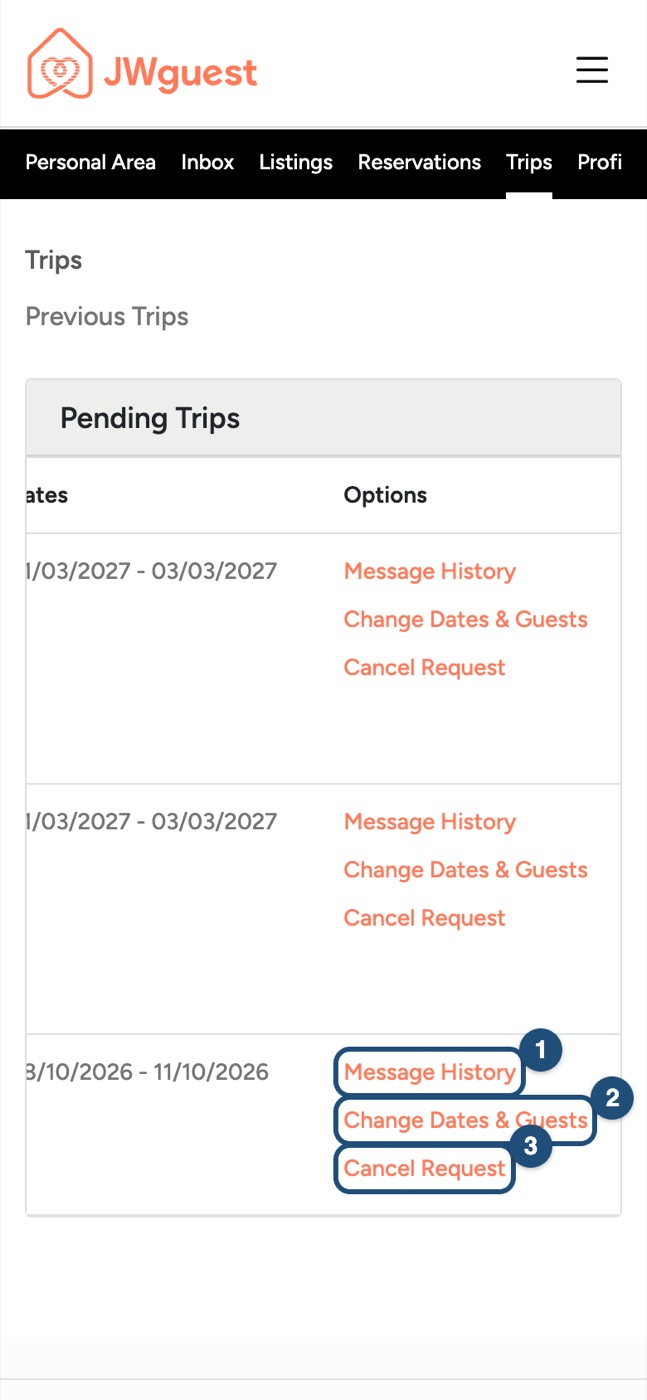
If your host has already pre-accepted your request, changing the dates sends it back to them for approval, and a special offer or SFTS discount on the old dates no longer applies.
Change a confirmed booking
Once a booking is confirmed, you can't change the dates or the number of guests yourself: our team does it for you.
- Write to us: email [email protected], or open the Contact us page and tap "A booking". Include your booking details and the new dates or number of guests you would like. Our team replies within 24 working hours.
- We agree it with the host: we check with your host that the new dates or guests are possible, and at what price.
- We update your booking: our team changes the booking in the system and confirms the change to you by email.
To add nights to a confirmed booking, see Add nights to your booking. If the new dates are not available, you can keep your booking or cancel it under the listing's cancellation policy. See Cancel your booking.
Refunds when the stay gets shorter
If the change reduces the number of nights, the refund for the nights removed follows the listing's cancellation policy:
- Flexible: full refund up to 24 hours before check-in.
- Moderate: full refund up to 7 days before check-in.
- Strict: 50% refund up to 7 days before check-in.
See all the details on the Cancellation Policies page.
Changing dates during your stay
Talk to your host directly. If you want to stay longer, see Add nights to your booking.
iOS app
Need different dates? Here's how to change a request or a confirmed booking in the app.
Change a request that is not yet confirmed
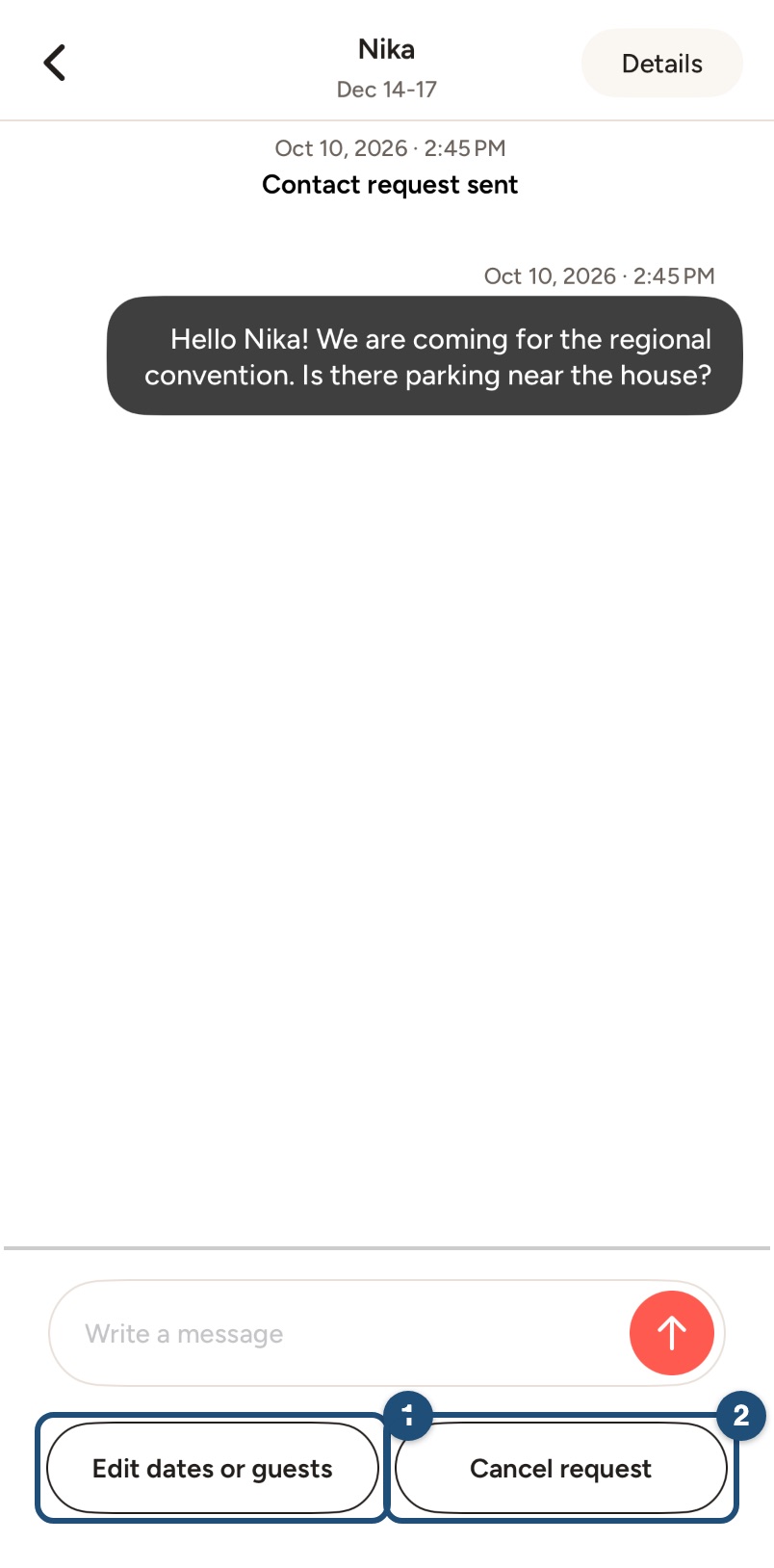
Open the conversation: tap Inbox in the bar at the bottom and open the conversation of your request (or open the trip in Trips and tap Message your host). Below the message field, tap Edit dates or guests (1). Cancel request (2) withdraws it.
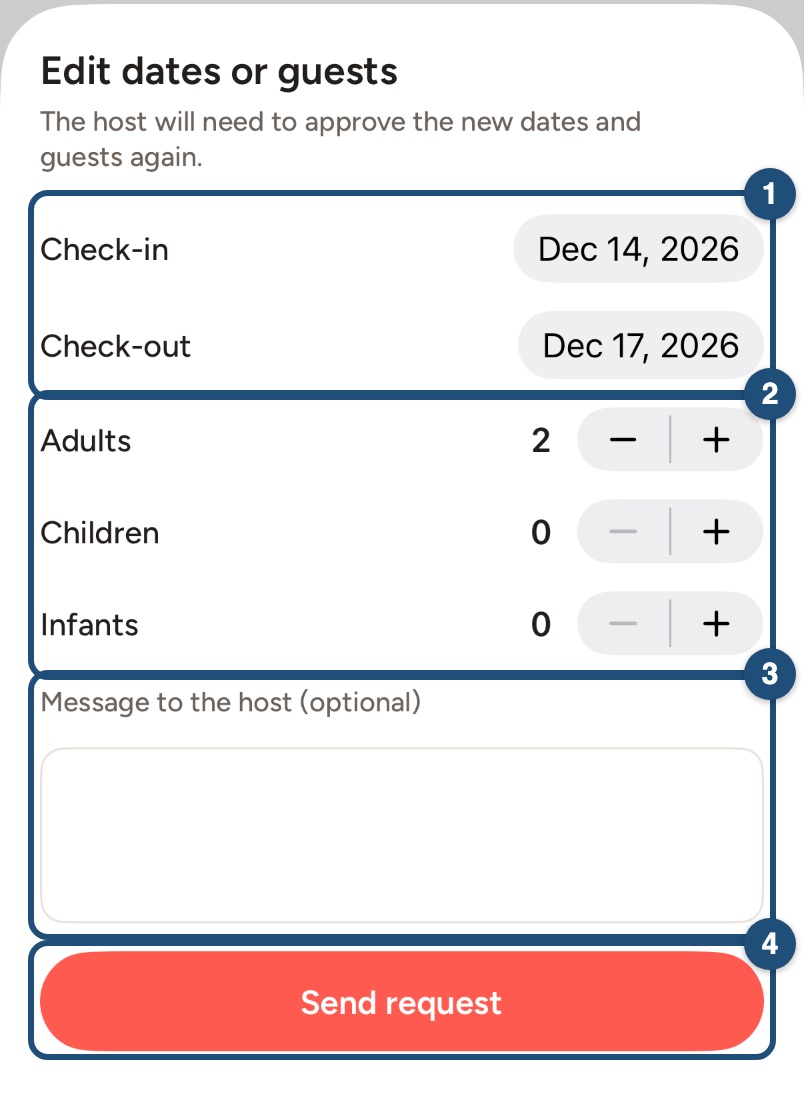
Enter the new dates (1) and guests (2), add a message for the host if you like (3) and tap Send request (4). The host will need to approve the new dates and guests again.
If your host has already pre-accepted your request, changing the dates sends it back to them for approval, and a special offer or SFTS discount on the old dates no longer applies.
Change a confirmed booking
Once a booking is confirmed, you can't change the dates or the number of guests yourself: our team does it for you.
- Write to us: email [email protected], or in the app tap Profile > Help & Support. Include your booking details and the new dates or number of guests you would like. Our team replies within 24 working hours.
- We agree it with the host: we check with your host that the new dates or guests are possible, and at what price.
- We update your booking: our team changes the booking in the system and confirms the change to you by email.
To add nights to a confirmed booking, see Add nights to your booking. If the new dates are not available, you can keep your booking or cancel it under the listing's cancellation policy. See Cancel your booking.
Refunds when the stay gets shorter
If the change reduces the number of nights, the refund for the nights removed follows the listing's cancellation policy:
- Flexible: full refund up to 24 hours before check-in.
- Moderate: full refund up to 7 days before check-in.
- Strict: 50% refund up to 7 days before check-in.
See all the details on the Cancellation Policies page.
Changing dates during your stay
Talk to your host directly. If you want to stay longer, see Add nights to your booking.
Android app
Need different dates? Here's how to change a request or a confirmed booking in the app.
Change a request that is not yet confirmed
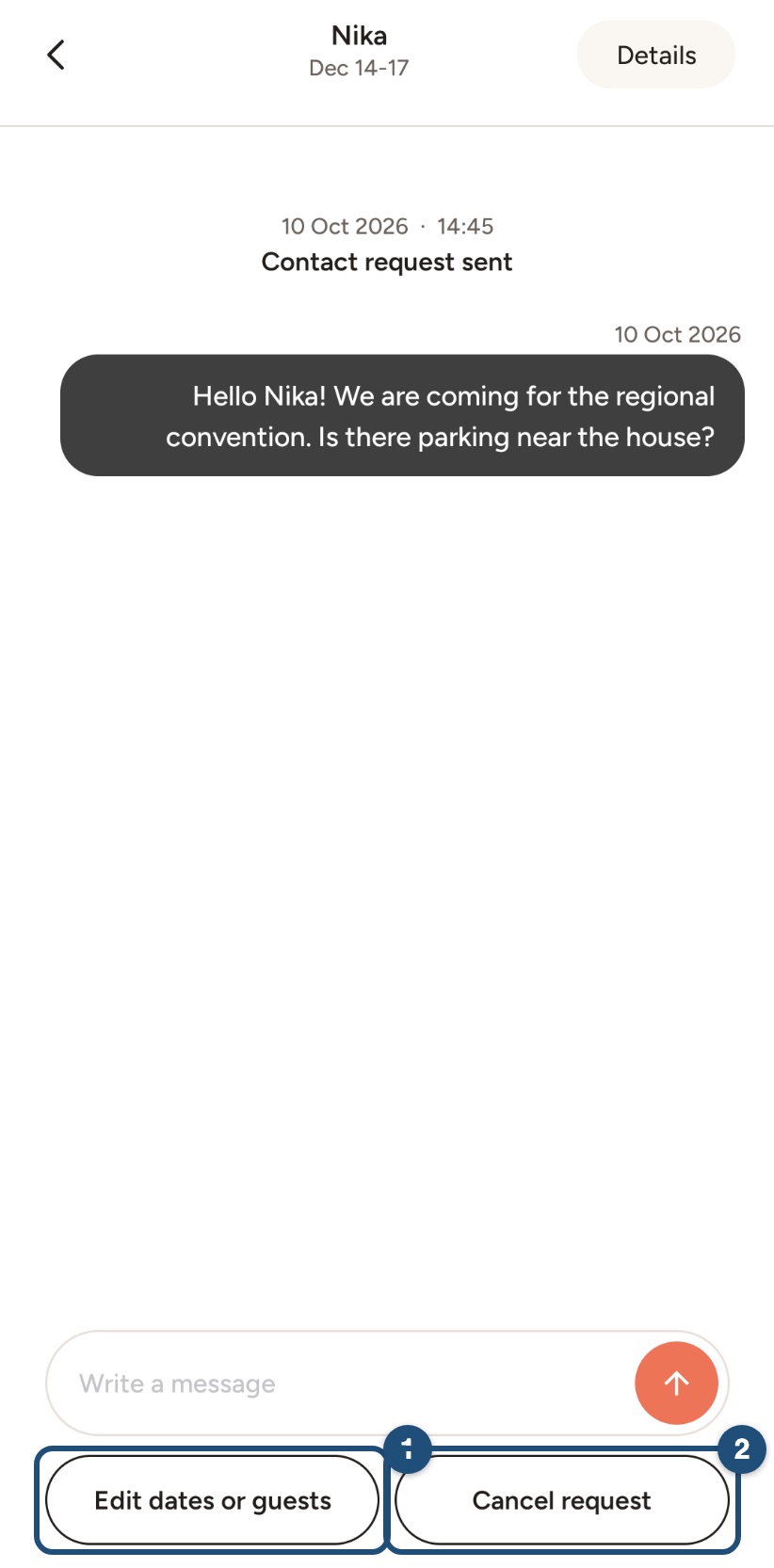
Open the conversation: tap Inbox in the bar at the bottom and open the conversation of your request (or open the trip in Trips and tap Message your host). Below the message field, tap Edit dates or guests (1). Cancel request (2) withdraws it.
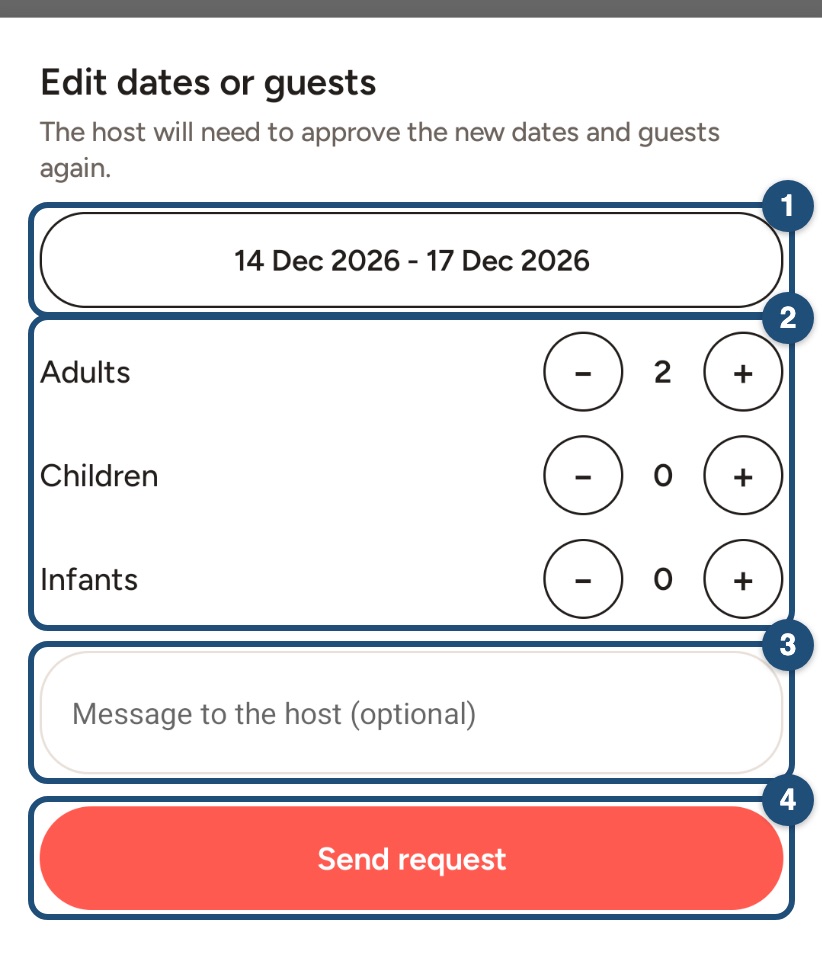
Enter the new dates (1) and guests (2), add a message for the host if you like (3) and tap Send request (4). The host will need to approve the new dates and guests again.
If your host has already pre-accepted your request, changing the dates sends it back to them for approval, and a special offer or SFTS discount on the old dates no longer applies.
Change a confirmed booking
Once a booking is confirmed, you can't change the dates or the number of guests yourself: our team does it for you.
- Write to us: email [email protected], or in the app tap Profile > Help & Support. Include your booking details and the new dates or number of guests you would like. Our team replies within 24 working hours.
- We agree it with the host: we check with your host that the new dates or guests are possible, and at what price.
- We update your booking: our team changes the booking in the system and confirms the change to you by email.
To add nights to a confirmed booking, see Add nights to your booking. If the new dates are not available, you can keep your booking or cancel it under the listing's cancellation policy. See Cancel your booking.
Refunds when the stay gets shorter
If the change reduces the number of nights, the refund for the nights removed follows the listing's cancellation policy:
- Flexible: full refund up to 24 hours before check-in.
- Moderate: full refund up to 7 days before check-in.
- Strict: 50% refund up to 7 days before check-in.
See all the details on the Cancellation Policies page.
Changing dates during your stay
Talk to your host directly. If you want to stay longer, see Add nights to your booking.