
Website
Every listing on JWguest is an entire home, a private room or a shared room. The room type tells you which spaces are yours alone and which you share with the host or with other guests, so look at it before you send a booking request.
The three room types
- Entire home: the whole place is for you and the people travelling with you. You don't share the kitchen, the bathroom or the living areas with anyone, and the host usually doesn't stay there during your visit.
- Private room: you have your own room to sleep in, and you share some common areas with the host or with other guests, such as the kitchen and the living room, and often the bathroom. It is a good way to stay with local brothers and sisters and get to know them.
- Shared room: you don't have a room to yourself: you sleep in a room you share with others. The host can accept more than one booking for the same nights, up to the number of guests the listing allows, so you may share it with guests you don't know. It is usually the most economical choice, for example for a few nights during an assembly or a convention.
Where a listing shows its room type
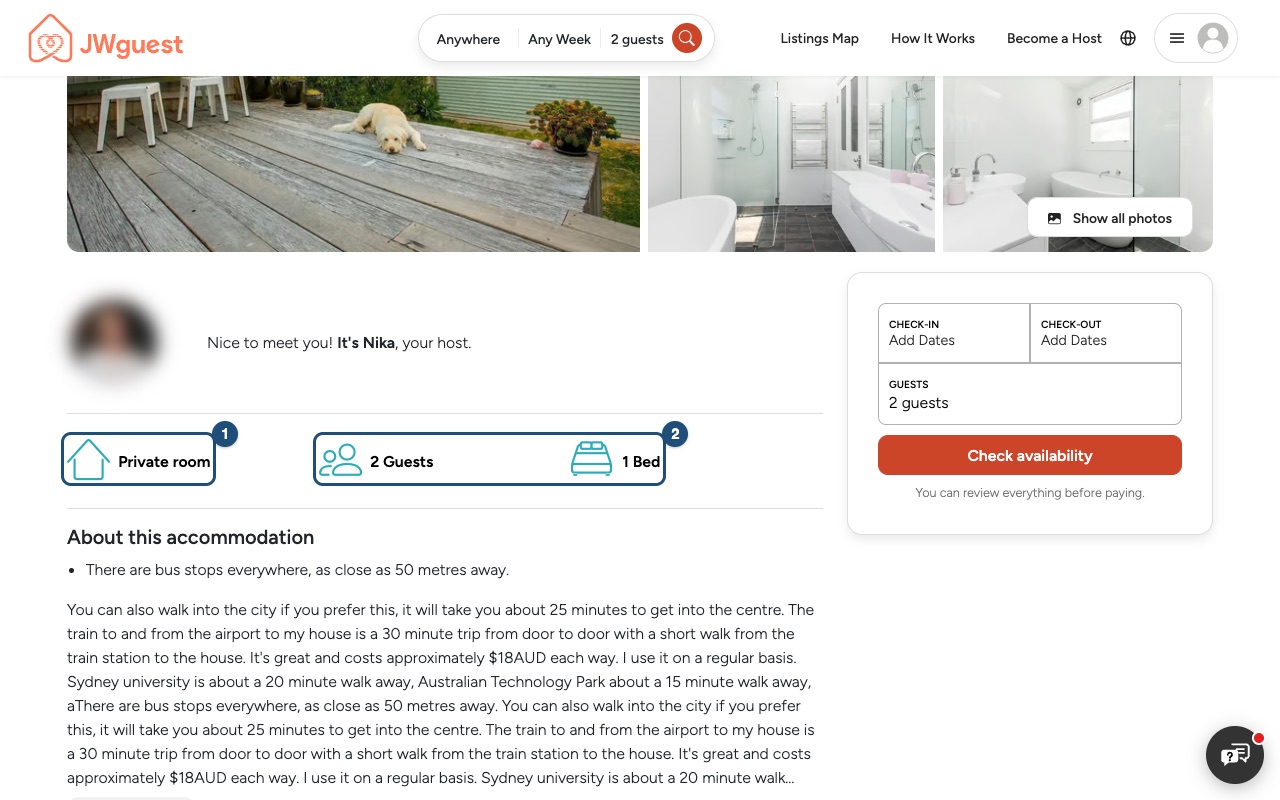
On the listing page, under the host's greeting, the first item is the room type (1): Entire home, Private room or Shared room. Next to it (2) you see how many guests the listing allows and how many beds it has. A shared room also says This is a shared room.
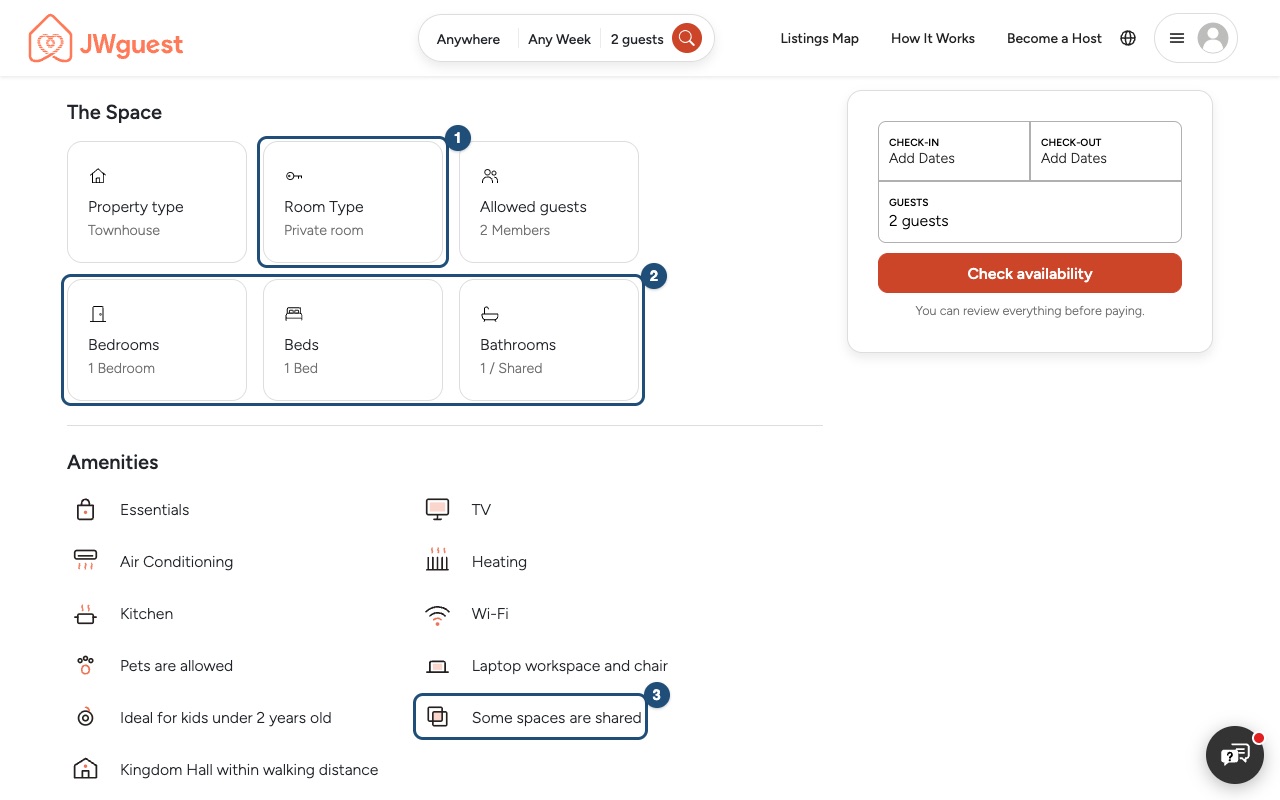
Further down, The Space shows the Room Type again (1) with the details (2): Allowed guests, Bedrooms, Beds and Bathrooms. Next to the number of bathrooms you read whether they are Private or Shared, for example 1 / Shared. Under Amenities, items such as Some spaces are shared (3), Shared Kitchen, Private entrance or Lock on bedroom door tell you more.
Before you book
- Room for everyone: check that the allowed guests, bedrooms and beds are enough for your group.
- Bathroom: in a private room or a shared room, check whether the bathroom is private or shared.
- The host's description and house rules: they say who else lives in or uses the home and which spaces you can use.
- Not sure? Ask the host before you book. See Contact a host before you book.
Show only one room type
On the search results, click Filters and choose one or more types under Room Type. See Use the search filters.
Related articles: How to search · Use the search filters · Contact a host before you book
Mobile browser
Every listing on JWguest is an entire home, a private room or a shared room. The room type tells you which spaces are yours alone and which you share with the host or with other guests, so look at it before you send a booking request.
The three room types
- Entire home: the whole place is for you and the people travelling with you. You don't share the kitchen, the bathroom or the living areas with anyone, and the host usually doesn't stay there during your visit.
- Private room: you have your own room to sleep in, and you share some common areas with the host or with other guests, such as the kitchen and the living room, and often the bathroom. It is a good way to stay with local brothers and sisters and get to know them.
- Shared room: you don't have a room to yourself: you sleep in a room you share with others. The host can accept more than one booking for the same nights, up to the number of guests the listing allows, so you may share it with guests you don't know. It is usually the most economical choice, for example for a few nights during an assembly or a convention.
Where a listing shows its room type
On the listing page, scroll down to The Space. The Room Type card (1) says Entire home, Private room or Shared room. The cards below (2) show Allowed guests, Bedrooms, Beds and Bathrooms; next to the number of bathrooms you read whether they are Private or Shared, for example 1 / Shared. A shared room also says This is a shared room under the host's greeting.
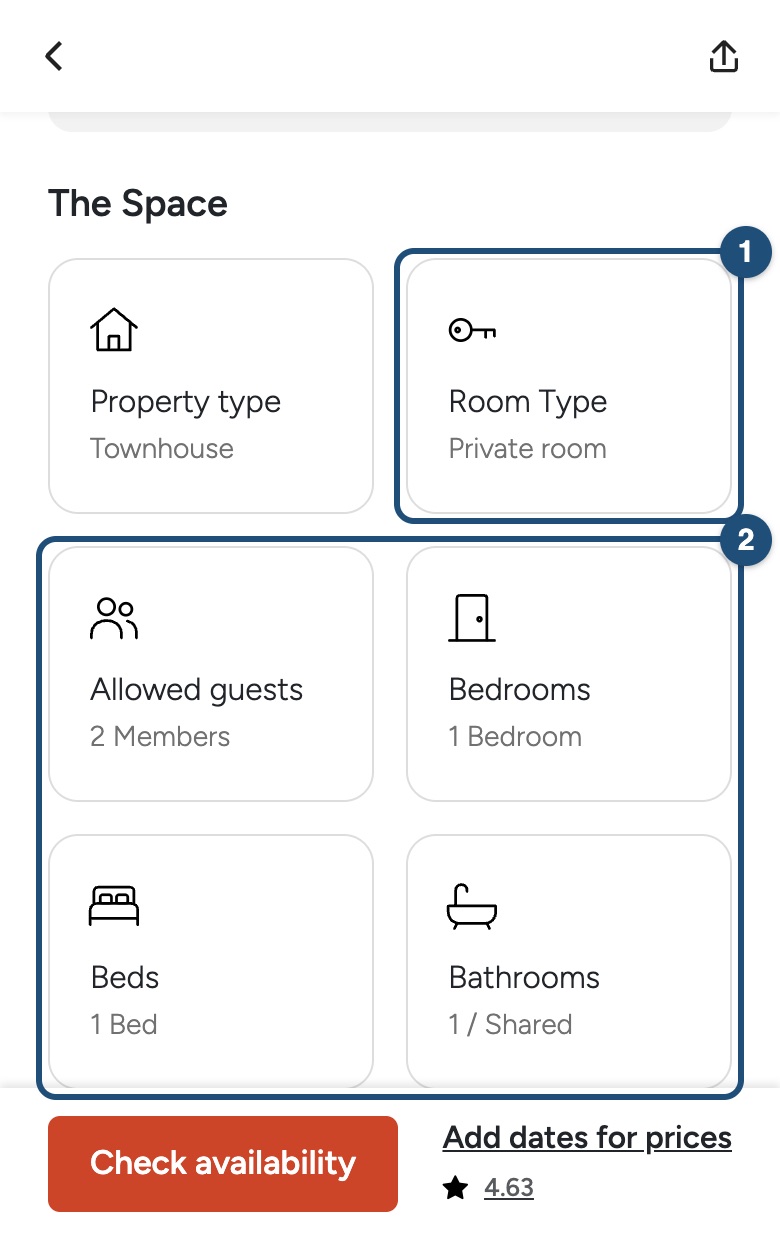
Under Amenities, items such as Some spaces are shared, Shared Kitchen, Private entrance or Lock on bedroom door tell you more.
Before you book
- Room for everyone: check that the allowed guests, bedrooms and beds are enough for your group.
- Bathroom: in a private room or a shared room, check whether the bathroom is private or shared.
- The host's description and house rules: they say who else lives in or uses the home and which spaces you can use.
- Not sure? Ask the host before you book. See Contact a host before you book.
Show only one room type
On the search results, tap the filter icon and choose one or more types under Room Type. See Use the search filters.
Related articles: How to search · Use the search filters · Contact a host before you book
iOS app
Every listing on JWguest is an entire home, a private room or a shared room. The room type tells you which spaces are yours alone and which you share with the host or with other guests, so look at it before you send a booking request.
The three room types
- Entire home: the whole place is for you and the people travelling with you. You don't share the kitchen, the bathroom or the living areas with anyone, and the host usually doesn't stay there during your visit.
- Private room: you have your own room to sleep in, and you share some common areas with the host or with other guests, such as the kitchen and the living room, and often the bathroom. It is a good way to stay with local brothers and sisters and get to know them.
- Shared room: you don't have a room to yourself: you sleep in a room you share with others. The host can accept more than one booking for the same nights, up to the number of guests the listing allows, so you may share it with guests you don't know. It is usually the most economical choice, for example for a few nights during an assembly or a convention.
Where a listing shows its room type
On the listing, scroll down to The Space. The Room Type card (1) says Entire home, Private room or Shared room. The cards below (2) show Allowed guests, Bedrooms, Beds and Bathrooms; next to the number of bathrooms you read whether they are Private or Shared, for example 1/Shared.
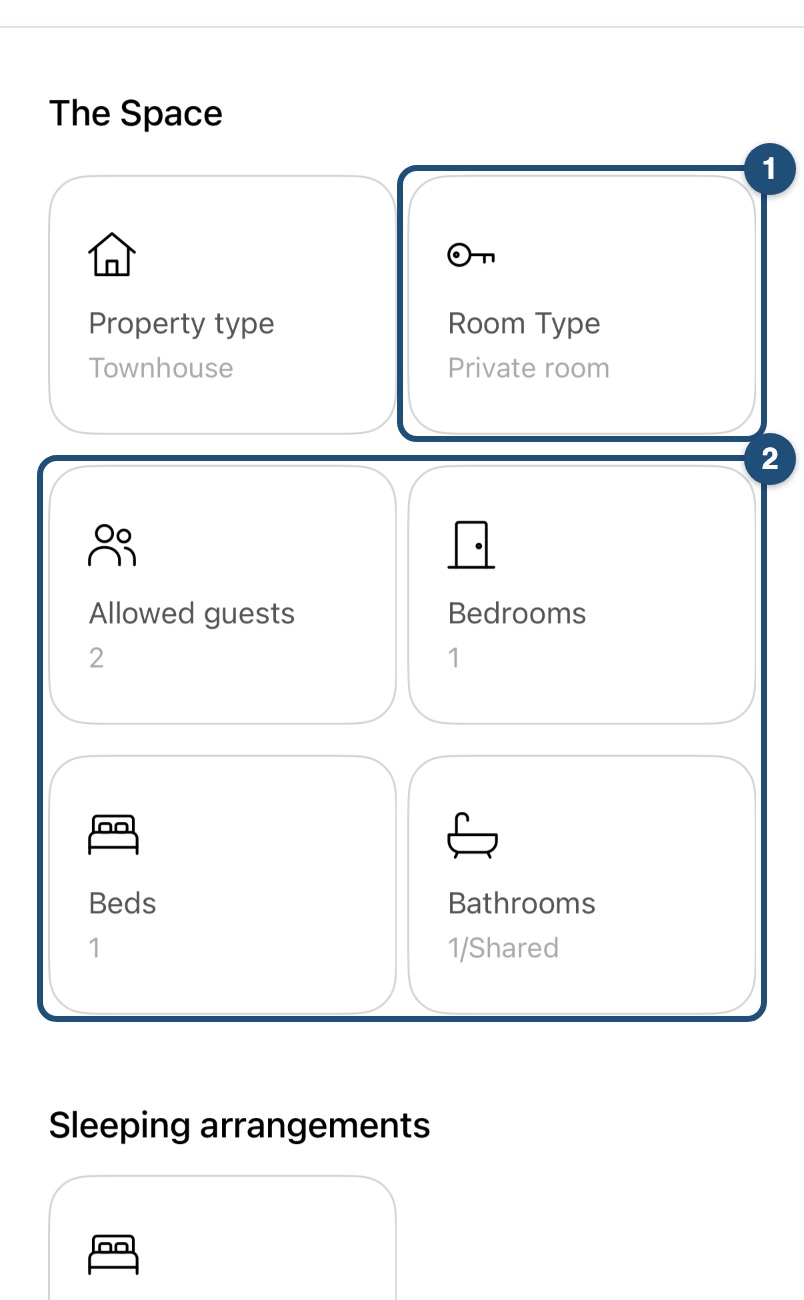
Under What this place offers, items such as Some spaces are shared, Shared Kitchen, Private entrance or Lock on bedroom door tell you more.
Before you book
- Room for everyone: check that the allowed guests, bedrooms and beds are enough for your group.
- Bathroom: in a private room or a shared room, check whether the bathroom is private or shared.
- The host's description and house rules: they say who else lives in or uses the home and which spaces you can use.
- Not sure? Ask the host before you book. See Contact a host before you book.
Show only one room type
On the search results, tap the filter icon, tick one or more types under Room Types and tap Save. See Use the search filters.
Related articles: How to search · Use the search filters · Contact a host before you book
Android app
Every listing on JWguest is an entire home, a private room or a shared room. The room type tells you which spaces are yours alone and which you share with the host or with other guests, so look at it before you send a booking request.
The three room types
- Entire home: the whole place is for you and the people travelling with you. You don't share the kitchen, the bathroom or the living areas with anyone, and the host usually doesn't stay there during your visit.
- Private room: you have your own room to sleep in, and you share some common areas with the host or with other guests, such as the kitchen and the living room, and often the bathroom. It is a good way to stay with local brothers and sisters and get to know them.
- Shared room: you don't have a room to yourself: you sleep in a room you share with others. The host can accept more than one booking for the same nights, up to the number of guests the listing allows, so you may share it with guests you don't know. It is usually the most economical choice, for example for a few nights during an assembly or a convention.
Where a listing shows its room type
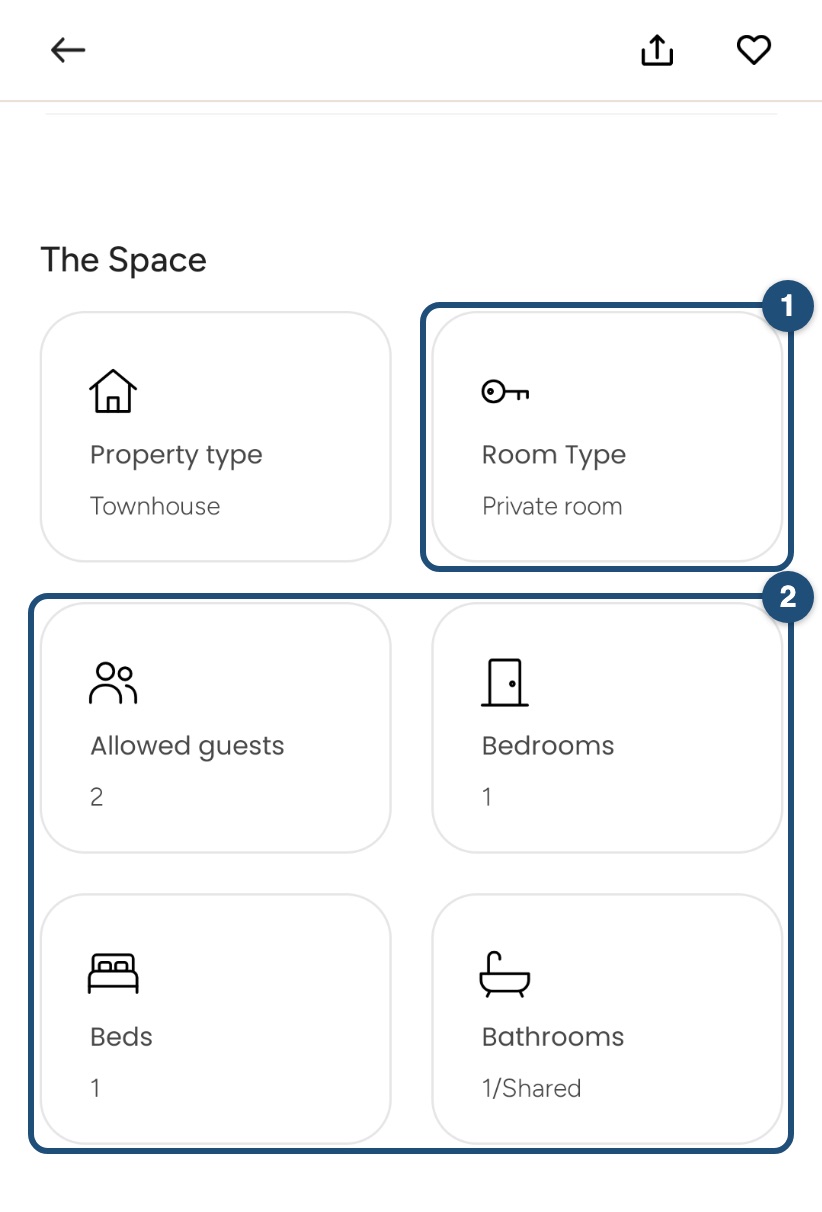
On the listing, scroll down to The Space. The Room Type card (1) says Entire home, Private room or Shared room. The cards below (2) show Allowed guests, Bedrooms, Beds and Bathrooms; next to the number of bathrooms you read whether they are Private or Shared, for example 1/Shared.
Under What this place offers, items such as Some spaces are shared, Shared Kitchen, Private entrance or Lock on bedroom door tell you more.
Before you book
- Room for everyone: check that the allowed guests, bedrooms and beds are enough for your group.
- Bathroom: in a private room or a shared room, check whether the bathroom is private or shared.
- The host's description and house rules: they say who else lives in or uses the home and which spaces you can use.
- Not sure? Ask the host before you book. See Contact a host before you book.
Show only one room type
On the search results, tap the filter icon. Under Room type, tap Select, tick one or more types and tap Save, then Save again to apply the filters. See Use the search filters.
Related articles: How to search · Use the search filters · Contact a host before you book