

Website
If your request is declined or expires, nothing is booked and you are not charged: any temporary hold or verification amount on your card is released, and you are free to send a request for another stay. Hosts have 48 hours to accept or decline a request; if they don't answer in time, the request expires.
Why a request ends without a booking
- Declined: the host can't welcome you, for example because the place is no longer free on those dates, the stay doesn't suit the home, or the host has other plans. Please don't take it personally.
- Expired: the host did not answer within 48 hours, or you did not complete Confirm & Pay within 48 hours of a pre-approval or a special offer.
You can see the status of each request in Trips and in your Inbox. See Understand your booking status.
What happens to your payment
When you send a request, we place a temporary hold on your card for the amount due, and we may charge a small verification amount (no more than CHF 1). You are charged only when the host accepts. If the request is declined or expires, we release the hold and refund the verification amount. If the host pre-approved your inquiry or sent you a special offer, nothing is charged until you complete Confirm & Pay; if you don't complete it within 48 hours, the offer expires. How quickly the hold disappears from your statement depends on your bank.
What to do next
Here's a step-by-step guide:
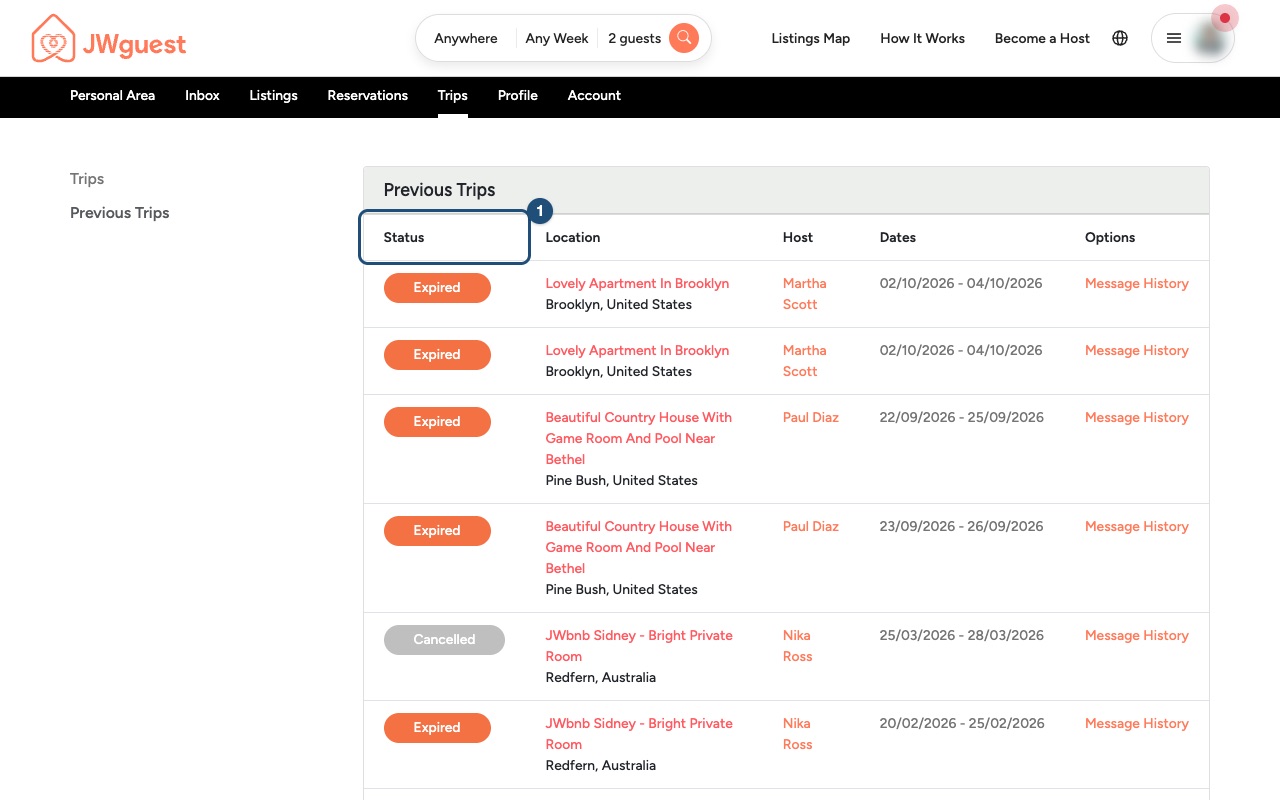
Check your past requests: In the Personal Area bar, click Trips, then Previous Trips. The Status column (1) shows whether a request was declined or expired.
Ask the host, if it helps: If the request expired, the host may simply have missed it. You can write to them from the listing with Contact Host and ask whether other dates work. See Contact a host before you book.
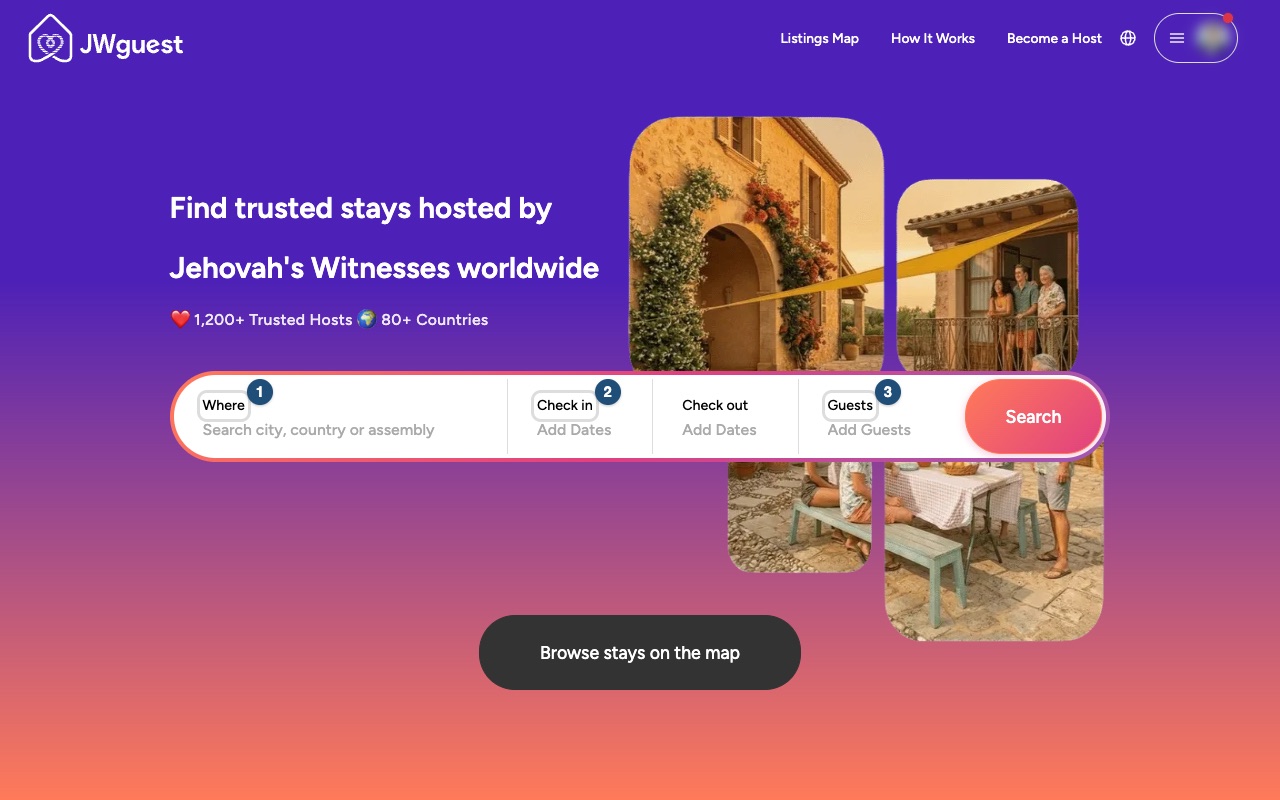
Look for another stay: Search again with Where (1), your dates (2) and Guests (3). If you are coming for an assembly, a convention or a visit to Bethel, see Find a stay near an assembly, convention or Bethel.
Related articles: Booking process · When will I pay for my booking? · How to search
Mobile browser
If your request is declined or expires, nothing is booked and you are not charged: any temporary hold or verification amount on your card is released, and you are free to send a request for another stay. Hosts have 48 hours to accept or decline a request; if they don't answer in time, the request expires.
Why a request ends without a booking
- Declined: the host can't welcome you, for example because the place is no longer free on those dates. Please don't take it personally.
- Expired: the host did not answer within 48 hours, or you did not complete Confirm & Pay within 48 hours of a pre-approval or a special offer.
What happens to your payment
When you send a request, we place a temporary hold on your card for the amount due, and we may charge a small verification amount (no more than CHF 1). You are charged only when the host accepts. If the request is declined or expires, we release the hold and refund the verification amount. If the host pre-approved your inquiry or sent you a special offer, nothing is charged until you complete Confirm & Pay; if you don't complete it within 48 hours, the offer expires. How quickly the hold disappears from your statement depends on your bank.
What to do next on your phone
Here's a step-by-step guide:
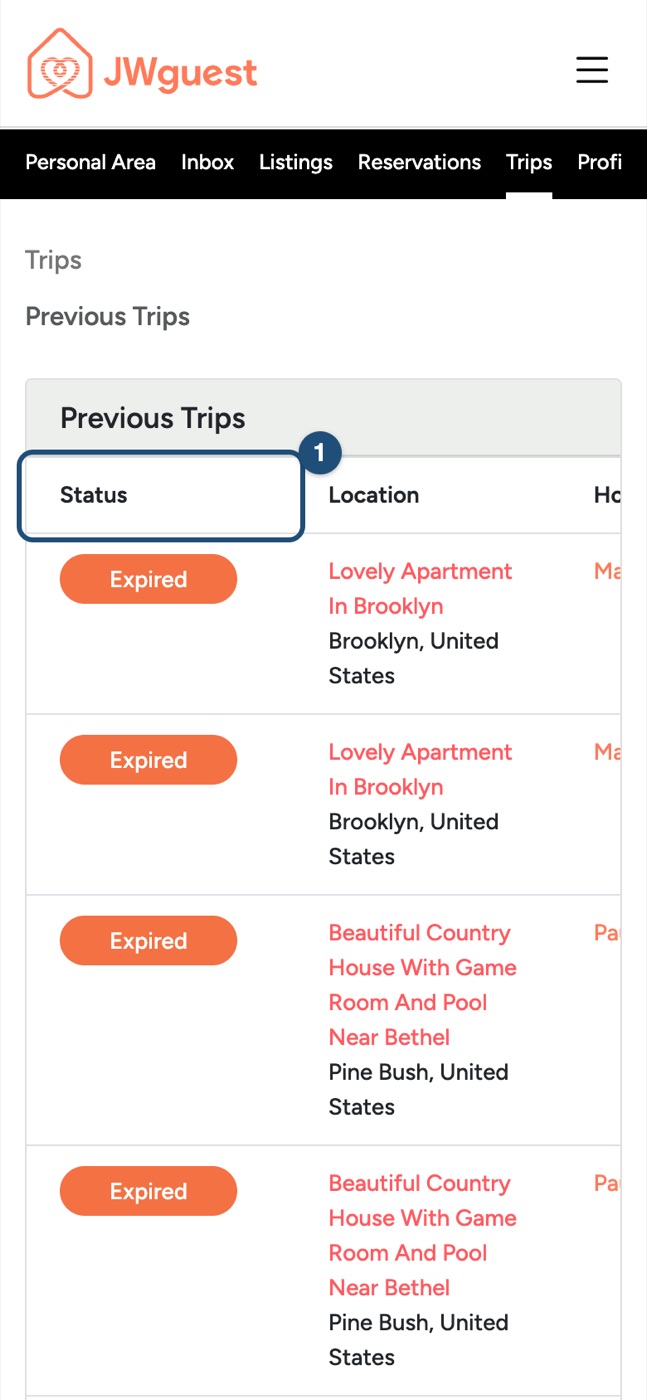
Check your past requests: Tap the menu (three lines, top right), then Trips in the black Personal Area bar, then Previous Trips. The table is wider than your screen: swipe it left if needed to read the Status column (1).
Ask the host, if it helps: Open the listing and tap Contact Host to ask whether other dates work. See Contact a host before you book.
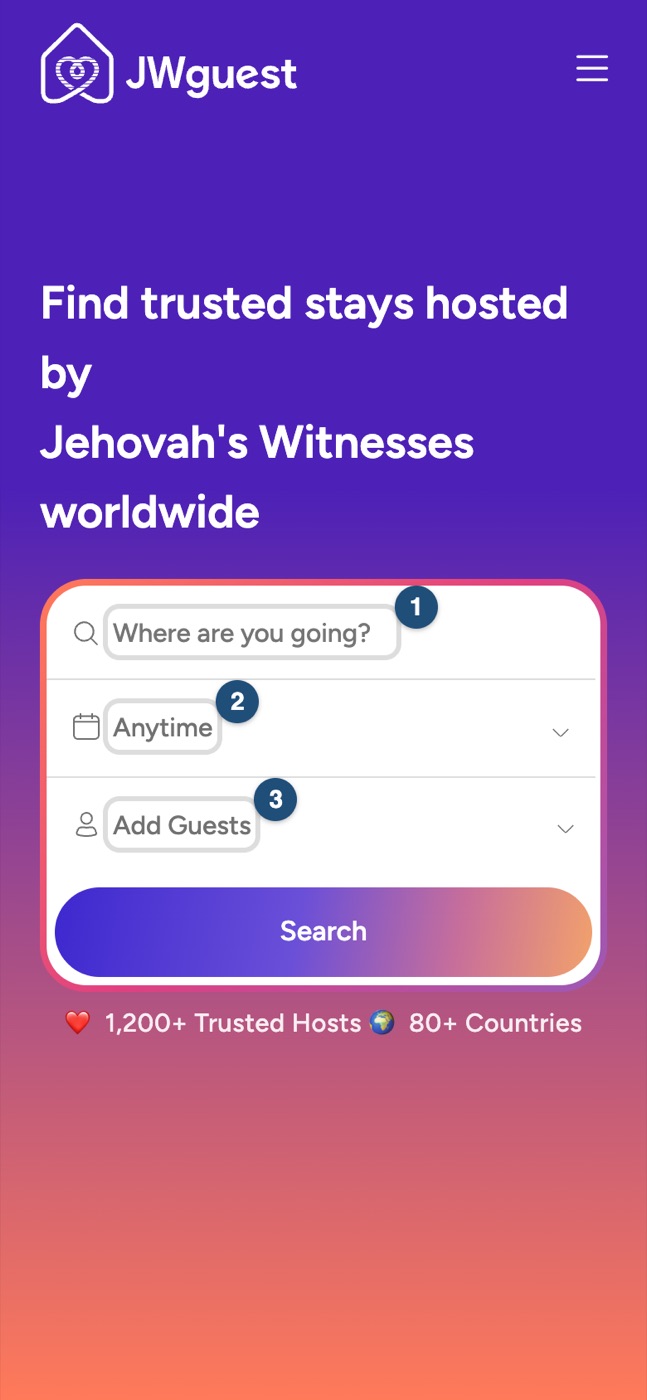
Look for another stay: Search again with Where (1), your dates (2) and Guests (3).
Related articles: Booking process · When will I pay for my booking? · Find a stay near an assembly, convention or Bethel
iOS app
If your request is declined or expires, nothing is booked and you are not charged: any temporary hold or verification amount on your card is released, and you are free to send a request for another stay. Hosts have 48 hours to accept or decline a request; if they don't answer in time, the request expires.
Why a request ends without a booking
- Declined: the host can't welcome you, for example because the place is no longer free on those dates. Please don't take it personally.
- Expired: the host did not answer within 48 hours, or you did not complete Confirm and pay within 48 hours of a pre-approval or a special offer.
What happens to your payment
When you send a request, we place a temporary hold on your card for the amount due, and we may charge a small verification amount (no more than CHF 1). You are charged only when the host accepts. If the request is declined or expires, we release the hold and refund the verification amount. If the host pre-approved your inquiry or sent you a special offer, nothing is charged until you complete Confirm and pay; if you don't complete it within 48 hours, the offer expires. How quickly the hold disappears from your statement depends on your bank.
What to do next in the app
Here's a step-by-step guide:
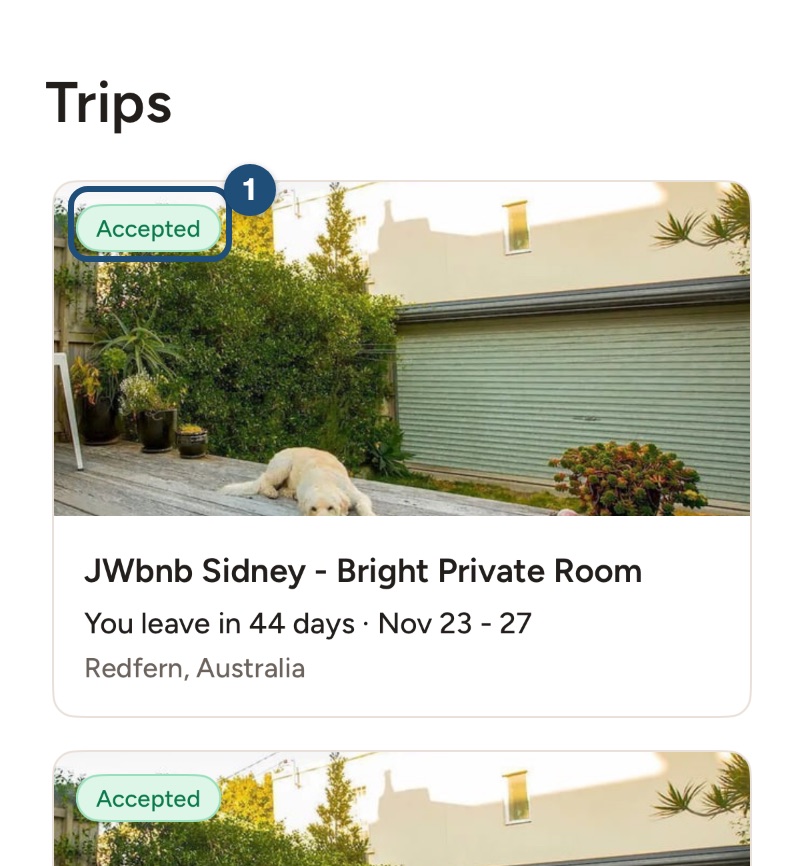
Check your requests: tap Trips in the bar at the bottom. Each trip shows its status on the photo (1); requests that ended without a booking are under Cancelled and Past trips at the bottom of the list. The conversation in your Inbox shows the same status.
Ask the host, if it helps: open the listing and tap Contact Host to ask whether other dates work. See Contact a host before you book.
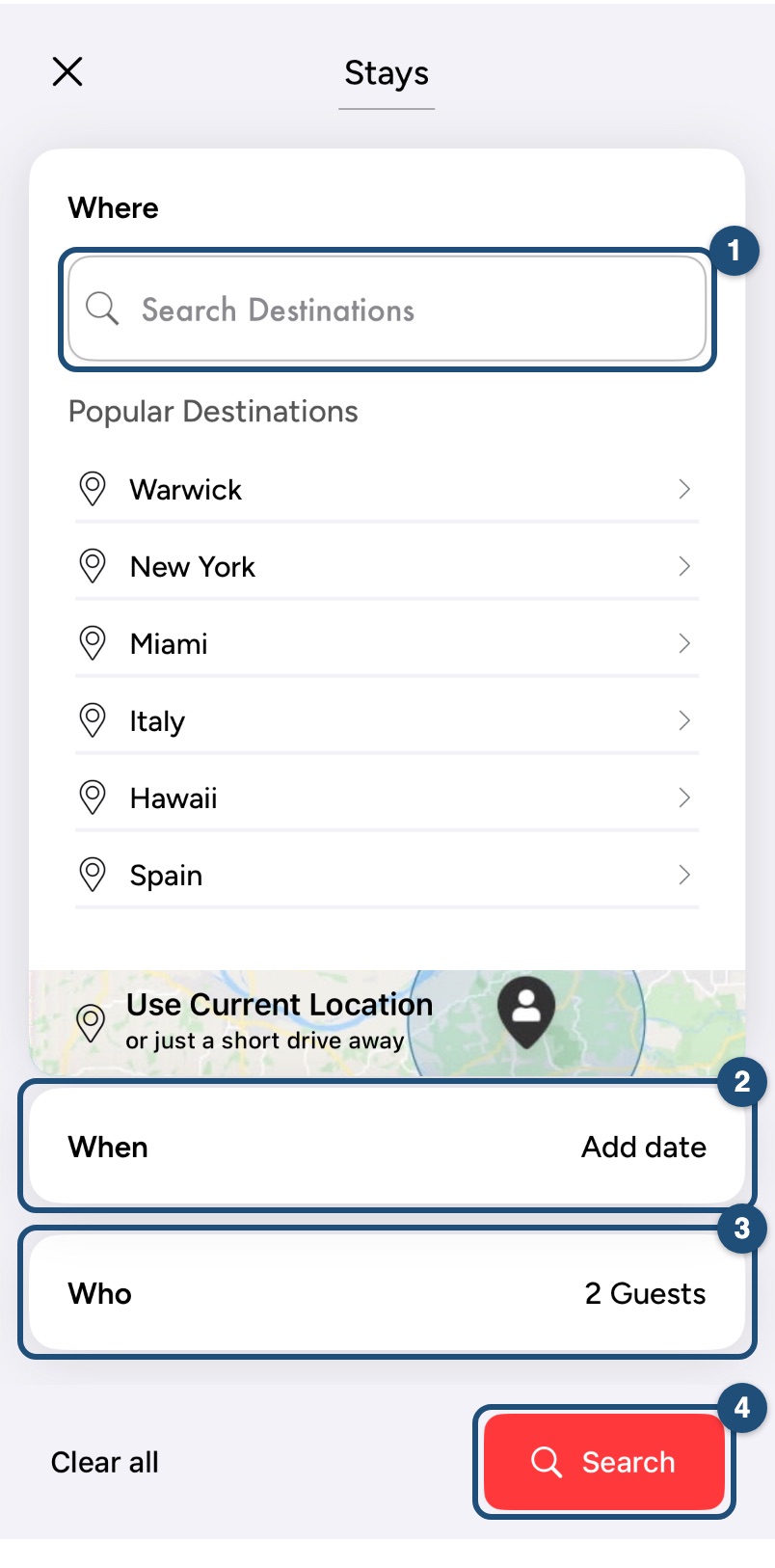
Look for another stay: tap Start your search on Explore and search again with Where (1), When (2) and Who (3).
Related articles: Booking process · When will I pay for my booking? · Find a stay near an assembly, convention or Bethel
Android app
If your request is declined or expires, nothing is booked and you are not charged: any temporary hold or verification amount on your card is released, and you are free to send a request for another stay. Hosts have 48 hours to accept or decline a request; if they don't answer in time, the request expires.
Why a request ends without a booking
- Declined: the host can't welcome you, for example because the place is no longer free on those dates. Please don't take it personally.
- Expired: the host did not answer within 48 hours, or you did not complete Confirm and pay within 48 hours of a pre-approval or a special offer.
What happens to your payment
When you send a request, we place a temporary hold on your card for the amount due, and we may charge a small verification amount (no more than CHF 1). You are charged only when the host accepts. If the request is declined or expires, we release the hold and refund the verification amount. If the host pre-approved your inquiry or sent you a special offer, nothing is charged until you complete Confirm and pay; if you don't complete it within 48 hours, the offer expires. How quickly the hold disappears from your statement depends on your bank.
What to do next in the app
Here's a step-by-step guide:
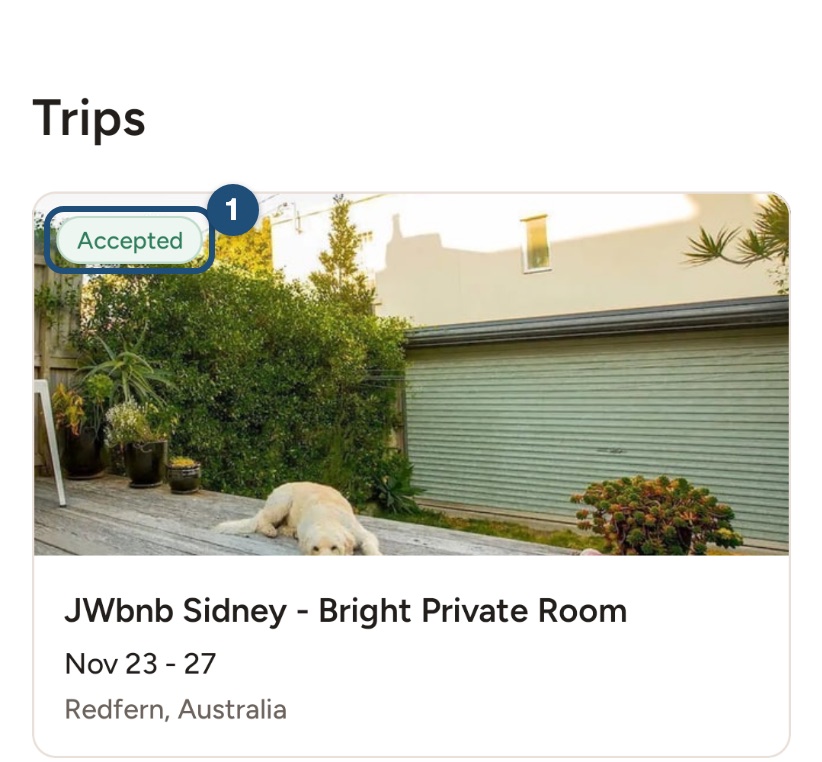
Check your requests: tap Trips in the bar at the bottom. Each trip shows its status on the photo (1); requests that ended without a booking are under Cancelled and Past trips at the bottom of the list. The conversation in your Inbox shows the same status.
Ask the host, if it helps: open the listing and tap Contact Host to ask whether other dates work. See Contact a host before you book.
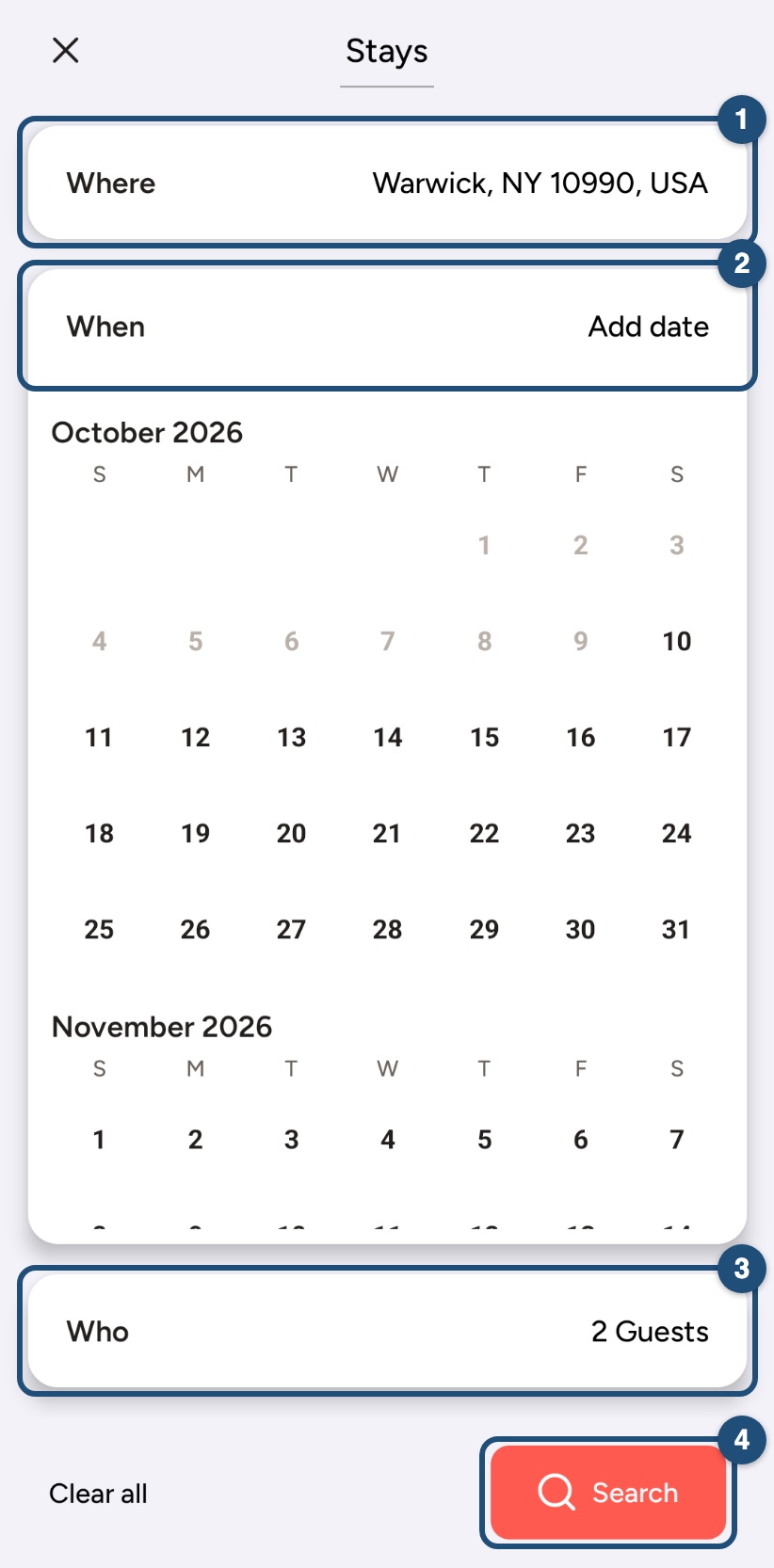
Look for another stay: tap Start your search on Explore and search again with Where (1), When (2) and Who (3).
Related articles: Booking process · When will I pay for my booking? · Find a stay near an assembly, convention or Bethel