

Website
Finding a place to stay with brothers and sisters takes just a few clicks.
How to search for a stay
- Where (1): type a city, a country or the name of an assembly or convention location.
- Check in (2) and Check out: choose your arrival and departure dates.
- Guests (3): enter how many people will stay.
- Click Search: you will see the available listings for your dates.
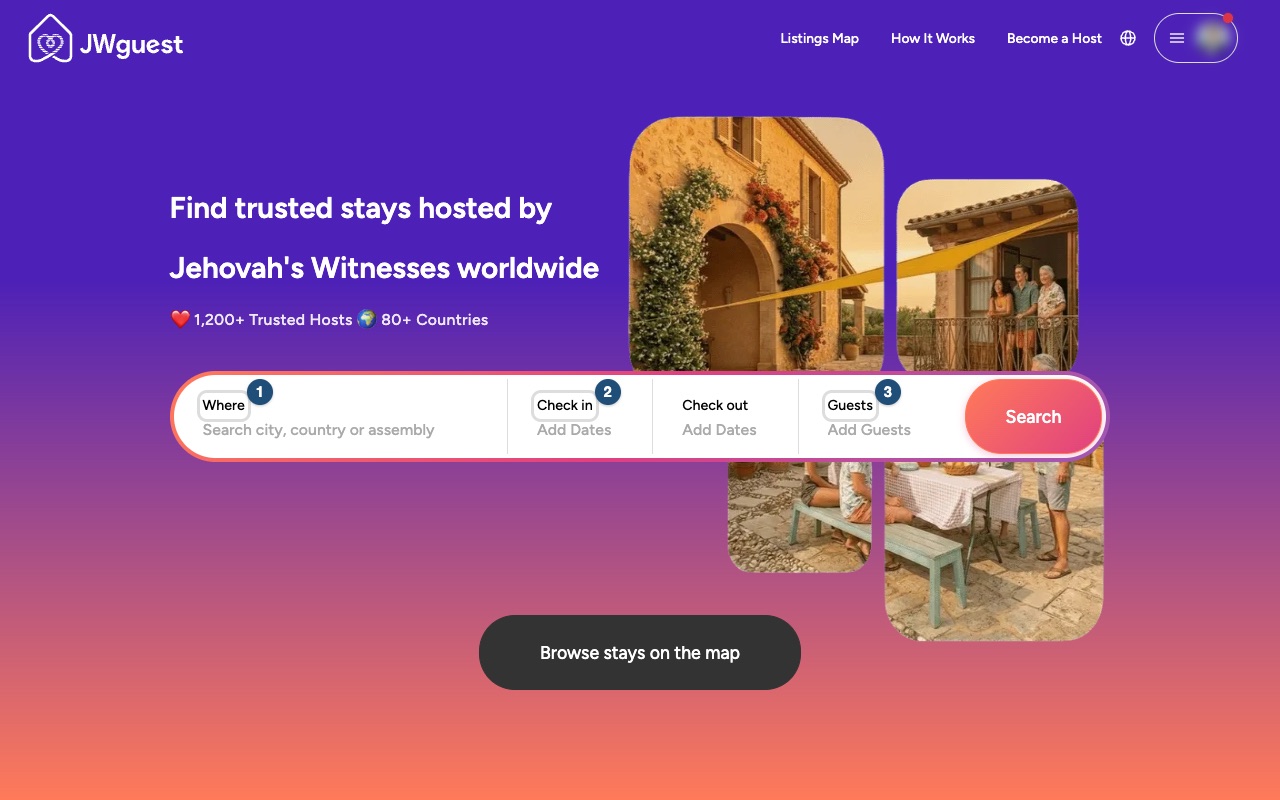
Prefer a map? Click Browse stays on the map, or Listings Map at the top of the page.
Choose the right place
Each listing shows photos, the host's profile and reviews from past guests. Use the filters to narrow your results by type of accommodation, price and location: see Use the search filters. For example, choose a private room or a shared room if you'd like to stay with the host or with other brothers and sisters. To see what each room type means and where a listing shows it, see Entire home, private room or shared room: which to choose.
Prices in the results: if you search without dates, each home shows the total for its first 4 bookable nights (or for its minimum stay, if that is longer), cleaning fee and Service Fee included. With dates, you see the exact price for your dates. On the home page and the destination pages, the prices shown are for 2 nights.
Contact the host or request to book
Before you write, complete your profile so the host knows who you are. Then, on the listing page:
- Contact Host: ask a question before booking.
- Reserve: once you have chosen your dates, send a booking request with a message to the host.
You can have up to 3 pending booking requests (and up to 3 pending contact requests) at a time. When one is answered or cancelled, you can send a new one. See Booking process.
Mobile browser
Finding a place to stay with brothers and sisters takes just a few taps.
How to search for a stay on your phone
- Where are you going? Tap the first field and type a city, a country or the name of an assembly or convention location.
- Anytime: tap to choose your check-in and check-out dates.
- Add Guests: tap to enter how many people will stay.
- Tap Search: you will see the available listings for your dates.
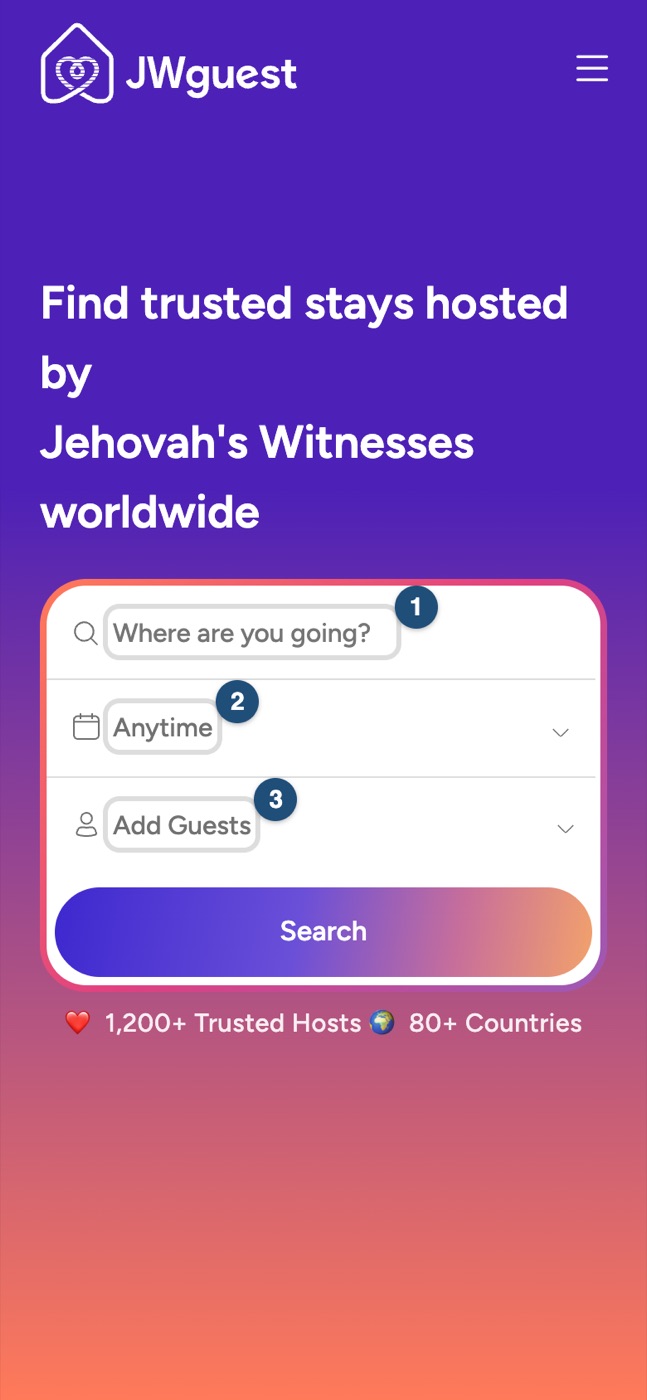
Prefer a map? Open the menu (three lines, top right) and tap Listings Map.
Choose the right place
Each listing shows photos, the host's profile and reviews from past guests. Use the filters to narrow your results by type of accommodation, price and location: see Use the search filters. Check the room type too: an entire home, a private room or a shared room (see Entire home, private room or shared room: which to choose).
Prices in the results: if you search without dates, each home shows the total for its first 4 bookable nights (or for its minimum stay, if that is longer), cleaning fee and Service Fee included. With dates, you see the exact price for your dates. On the home page and the destination pages, the prices shown are for 2 nights.
Contact the host or request to book
Before you write, complete your profile so the host knows who you are. Then, on the listing page, tap Contact Host to ask a question, or Reserve to send a booking request with a message.
You can have up to 3 pending booking requests (and up to 3 pending contact requests) at a time. See Booking process.
iOS app
Finding a place to stay with brothers and sisters takes just a few taps.
How to search for a stay in the app
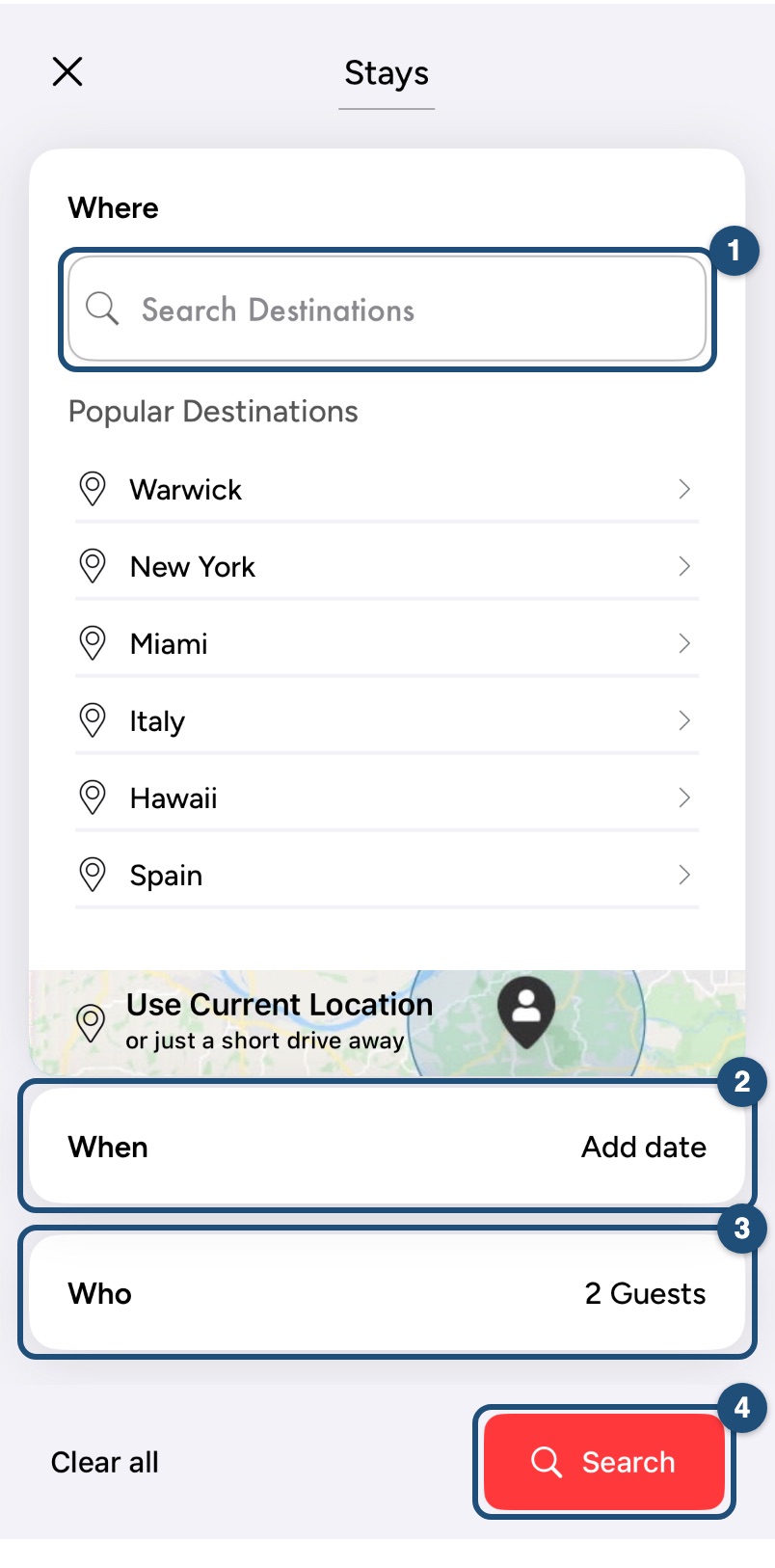
- Start your search: on Explore, tap Start your search at the top.
- Where (1): type a city, a country or the name of an assembly or convention location, or pick one of the Popular Destinations. Use Current Location finds homes near you.
- When (2): tap to choose your check-in and check-out dates.
- Who (3): tap to enter how many people will stay.
- Tap Search (4): you will see the available listings for your dates.
Refine the results
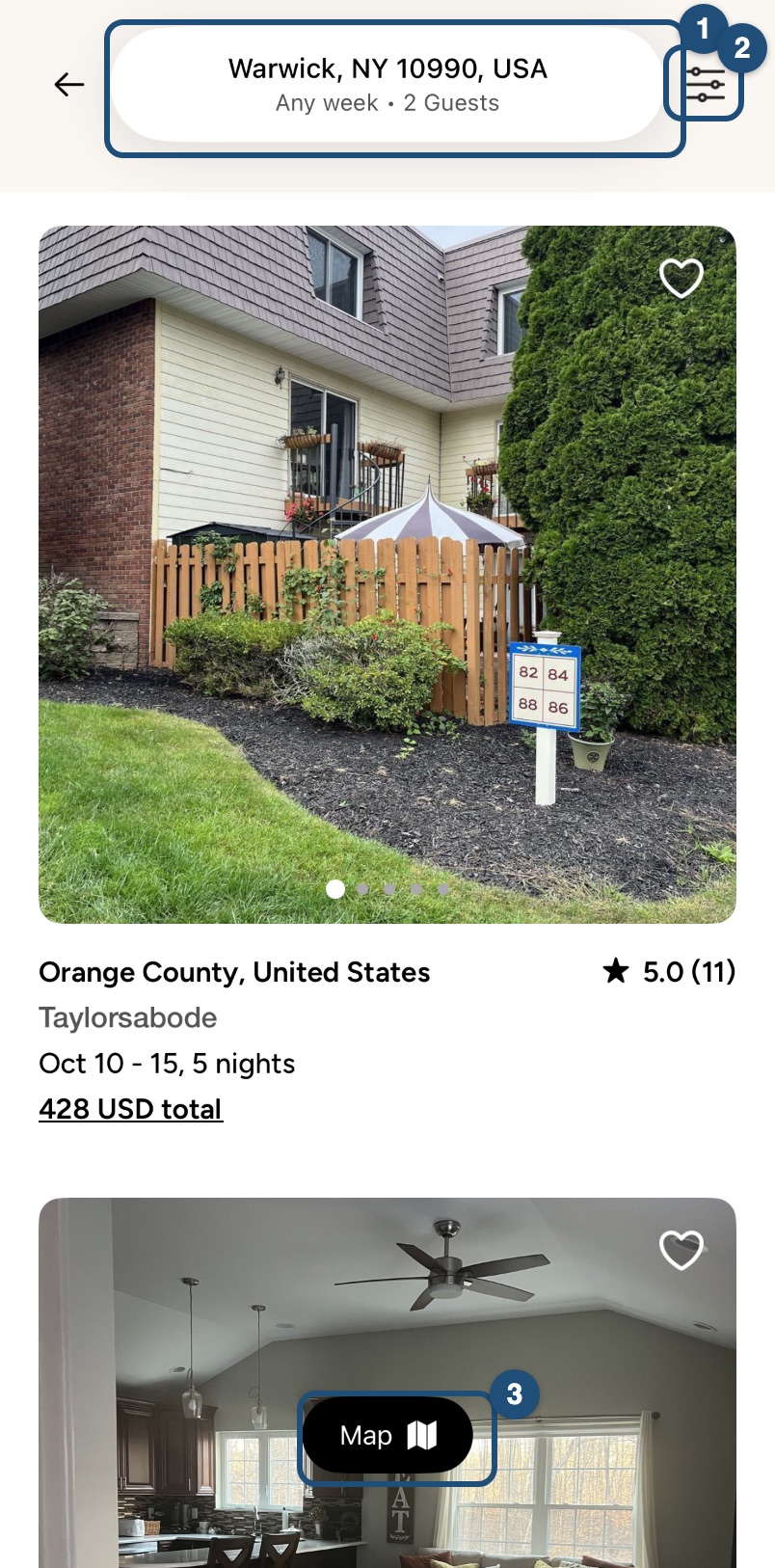
Tap the search bar (1) to change place, dates or guests, and the filters icon (2) to narrow the results by type of accommodation, price and more (see Use the search filters). Prefer a map? Tap Map (3).
Choose the right place
Each listing shows photos, the host's profile and reviews from past guests. Tap the heart to save a listing to your Saved list (see Save homes to a wishlist). Check the room type too: an entire home, a private room or a shared room (see Entire home, private room or shared room: which to choose).
Prices in the results: if you search without dates, each home shows the total for 5 nights, cleaning fee and Service Fee included. With dates, you see the exact price for your dates.
Contact the host or request to book
Before you write, complete your profile so the host knows who you are. Then, on the listing page, tap Contact Host to ask a question, or Reserve at the bottom to send a booking request with a message.
You can have up to 3 pending booking requests (and up to 3 pending contact requests) at a time. See Booking process.
Android app
Finding a place to stay with brothers and sisters takes just a few taps.
How to search for a stay in the app
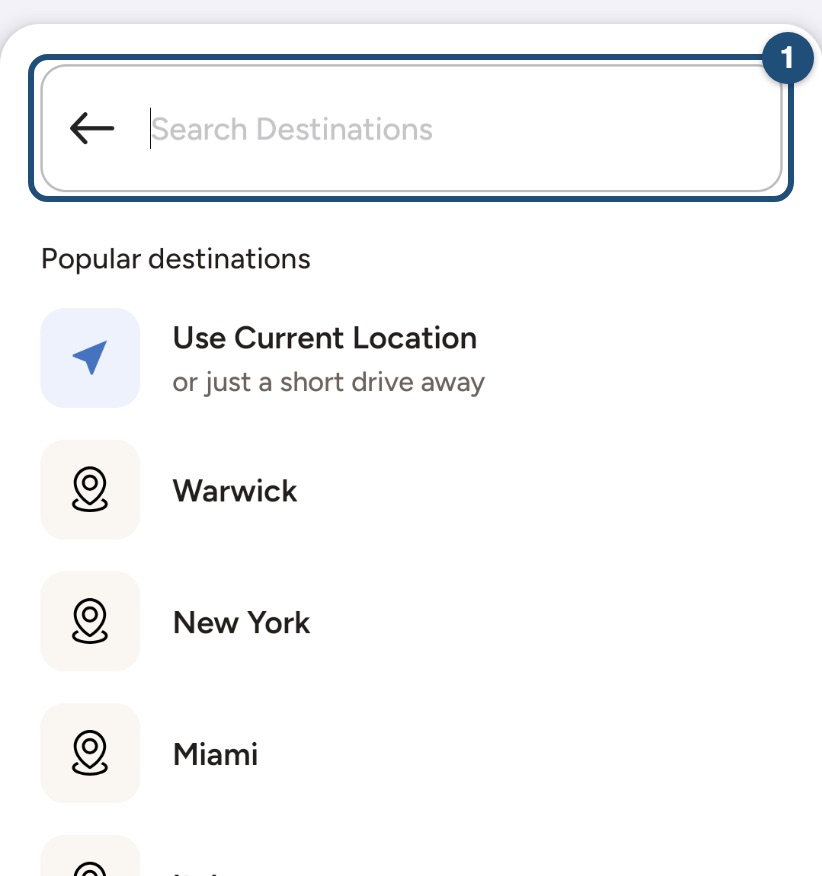
Start your search: on Explore, tap Start your search at the top. Type a city, a country or the name of an assembly or convention location in Search Destinations (1), or pick one of the Popular destinations. Use Current Location finds homes near you.
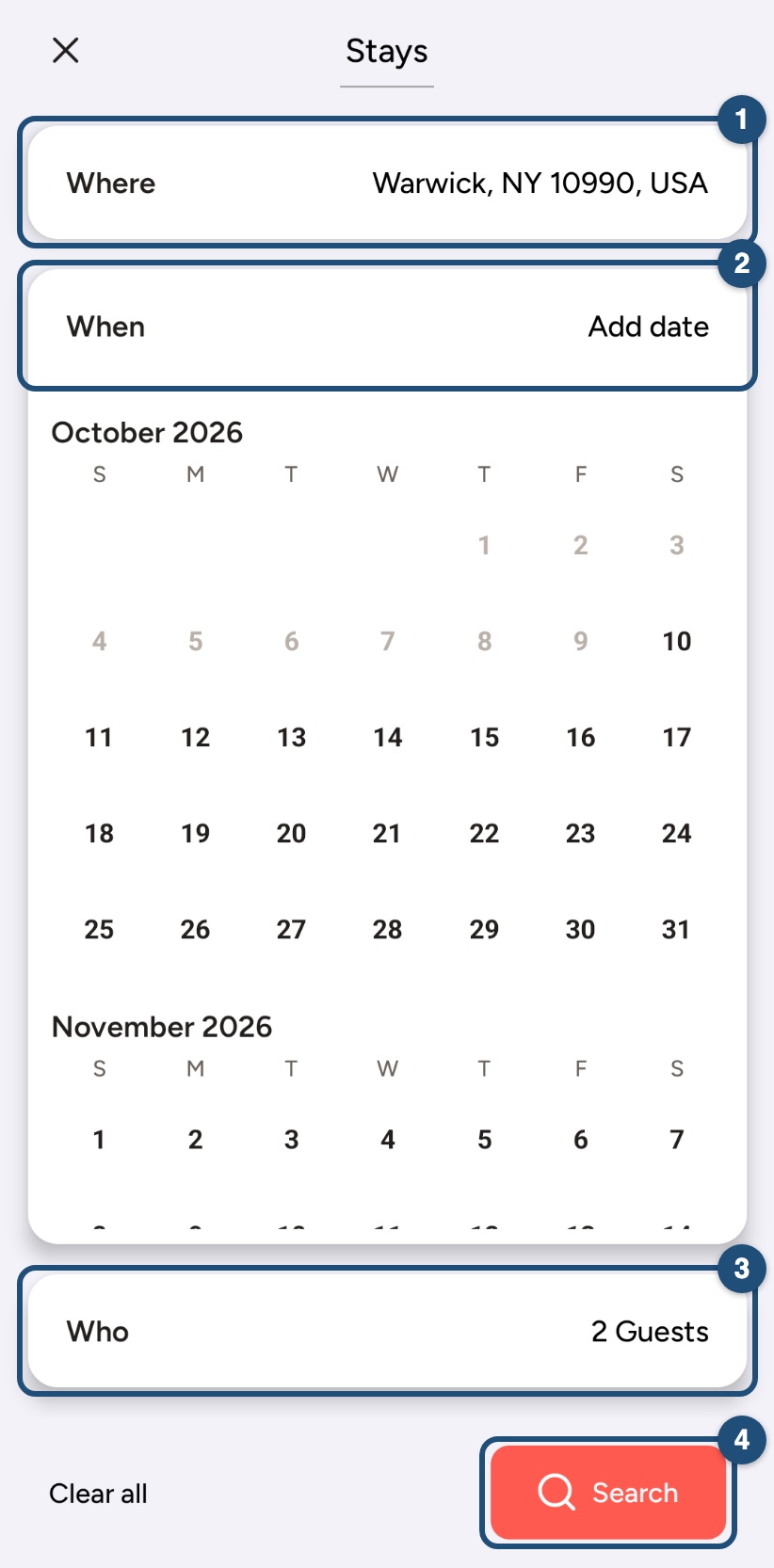
Dates and guests: your place appears under Where (1). Choose your check-in and check-out dates under When (2) and how many people will stay under Who (3), then tap Search (4).
Refine the results
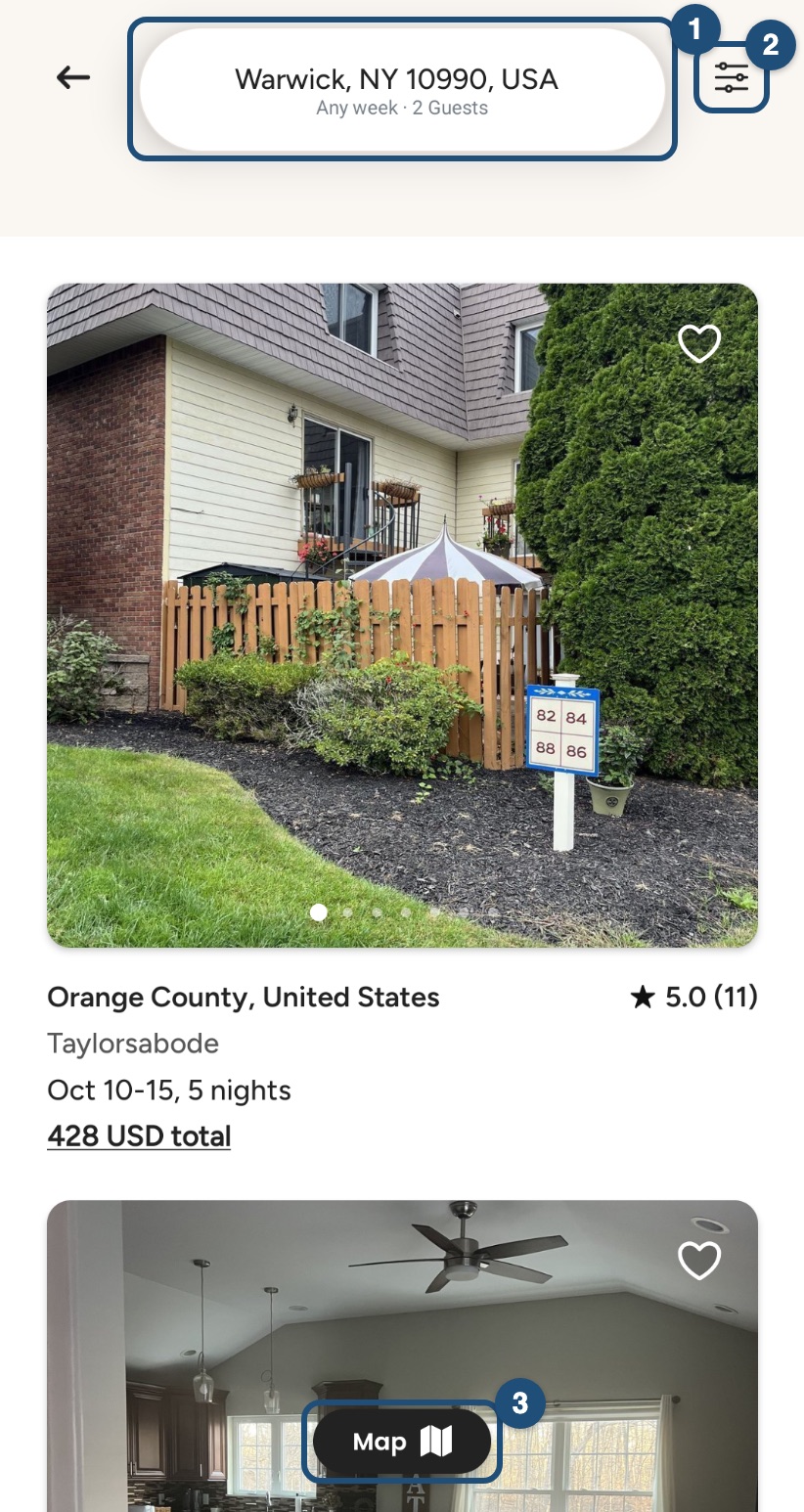
Tap the search bar (1) to change place, dates or guests, and the filters icon (2) to narrow the results by type of accommodation, price and more (see Use the search filters). Prefer a map? Tap Map (3).
Choose the right place
Each listing shows photos, the host's profile and reviews from past guests. Tap the heart to save a listing to your Save list (see Save homes to a wishlist). Check the room type too: an entire home, a private room or a shared room (see Entire home, private room or shared room: which to choose).
Prices in the results: if you search without dates, each home shows the total for 5 nights, cleaning fee and Service Fee included. With dates, you see the exact price for your dates.
Contact the host or request to book
Before you write, complete your profile so the host knows who you are. Then, on the listing page, tap Contact Host to ask a question, or Reserve at the bottom to send a booking request with a message.
You can have up to 3 pending booking requests (and up to 3 pending contact requests) at a time. See Booking process.