
Website
Don't pay, and tell us: every booking on JWguest is paid by card through JWguest with Confirm & Pay, never by bank transfer, cash or a payment app to the host. A request to pay outside JWguest breaks our Terms of Service, and if you pay that way you lose the protection you have when you pay through JWguest.
Why it matters
When you pay through JWguest:
- you see the full price, with every fee, before you send your request;
- your money is handled by JWguest under the listing's cancellation policy and our Guest Refund Policy;
- if the host cancels, you get a full refund, Service Fee included;
- if something is wrong when you arrive, you can report it to us within 12 hours of check-in.
If you pay outside JWguest, none of this applies. Our Terms of Service say that whoever makes or accepts such a payment accepts all the risk.
Warning signs
- The host asks you to "book directly", by bank transfer or with a payment app, to save the Service Fee.
- Someone sends you a phone number, an email address or a link in the chat before your booking is confirmed. Sharing contact details before confirmation is not allowed on JWguest.
- You are asked for more money than the total shown in your booking, or for a "deposit" by transfer.
- A message or email asks you to pay on a page that is not jwguest.com.
What is legitimate
- Everything shown in your price breakdown (nights, additional-guest fees, cleaning fee, Service Fees, local taxes) is paid through JWguest. See Understand your price breakdown.
- A security deposit shown on the listing is a temporary hold on your card through JWguest, not a payment to the host. For stays longer than 7 days, a host may manage the deposit directly with you: this is the only exception, and the deposit must be stated in the listing. See If I am asked to pay a deposit, is it refundable?
How to report it
Here's a step-by-step guide:
Don't pay and don't share your card or bank details in the chat.
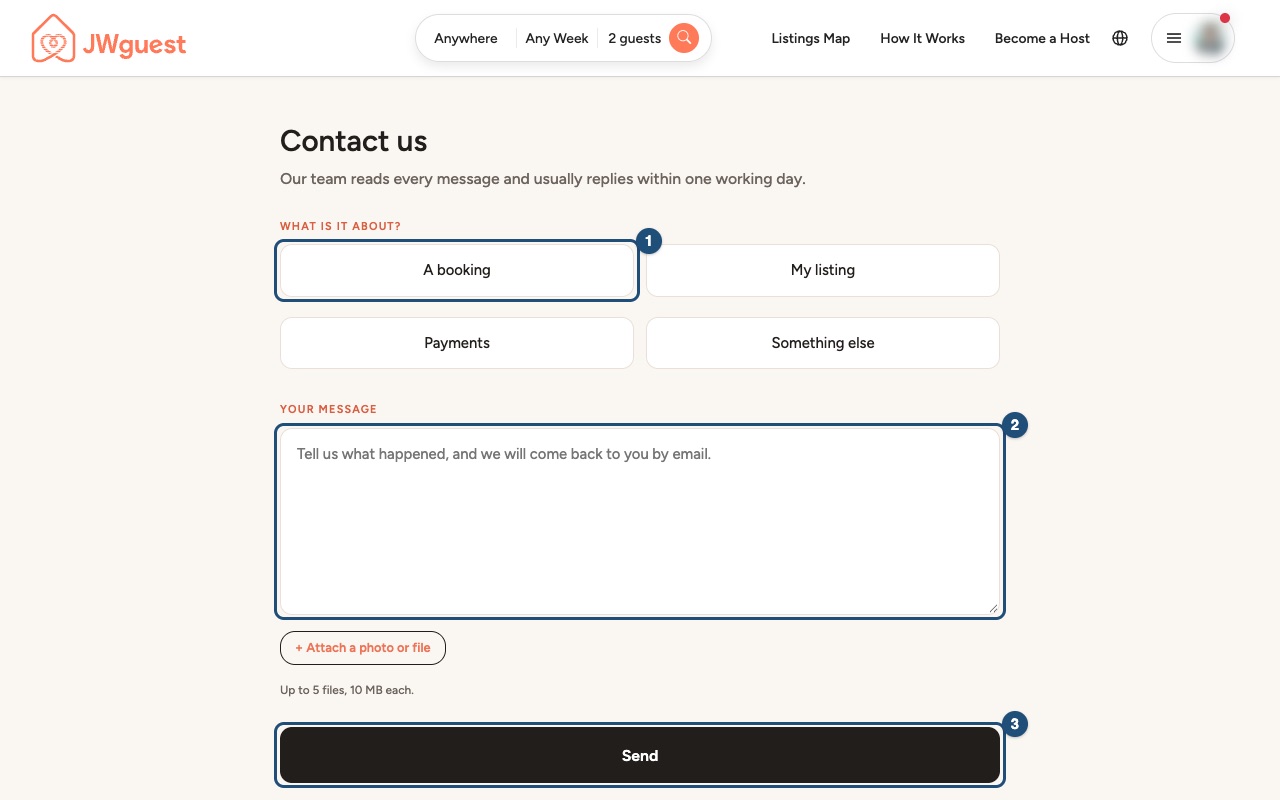
Open Contact us: go to Contact us and choose A booking (1).
Describe what happened (2): include the listing and, if you have one, the reservation code. You can attach screenshots of the messages with + Attach (up to 5 files, 10 MB each).
Click Send (3). We usually reply within one working day. You can also write to [email protected].
Related articles: Book with confidence · When will I pay for my booking? · Booking process
Mobile browser
Don't pay, and tell us: every booking on JWguest is paid by card through JWguest with Confirm & Pay, never by bank transfer, cash or a payment app to the host. A request to pay outside JWguest breaks our Terms of Service, and if you pay that way you lose the protection you have when you pay through JWguest.
Why it matters
When you pay through JWguest, you see the full price before you send your request, your money is handled under the listing's cancellation policy and our Guest Refund Policy, you get a full refund if the host cancels (Service Fee included), and you can report a problem to us within 12 hours of check-in. If you pay outside JWguest, none of this applies: our Terms of Service say that whoever makes or accepts such a payment accepts all the risk.
Warning signs
- The host asks you to "book directly", by bank transfer or with a payment app, to save the Service Fee.
- Someone sends you a phone number, an email address or a link in the chat before your booking is confirmed.
- You are asked for more money than the total shown in your booking, or for a "deposit" by transfer.
- A message asks you to pay on a page that is not jwguest.com.
What is legitimate
Everything in your price breakdown is paid through JWguest. A security deposit shown on the listing is a temporary hold on your card through JWguest. For stays longer than 7 days, a host may manage the deposit directly with you: this is the only exception, and it must be stated in the listing. See If I am asked to pay a deposit, is it refundable?
How to report it from your phone
Here's a step-by-step guide:
Don't pay and don't share your card or bank details in the chat. Take screenshots of the messages.
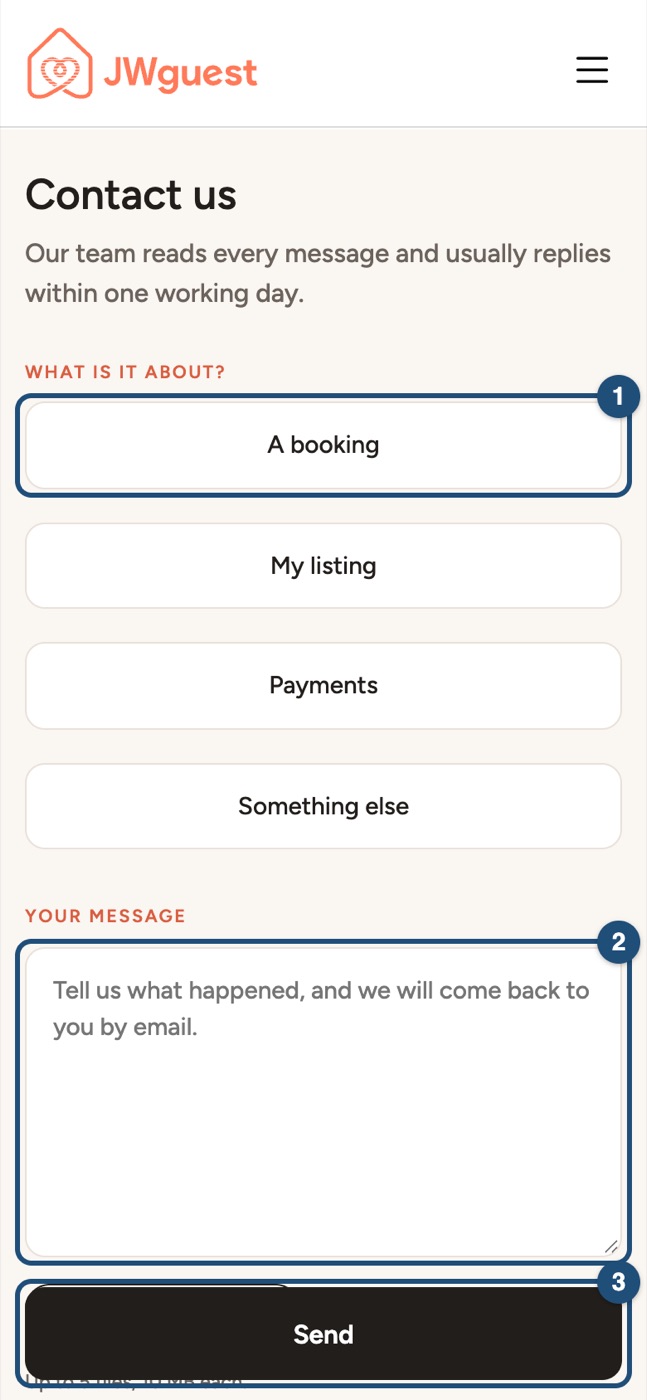
Open Contact us: it is also at the bottom of every page. Tap A booking (1).
Describe what happened (2) and tap + Attach to add your screenshots (up to 5 files, 10 MB each).
Tap Send (3). We usually reply within one working day. You can also write to [email protected].
Related articles: Book with confidence · When will I pay for my booking? · Booking process