
Website
Your price breakdown shows the price of the nights plus the fees the host sets (such as cleaning and additional guests), the JWguest Service Fee and any local taxes, and adds them up to the Total you pay. You see it on the listing page as soon as you choose your dates and guests, before you send a request.
How to see the breakdown
Here's a step-by-step guide:
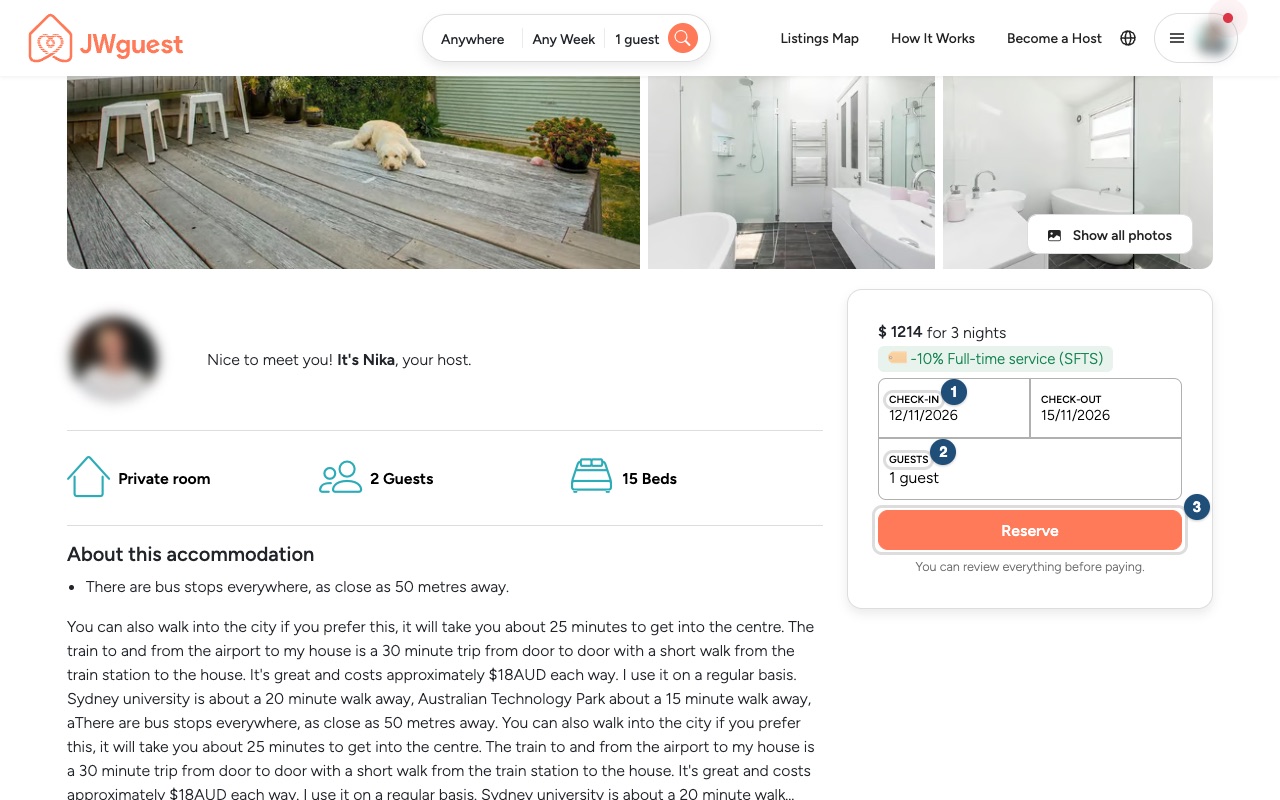
Choose your dates and guests: on the listing page, enter your dates (1) and the number of guests (2), and the breakdown appears. (Reserve (3) sends your request.)
Read each line: the nights line (1) shows the nightly price times the number of nights, the Service Fees line (2) shows the JWguest fee, and the Total (3) is what you will pay.
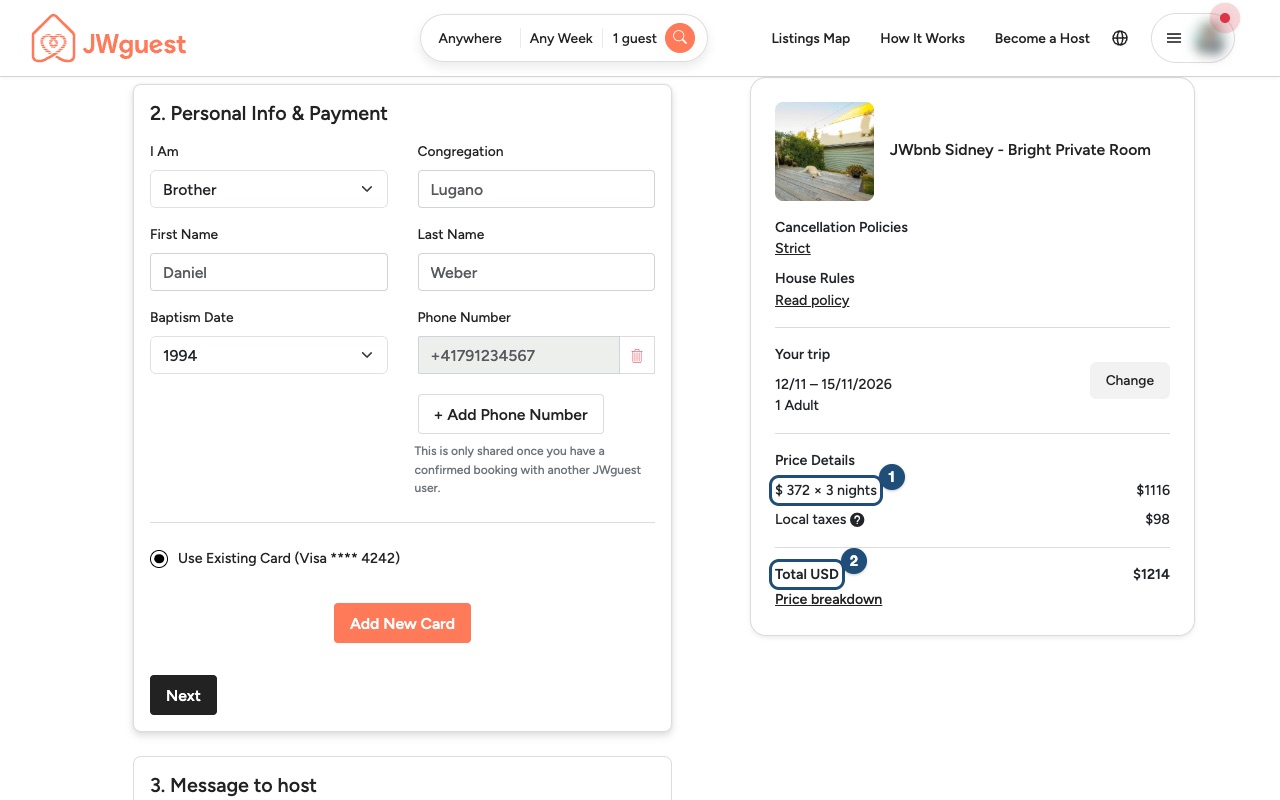
What each line means
| Line | Who sets it | What it is |
|---|---|---|
| Nights | The host | The nightly price times the number of nights. Some hosts set a different price for weekends. |
| Additional Guest fee | The host | An amount for each guest beyond the number included in the price. |
| Cleaning fee | The host | A one-off amount for cleaning the place. |
| Service Fees | JWguest | A percentage of the accommodation price, added on top of the host's price. JWguest keeps it to run the platform; the host receives the price they set. See Service fee for guests. |
| Local taxes | The host | Tourist or stay taxes that apply where the listing is. |
| Total | Everything above, added up. |
An example (a stay of 3 nights, in USD):
| 3 nights | $950 |
|---|---|
| Additional Guest fee | $60 |
| Cleaning fee | $29 |
| Service Fees | $145 |
| Local taxes | $104 |
| Total (USD) | $1,288 |
Security deposit and discounts
- Security deposit: some hosts ask for one. It is not a charge but a temporary hold on your card, usually for up to 7 days; no money is taken unless the host makes a valid claim. See If I am asked to pay a deposit, is it refundable?
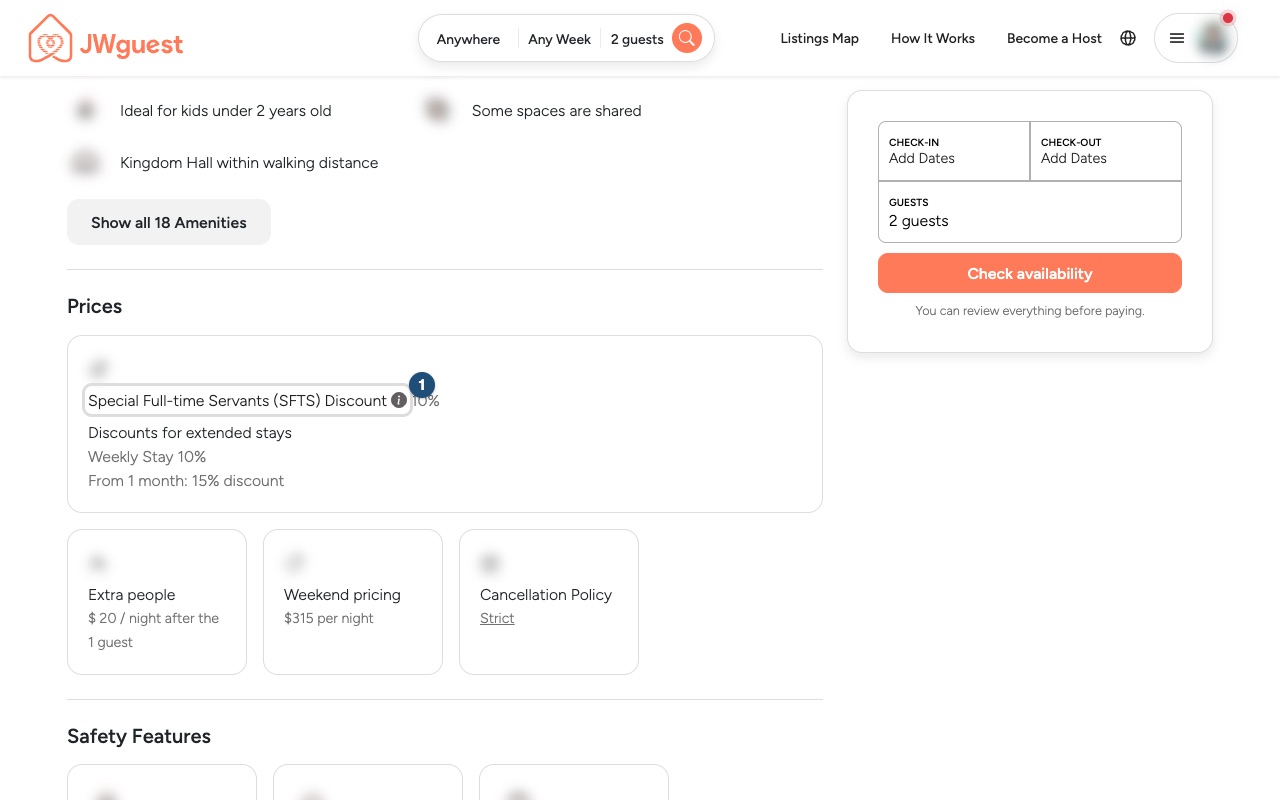
- Full-time servants discount: if the host offers it, it appears in the Special Full-time Servants (SFTS) Discount section (1) of the listing. It applies only to the nights and the additional-guest fees, never to the cleaning fee, taxes, the Service Fee or other fees. See Full-time servants discount.
Related articles: When will I pay for my booking? · Service fee for guests · How does a special offer work?
Mobile browser
Your price breakdown shows the price of the nights plus the fees the host sets (such as cleaning and additional guests), the JWguest Service Fee and any local taxes, and adds them up to the Total you pay. You see it on the listing page as soon as you choose your dates and guests, before you send a request.
How to see the breakdown on your phone
Here's a step-by-step guide:
Choose your dates and guests: on the listing page, tap the dates (1) and the number of guests (2). (Reserve (3) sends your request.)
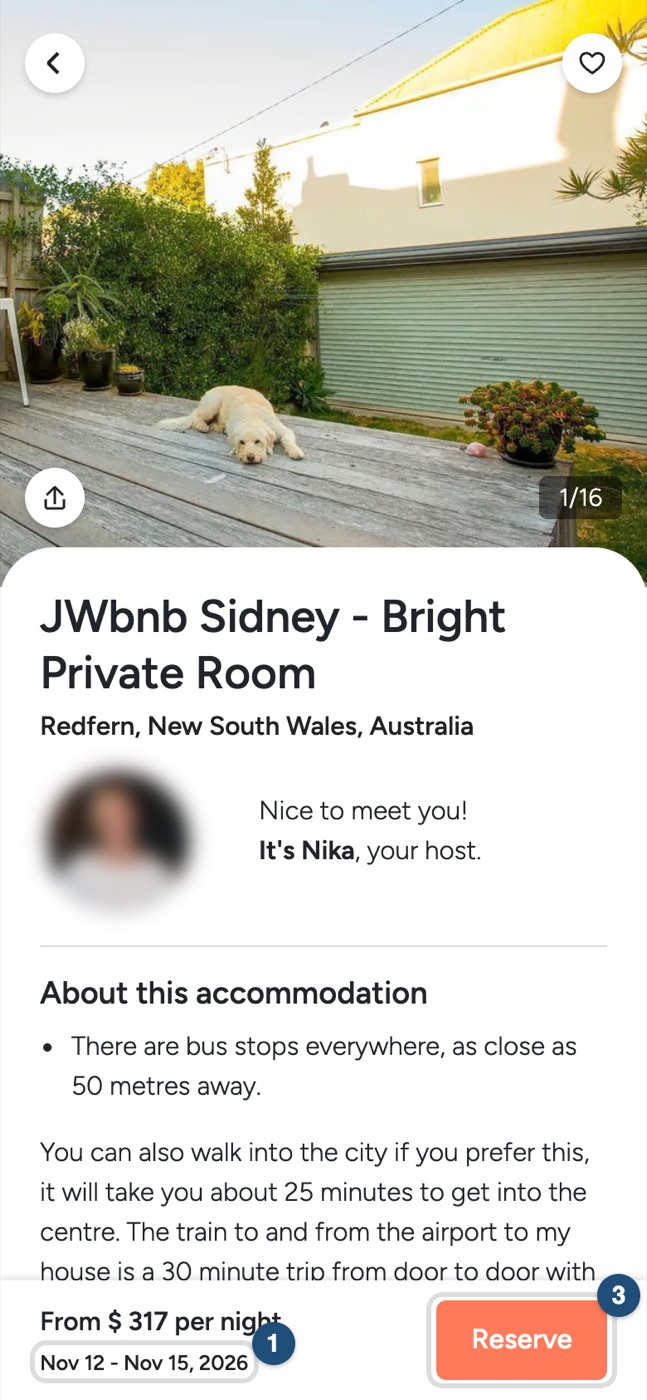
Read each line: the nights line (1), the Service Fees line (2) and the Total (3).
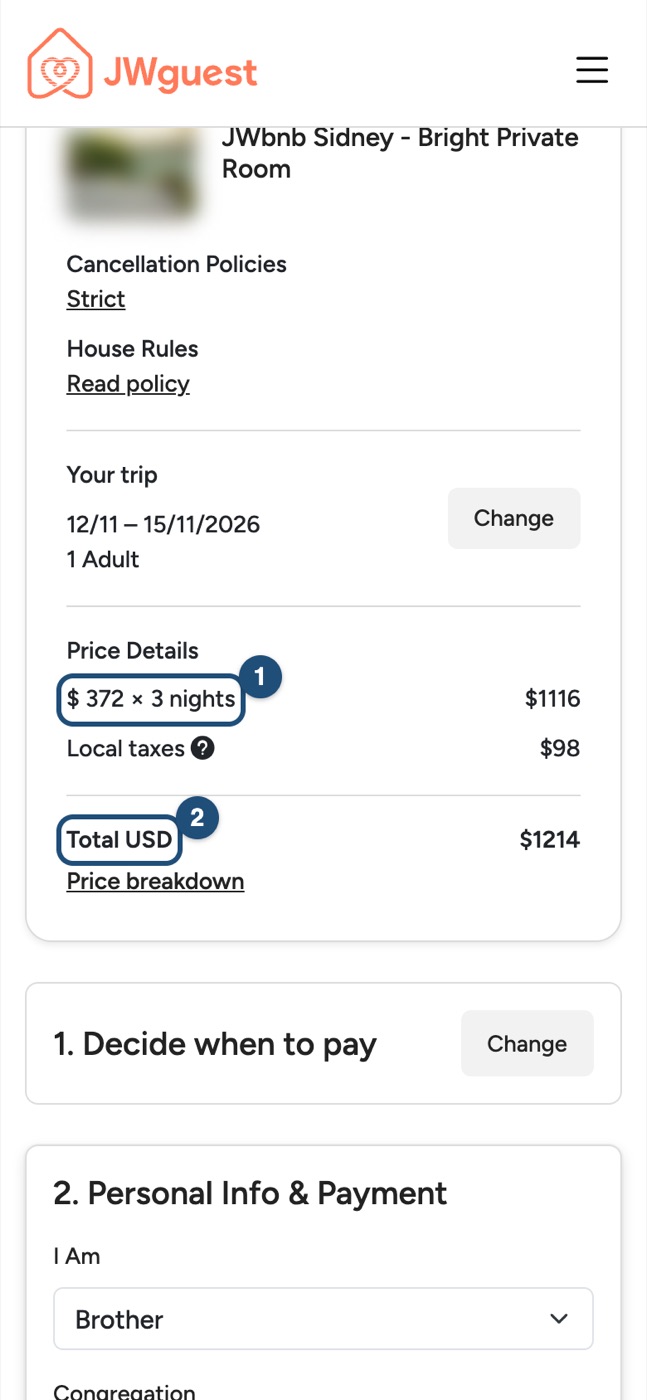
What each line means
- Nights (set by the host): the nightly price times the number of nights. Some hosts set a different price for weekends.
- Additional Guest fee (host): an amount for each guest beyond the number included in the price.
- Cleaning fee (host): a one-off amount for cleaning the place.
- Service Fees (JWguest): a percentage of the accommodation price, added on top of the host's price. JWguest keeps it; the host receives the price they set. See Service fee for guests.
- Local taxes (host): tourist or stay taxes that apply where the listing is.
- Total: everything above, added up.
An example (3 nights, in USD): 3 nights $950 + Additional Guest fee $60 + Cleaning fee $29 + Service Fees $145 + Local taxes $104 = Total $1,288.
Security deposit and discounts
- Security deposit: not a charge but a temporary hold on your card, usually for up to 7 days; no money is taken unless the host makes a valid claim. See If I am asked to pay a deposit, is it refundable?
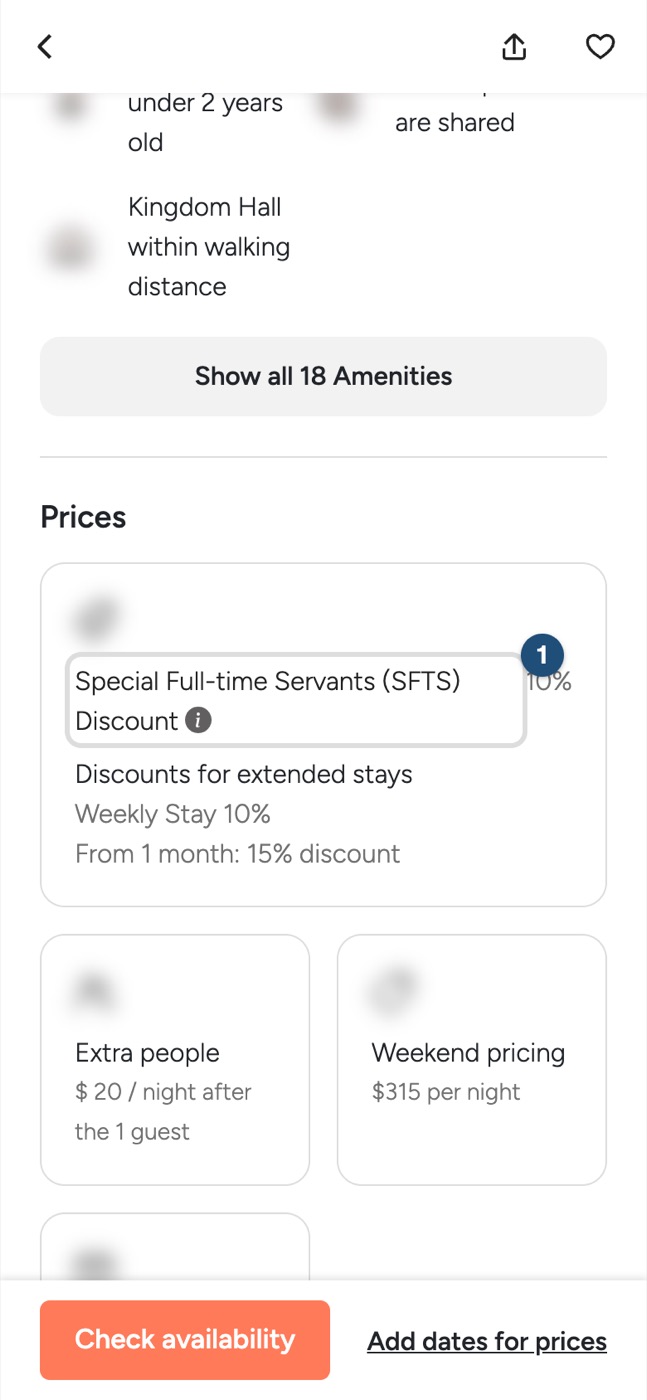
- Full-time servants discount: if offered, it appears in the Special Full-time Servants (SFTS) Discount section (1) of the listing. It applies only to the nights and the additional-guest fees. See Full-time servants discount.
Related articles: When will I pay for my booking? · Service fee for guests · How does a special offer work?