
Website
A special offer is a different price that a host proposes for your request: if you agree, you can confirm the booking straight away at that price with Confirm & Pay. Hosts can send one while they are answering your booking request, for example for a longer stay or for a family.
What the host can change
The special offer is for the stay in your request, at a new price. The host decides how much they want to receive for the stay, and JWguest adds the Service Fee on top for you, as for any booking. The total you will pay is always shown before you pay.
How to accept a special offer
Here's a step-by-step guide:
Read the host's message: The special offer comes with a message from your host. Go to Trips in the Personal Area bar and click Message History (1) next to your request to read the conversation.
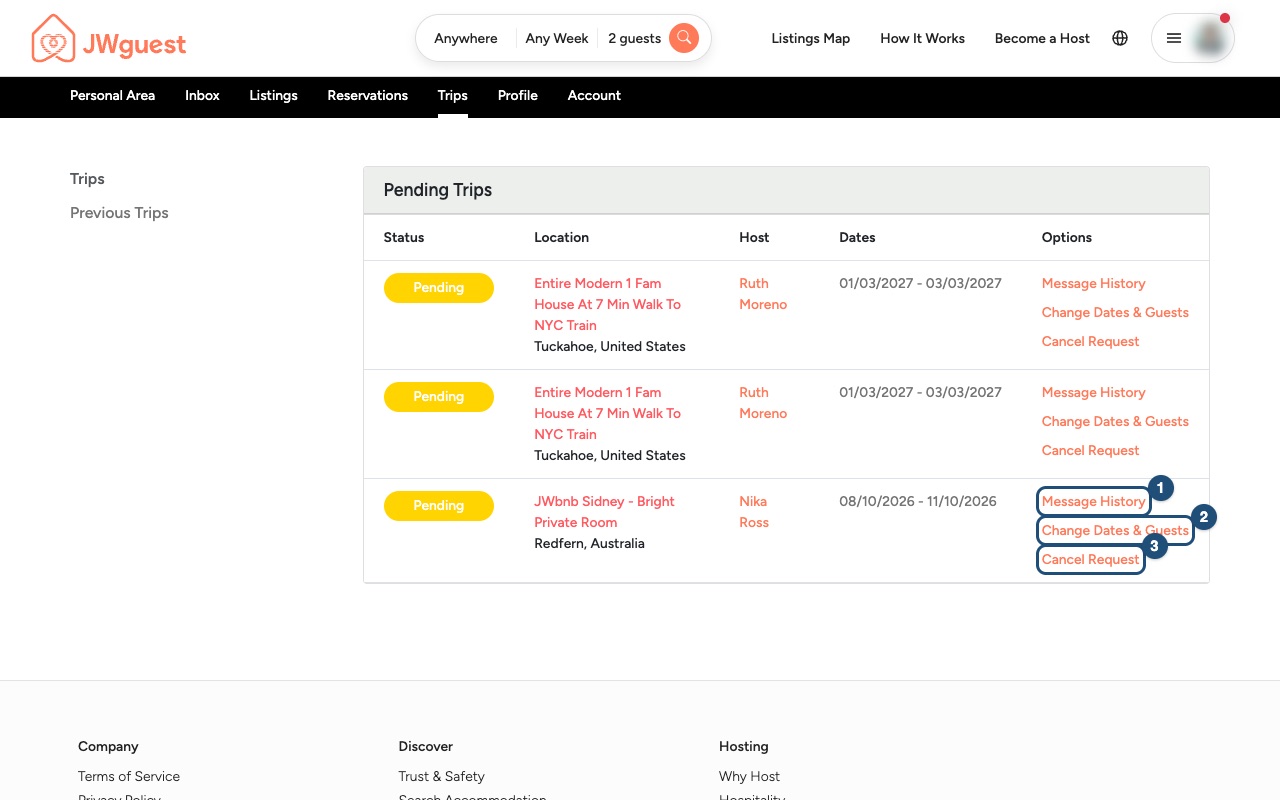
Check the price: Look at the stay and the total before you decide. If something is not clear, ask your host in the same conversation.
Confirm & Pay: If you agree, confirm the booking at the special price and complete the payment. Your booking is confirmed when the payment succeeds.
Not interested? You don't have to accept. You can reply to your host, or cancel your request in Trips with Cancel Request (3). Nothing is charged until you complete Confirm & Pay.
Good to know
- Always pay through JWguest. A special offer never asks you to pay the host directly or by bank transfer. See If someone asks you to pay outside JWguest.
- The Service Fee is non-refundable if you cancel, except when the host cancels. The listing's cancellation policy applies as usual. See Cancel your booking.
- Do not ask hosts for discounts that their listing does not show. Hosts decide on their own whether to send a special offer. See the Terms of Service.
Related articles: Understand your price breakdown · Booking process · Understand your booking status
Mobile browser
A special offer is a different price that a host proposes for your request: if you agree, you can confirm the booking straight away at that price with Confirm & Pay. Hosts can send one while they are answering your booking request, for example for a longer stay or for a family.
What the host can change
The special offer is for the stay in your request, at a new price. The host decides how much they want to receive, and JWguest adds the Service Fee on top for you. The total you will pay is always shown before you pay.
How to accept a special offer on your phone
Here's a step-by-step guide:
Open the conversation: Tap the menu (three lines, top right), then Trips in the black Personal Area bar. The trips table is wider than your screen: swipe it to the left until you see the Options column, then tap Message History (1).
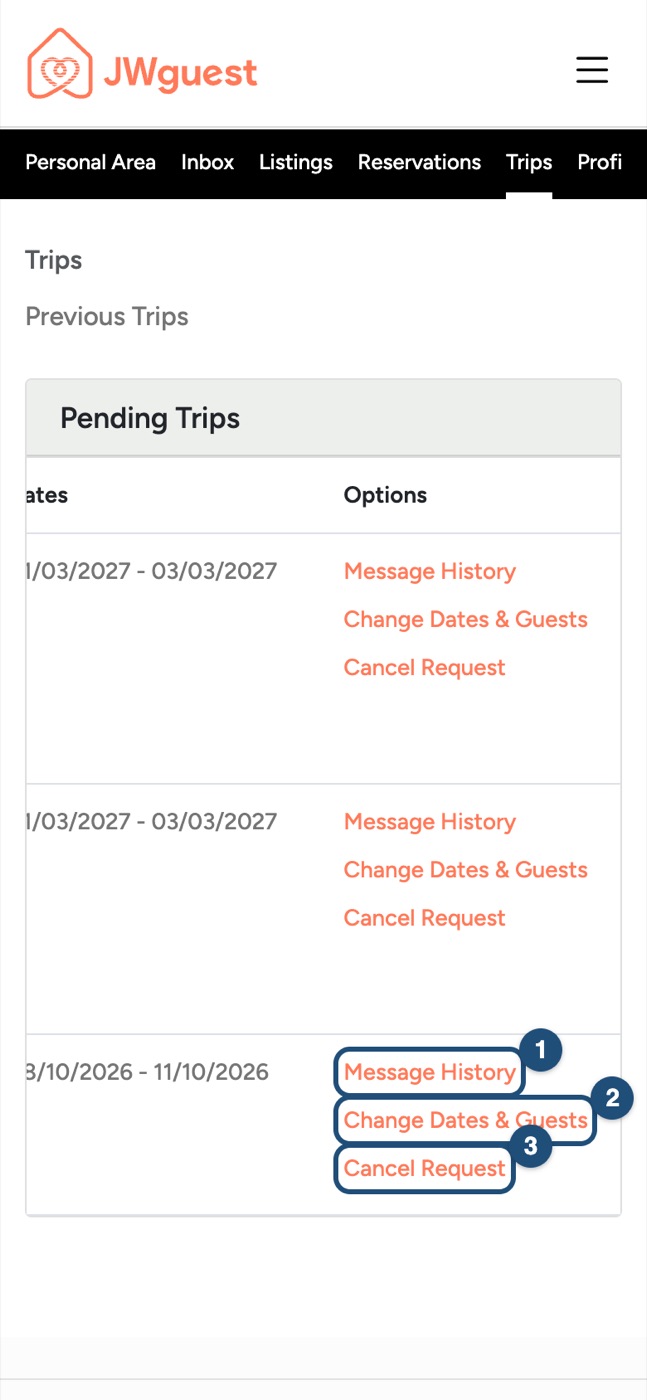
Check the price: Look at the stay and the total. If something is not clear, ask your host in the same conversation.
Confirm & Pay: If you agree, confirm at the special price and complete the payment. Your booking is confirmed when the payment succeeds.
Not interested? Reply to your host, or swipe the trips table left and tap Cancel Request (3). Nothing is charged until you complete Confirm & Pay.
Good to know
- Always pay through JWguest, never directly to the host. See If someone asks you to pay outside JWguest.
- The Service Fee is non-refundable if you cancel, except when the host cancels. See Cancel your booking.
- Do not ask hosts for discounts that their listing does not show. See the Terms of Service.
Related articles: Understand your price breakdown · Booking process · Understand your booking status