

Website
Trust between brothers and sisters is at the heart of JWguest. We encourage everyone to take a few simple steps to build trust and enjoy a safe, comfortable experience when hosting or traveling.
Verifying Your Guests
We receive many requests every day, so we can't interview every guest. During registration, guests are asked to provide personal details. However, JWguest cannot personally verify every guest.
We strongly encourage all hosts to verify that their guests are Jehovah's Witnesses before accepting a booking request. Use Chat with the guest on the request to ask your questions, and accept only when you feel at ease.
Check and complete your verification
Here's a step-by-step guide:
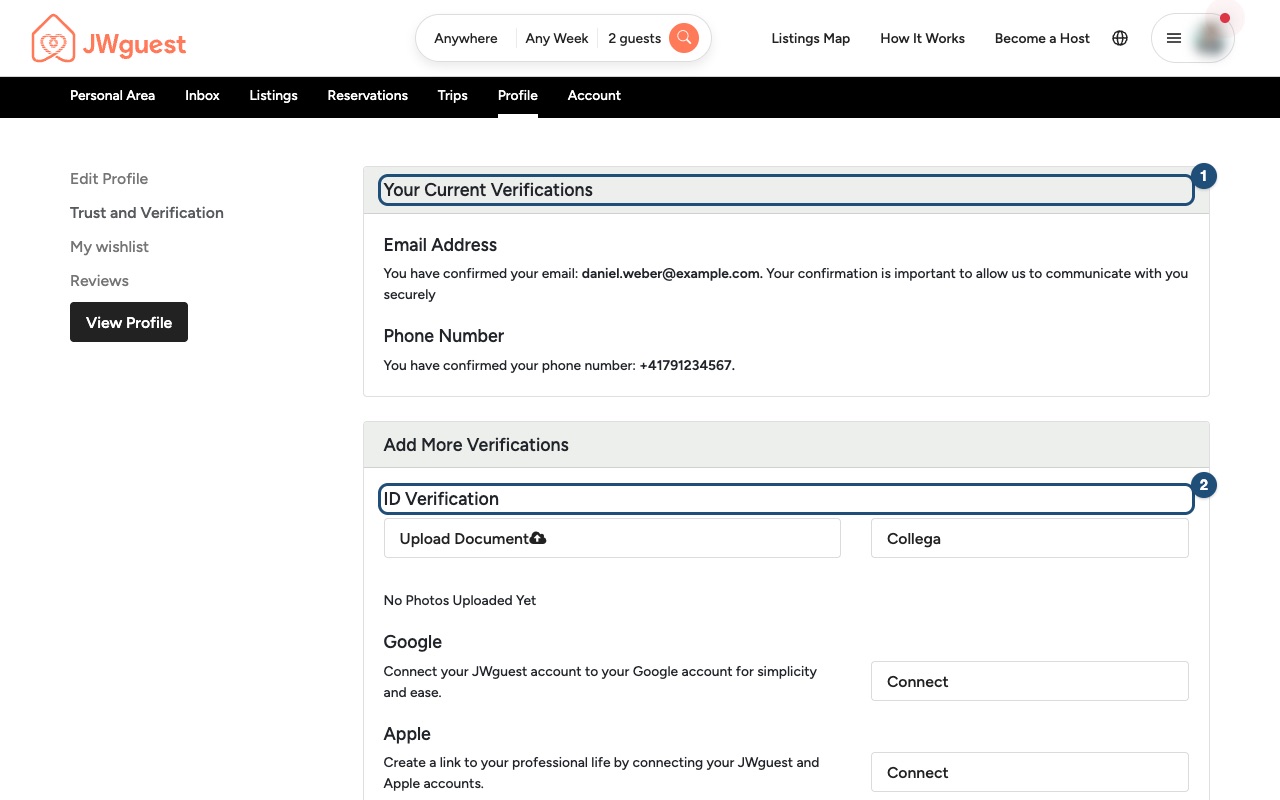
Open Trust and Verification: in the Personal Area bar, click Profile, then Trust and Verification (2).
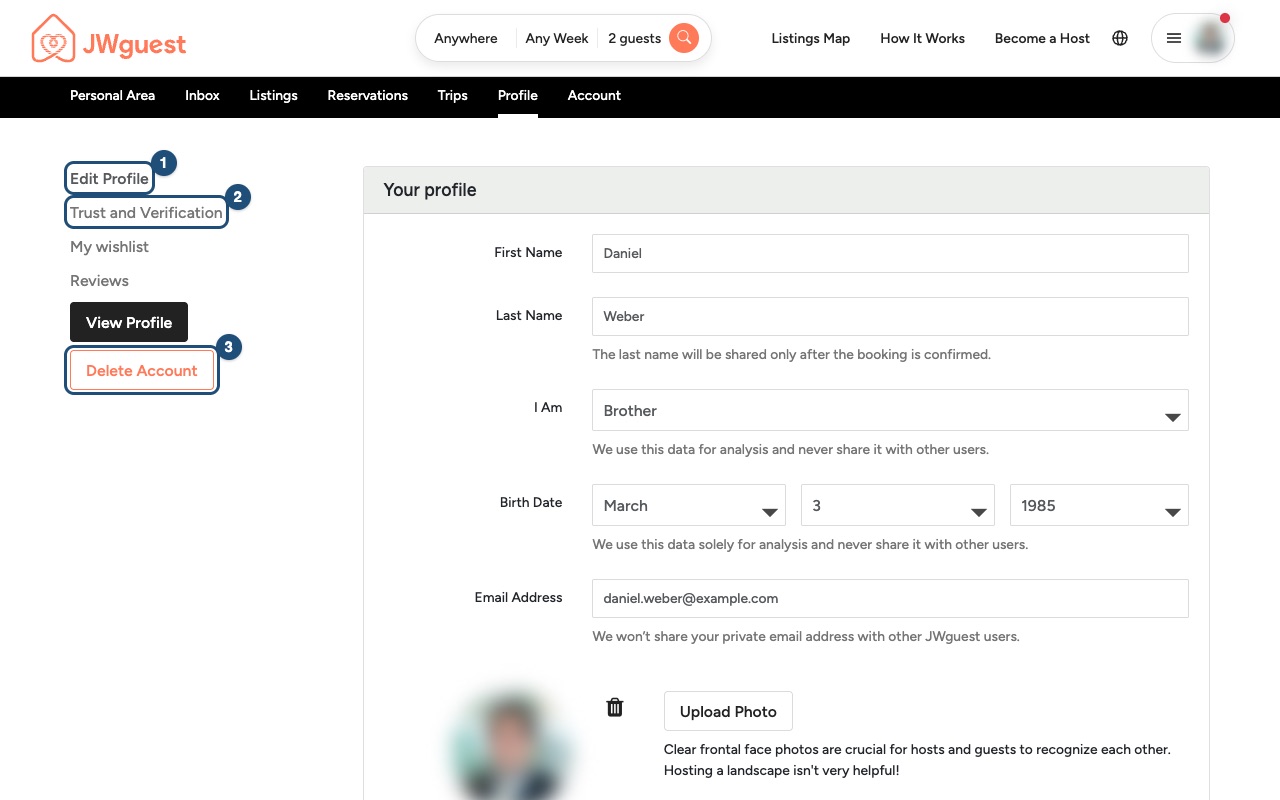
See what you have verified: Your Current Verifications (1) lists what is already confirmed, such as your email address and your phone number. If your email is not confirmed yet, you can ask for a new confirmation link on this page.
Add more verifications: under Add More Verifications, upload an identity document with ID Verification (2) > Upload Document, or click Connect next to Google or Apple to connect that account.
A complete profile with a clear photo of your face makes hosts and guests more comfortable with you. To change your photo or your phone number, see Edit your profile.
Your privacy
Your public profile never shows your last name or your contact details. When you send a request, the host sees your first name and your profile. Your last name, address, phone number and email are shared only once the booking is confirmed.
Full-time servants
We often host full-time servants such as Bethelites, circuit overseers, special pioneers and LDC or RDC members. For them, verification is usually straightforward, though it can sometimes take a little longer.
Related articles: Edit your profile · Log in to your account · What are the requirements to book?
Mobile browser
Trust between brothers and sisters is at the heart of JWguest. Here's how we review hosts and guests, and what you can do to book or host with peace of mind.
How we review hosts
Many hosts come to us through recommendations from brothers and sisters. We also take into account reviews and feedback from the local congregation. We usually set up a call with each new host before their listing goes live, to answer questions and get to know each other. If concerns arise, we may suspend or remove a host or a listing.
How we review guests
We receive many requests every day, so we can't interview every guest. When guests sign up, we ask for details such as their date of birth, whether they are a brother or sister, and their baptism date, and they must confirm their email address.
Hosts are welcome to get to know a guest before accepting a request. Use Chat with the guest on the request to ask your questions, and accept only when you feel at ease.
Check and complete your verification on your phone
Here's a step-by-step guide:
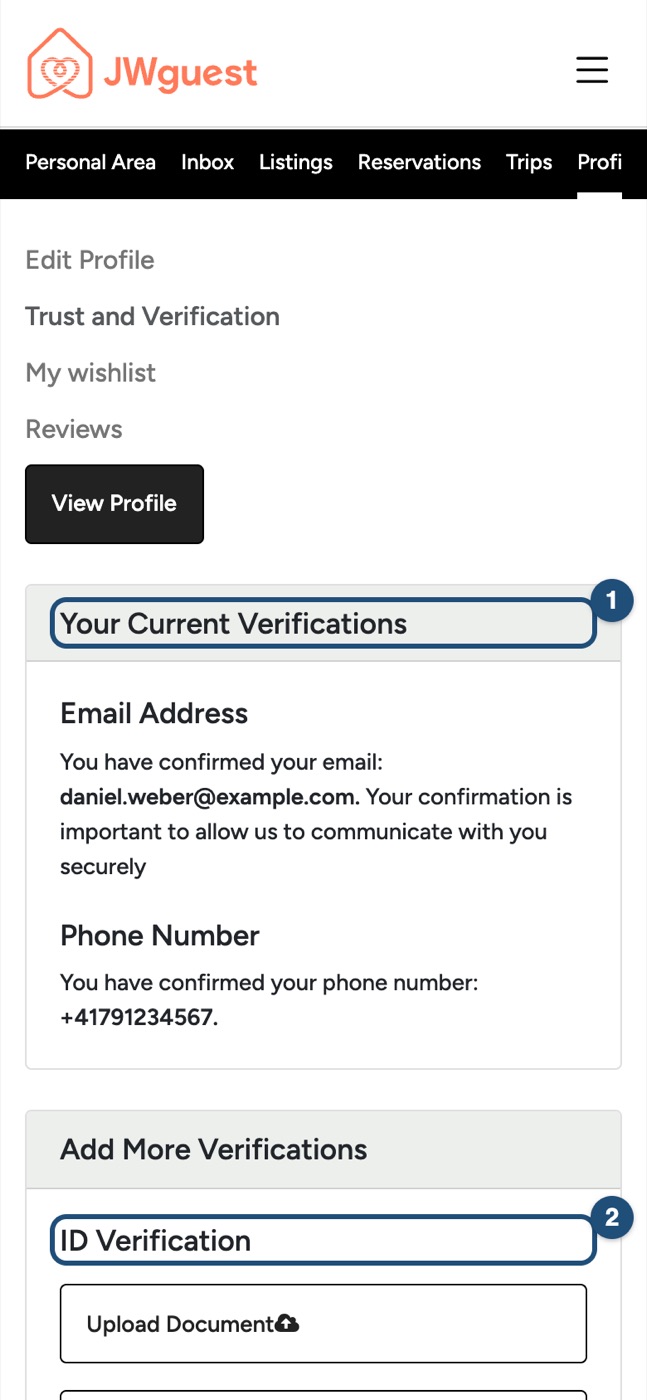
Open Trust and Verification: tap the menu (three lines, top right) and log in. Swipe the black Personal Area bar to the left until you see Profile, tap it, then tap Trust and Verification (2).
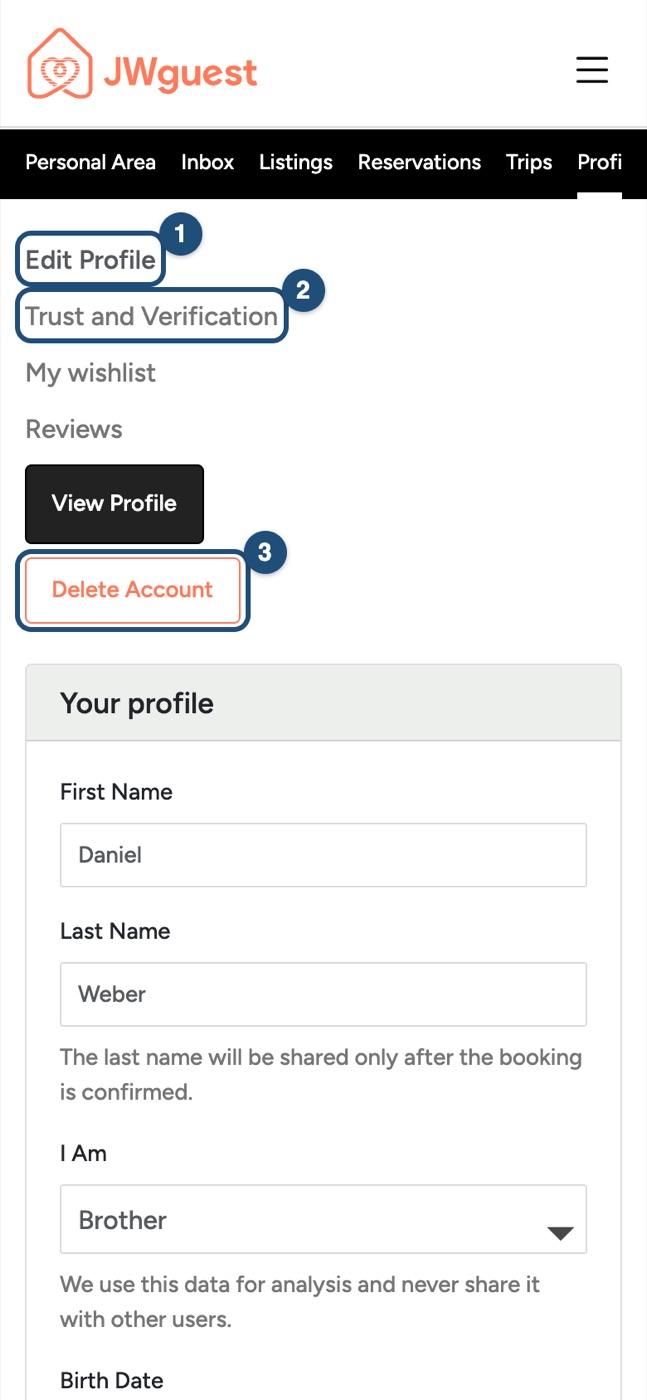
See what you have verified: Your Current Verifications (1) lists what is already confirmed, such as your email address and your phone number. If your email is not confirmed yet, you can ask for a new confirmation link on this page.
Add more verifications: under Add More Verifications, tap ID Verification (2) > Upload Document to upload an identity document, or tap Connect next to Google or Apple.
A complete profile with a clear photo of your face makes hosts and guests more comfortable with you. See Edit your profile.
Your privacy
Your public profile never shows your last name or your contact details. When you send a request, the host sees your first name and your profile. Your last name, address, phone number and email are shared only once the booking is confirmed.
Full-time servants
We often host full-time servants such as Bethelites, circuit overseers, special pioneers and LDC or RDC members. For them, verification is usually straightforward, though it can sometimes take a little longer.
Related articles: Edit your profile · Log in to your account · What are the requirements to book?
iOS app
Trust between brothers and sisters is at the heart of JWguest. Here's how we review hosts and guests, and what you can do to book or host with peace of mind.
How we review hosts
Many hosts come to us through recommendations from brothers and sisters. We also take into account reviews and feedback from the local congregation. We usually set up a call with each new host before their listing goes live, to answer questions and get to know each other. If concerns arise, we may suspend or remove a host or a listing.
How we review guests
We receive many requests every day, so we can't interview every guest. When guests sign up, we ask for details such as their date of birth, whether they are a brother or sister, and their baptism date, and they must confirm their email address.
Hosts are welcome to get to know a guest before accepting a request. Use the chat of the request to ask your questions, and accept only when you feel at ease.
Check and complete your verification in the app
Here's a step-by-step guide:
Open your profile: tap Profile in the bar at the bottom, then the Profile card (1).
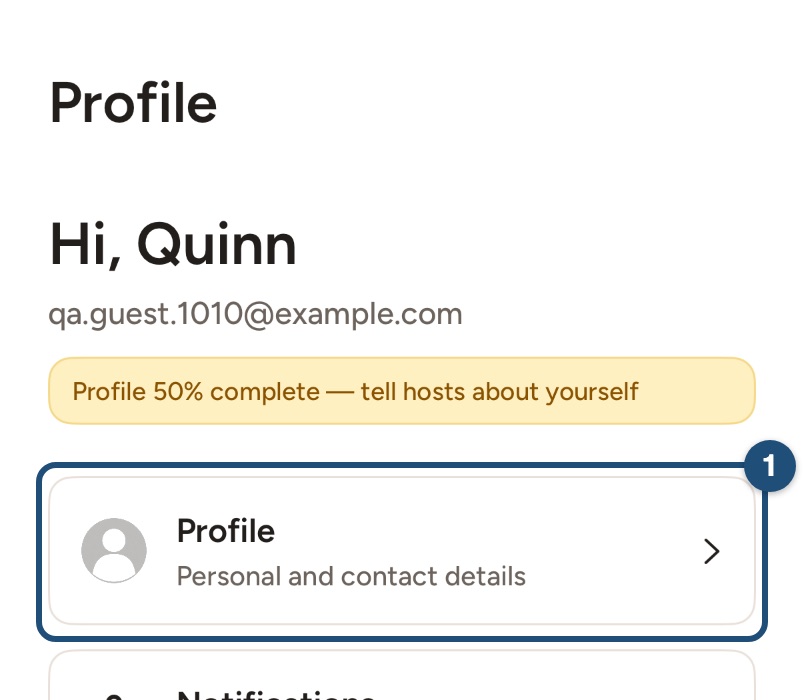
See what you have verified: under your name you see Email verified and Phone verified once they are confirmed. Tap Edit Profile (1) to see the details.
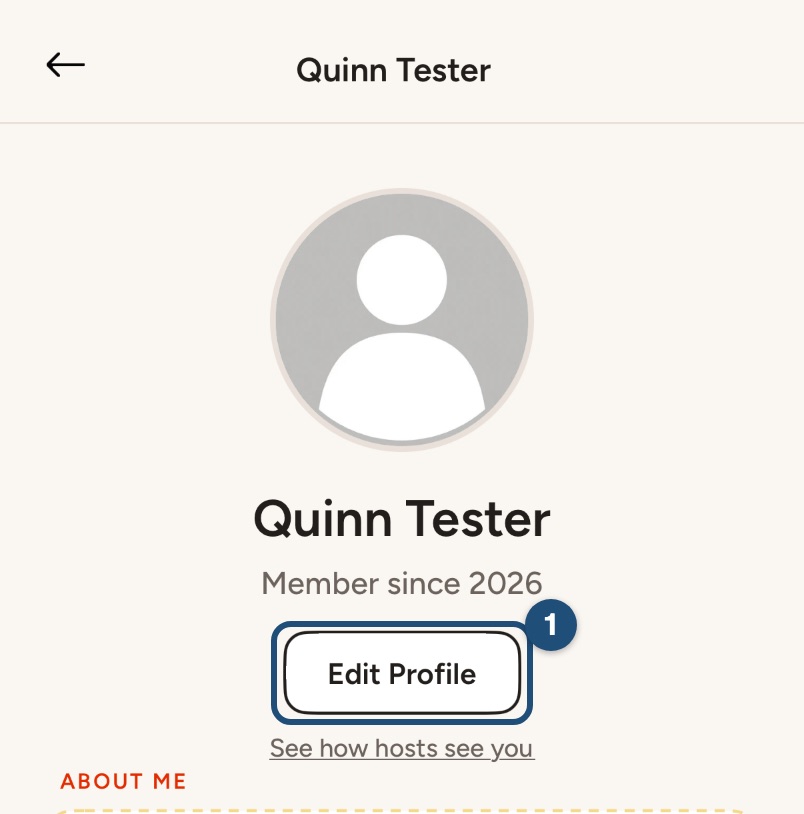
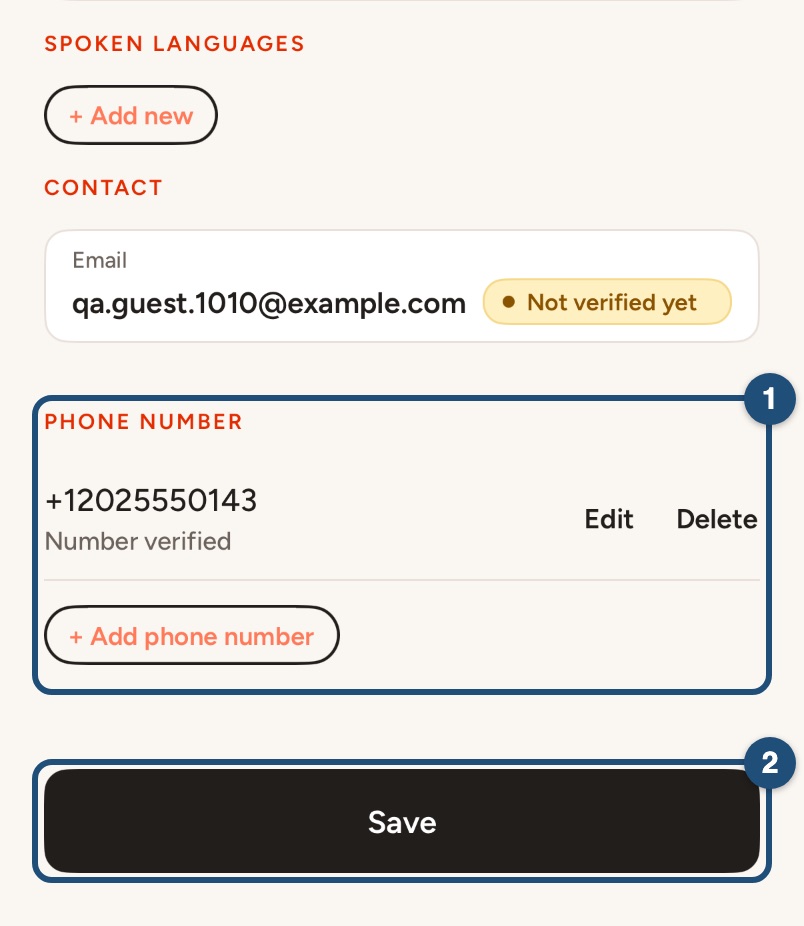
Check your email and phone: under Contact, your email shows Verified or Not verified yet. Under Phone number (1), each number shows whether it is verified. Next to a number that is not verified yet, tap Verify and type the 6-digit code we send you by SMS. Then tap Save (2).
Email not verified yet? Open the confirmation link we emailed you. If it has expired, you can ask for a new one on the website, in Profile > Trust and Verification.
Identity document, Google or Apple: the app can't upload an identity document or connect another account. Log in on jwguest.com and use Profile > Trust and Verification (see the Website tab).
A complete profile with a clear photo of your face makes hosts and guests more comfortable with you. See Edit your profile.
Your privacy
Your public profile never shows your last name or your contact details. When you send a request, the host sees your first name and your profile. Your last name, address, phone number and email are shared only once the booking is confirmed.
Full-time servants
We often host full-time servants such as Bethelites, circuit overseers, special pioneers and LDC or RDC members. For them, verification is usually straightforward, though it can sometimes take a little longer.
Related articles: Edit your profile · Log in to your account · What are the requirements to book?
Android app
Trust between brothers and sisters is at the heart of JWguest. Here's how we review hosts and guests, and what you can do to book or host with peace of mind.
How we review hosts
Many hosts come to us through recommendations from brothers and sisters. We also take into account reviews and feedback from the local congregation. We usually set up a call with each new host before their listing goes live, to answer questions and get to know each other. If concerns arise, we may suspend or remove a host or a listing.
How we review guests
We receive many requests every day, so we can't interview every guest. When guests sign up, we ask for details such as their date of birth, whether they are a brother or sister, and their baptism date, and they must confirm their email address.
Hosts are welcome to get to know a guest before accepting a request. Use the chat of the request to ask your questions, and accept only when you feel at ease.
Check and complete your verification in the app
Here's a step-by-step guide:
Open your profile: tap Profile in the bar at the bottom, then the Profile card (1).
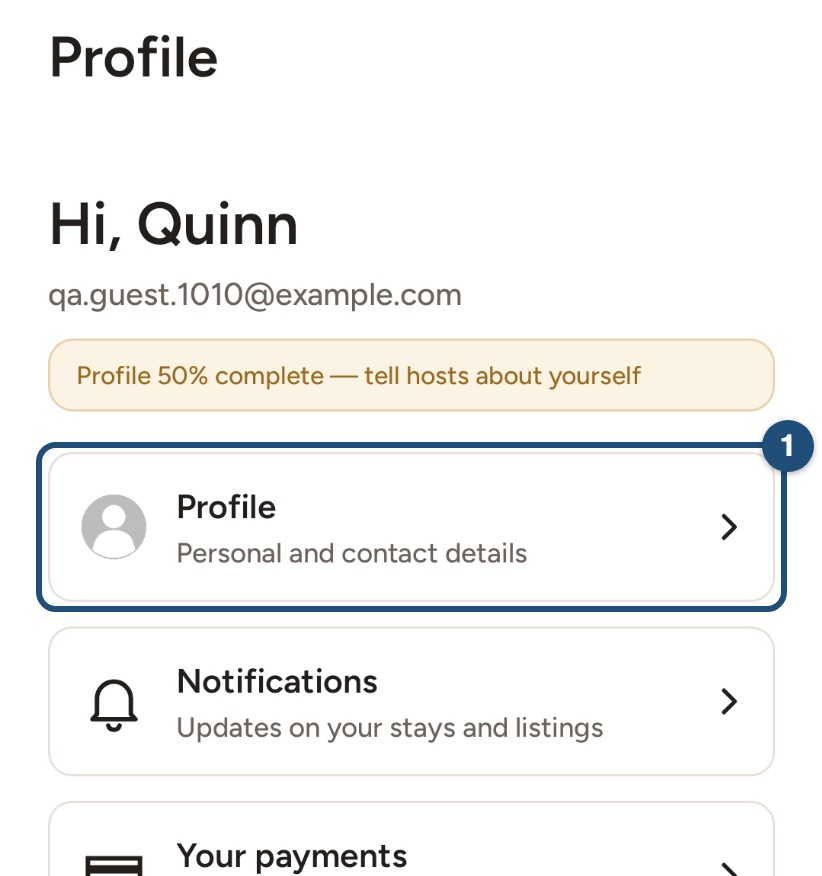
See what you have verified: under your name you see Email verified and Phone verified once they are confirmed. Tap Edit profile (1) to see the details.
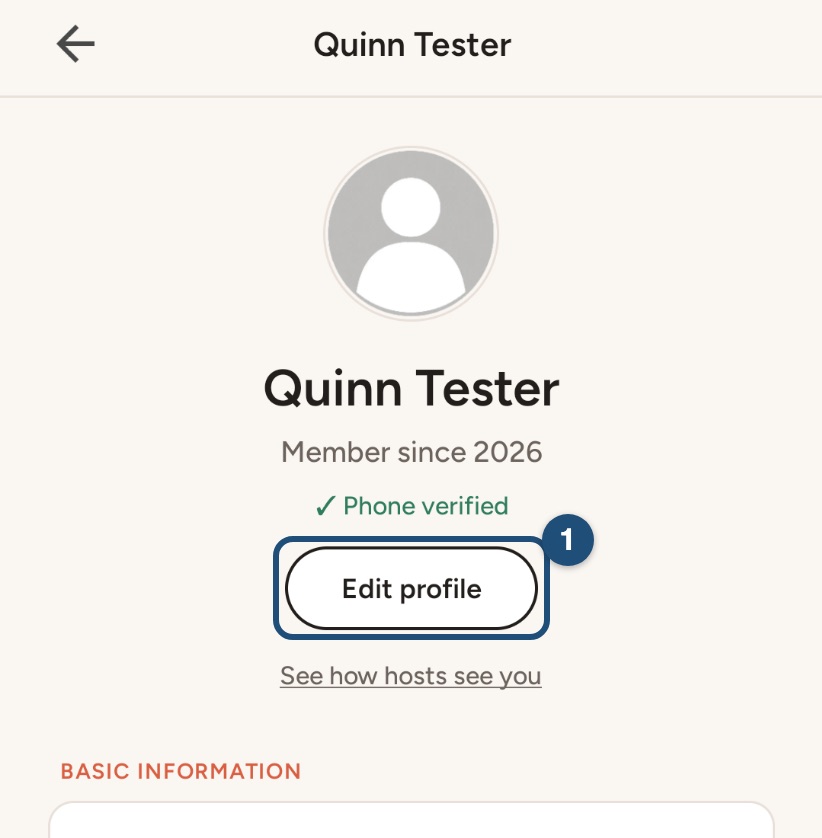
Check your email and phone: your email shows Verified or Not verified yet. Under Phone number (1), each number shows whether it is verified. Next to a number that is not verified yet, tap Verify and type the 6-digit code we send you by SMS. Then tap Save (2).
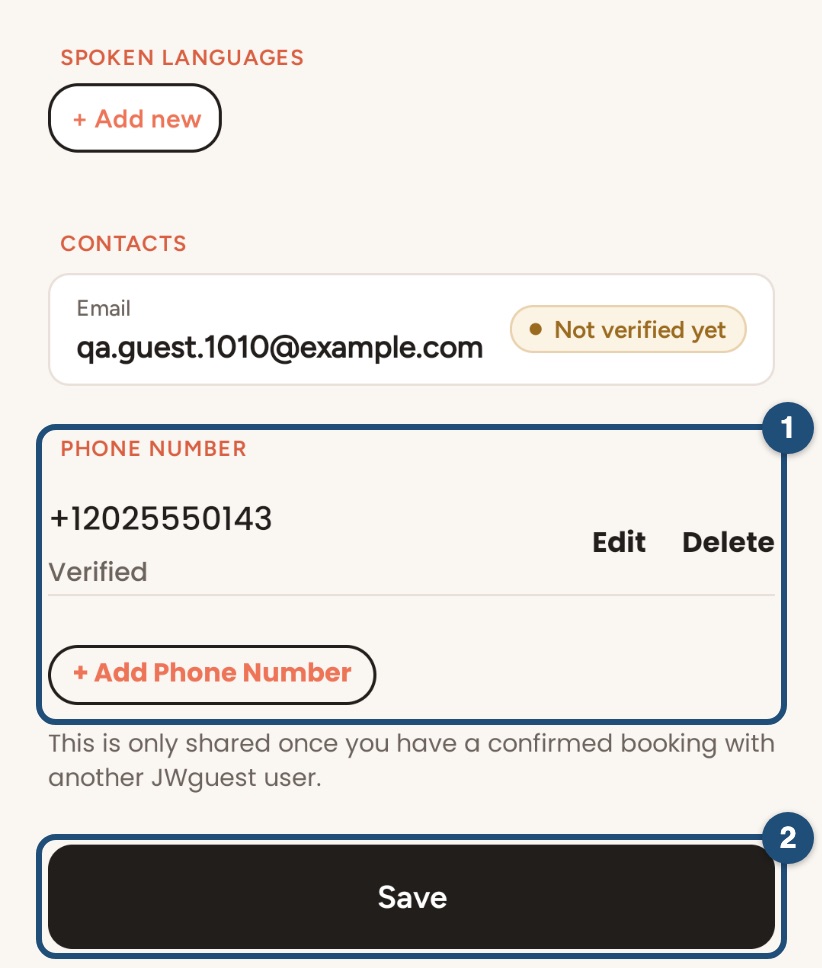
Email not verified yet? Open the confirmation link we emailed you. If it has expired, you can ask for a new one on the website, in Profile > Trust and Verification.
Identity document, Google or Apple: the app can't upload an identity document or connect another account. Log in on jwguest.com and use Profile > Trust and Verification (see the Website tab).
A complete profile with a clear photo of your face makes hosts and guests more comfortable with you. See Edit your profile.
Your privacy
Your public profile never shows your last name or your contact details. When you send a request, the host sees your first name and your profile. Your last name, address, phone number and email are shared only once the booking is confirmed.
Full-time servants
We often host full-time servants such as Bethelites, circuit overseers, special pioneers and LDC or RDC members. For them, verification is usually straightforward, though it can sometimes take a little longer.
Related articles: Edit your profile · Log in to your account · What are the requirements to book?