
Website
You can ask guests for a security deposit to protect your home. Here's how to set one, how it works, and how to report damage, missing items or extra cleaning within 24 hours after check-out.
Set a security deposit
Here's a step-by-step guide:
Open your listing: in the Personal Area bar, click Listings, then Manage Listing (1) next to the listing.
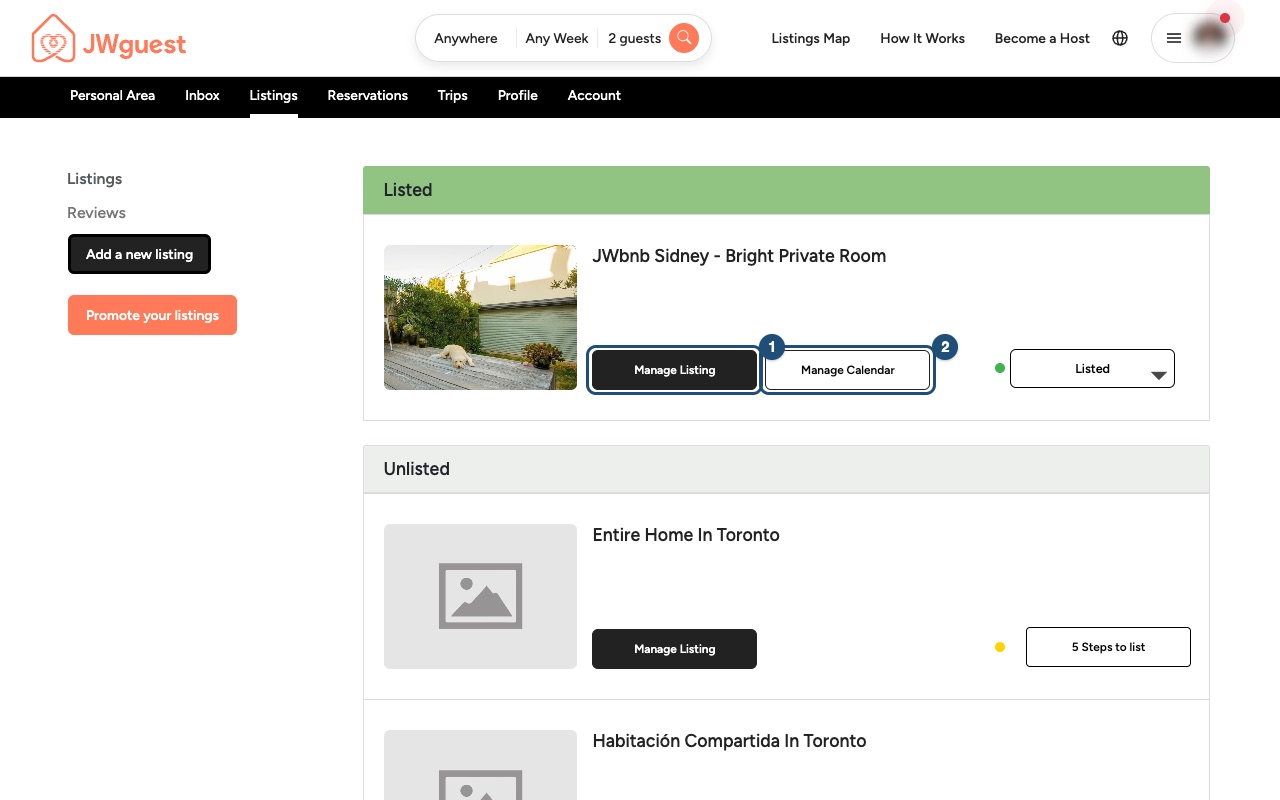
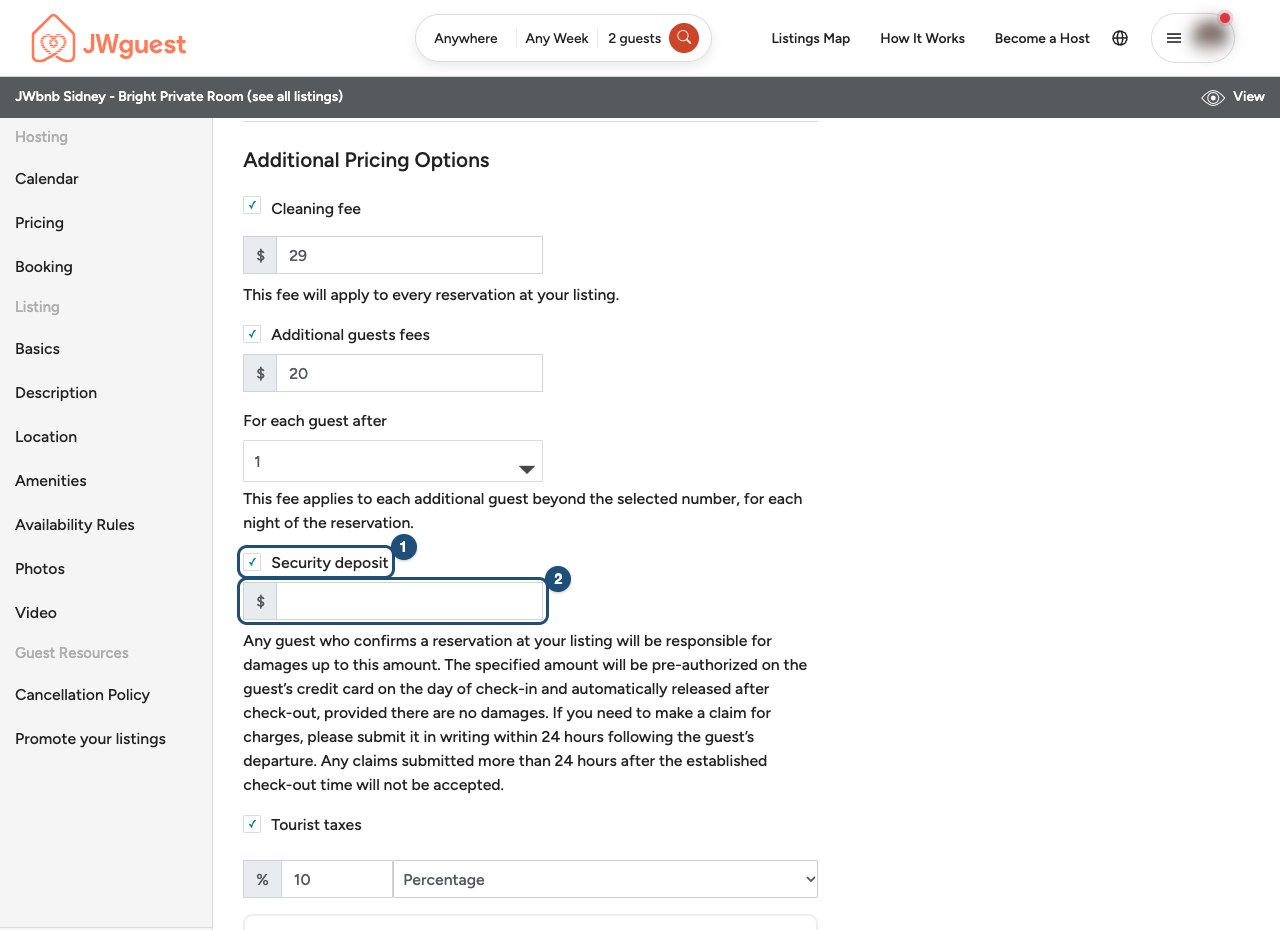
Open Pricing: select Pricing in the menu on the left and scroll down to Additional Pricing Options.
Tick Security deposit (1) and enter the amount (2). It is saved automatically. To stop asking for a deposit, untick it.
Guests see the deposit on your listing page before they book.
How the deposit works
Stays of up to 7 days: the deposit is a temporary hold on the guest's card, not a charge. Card networks usually keep a hold for up to 7 days from check-in, then it expires automatically.
Stays longer than 7 days: choose one of these options:
- You manage the deposit directly with the guest (default option).
- JWguest manages the deposit: we charge it to the guest's card and refund it at the end of the stay if no damage is reported. A 7% processing fee is deducted from your payout. Request this option by emailing [email protected] at least 7 days before check-in.
Damage, missing items or extra cleaning
- Write to us within 24 hours after check-out: email [email protected], describe the problem and attach clear, dated photos.
- We try to secure the deposit: if your claim is on time, we will make reasonable efforts to withhold the deposit and carry out a preliminary assessment.
- The guest can respond: the guest has 48 hours to reply to the claim. The final outcome remains between you and the guest.
Related articles: Guest payment · Update your prices · Service fees for hosts
Mobile browser
You can ask guests for a security deposit to protect your home. Here's how to set one, how it works, and how to report damage, missing items or extra cleaning within 24 hours after check-out.
Set a security deposit on your phone
Here's a step-by-step guide:
Open your listing: tap the menu (three lines, top right), then Listings in the black Personal Area bar, then Manage Listing (1).
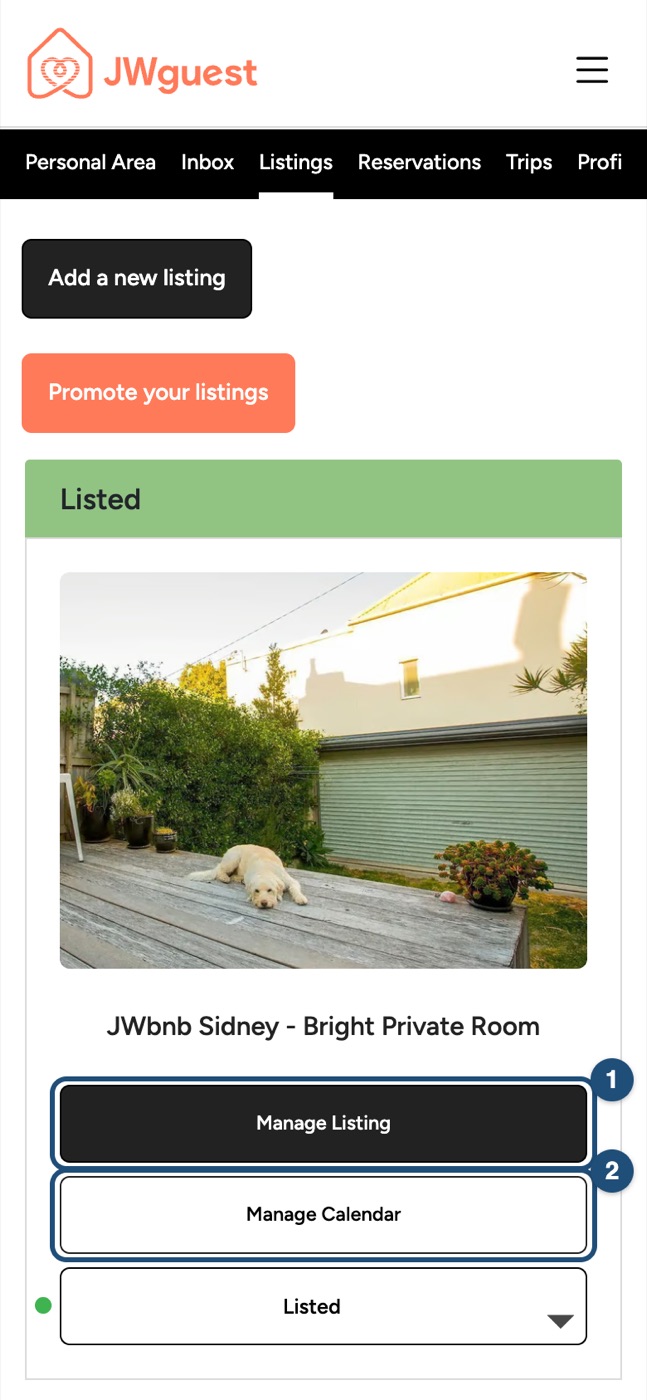
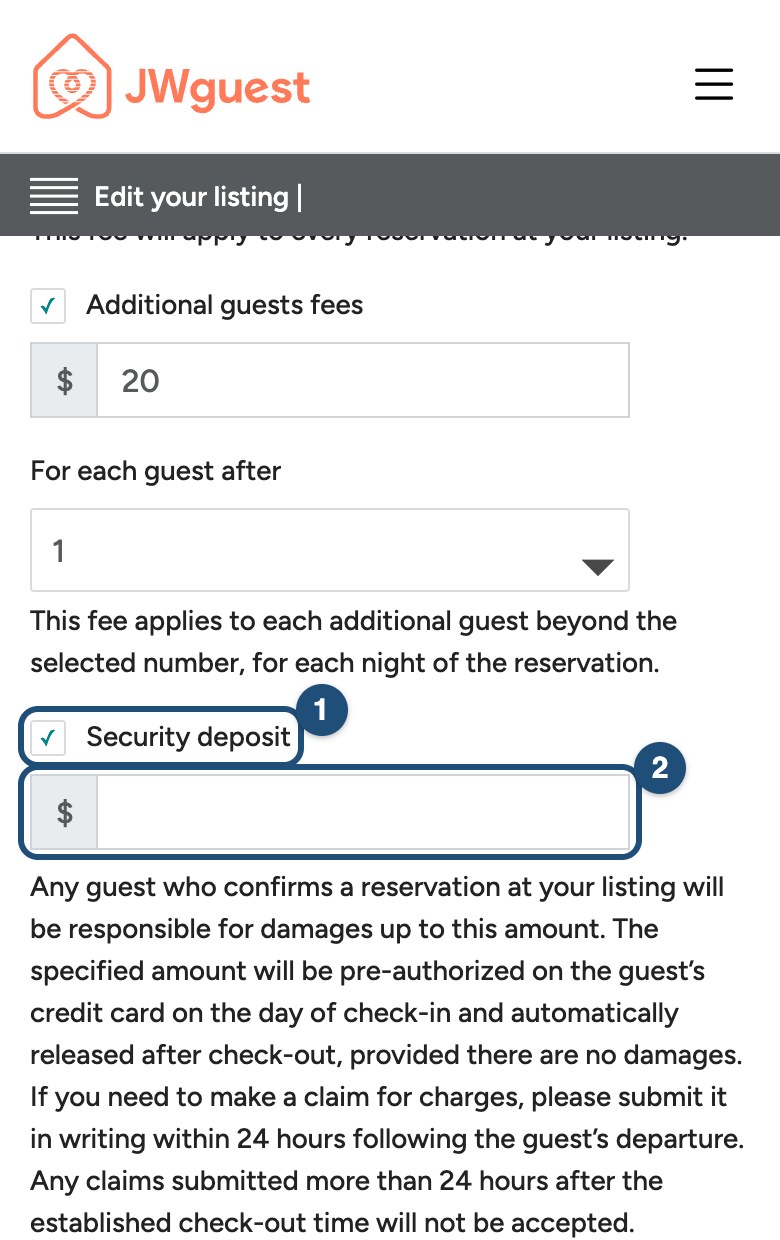
Open Pricing: tap Edit your listing (the icon with lines, at the top), then Pricing, and scroll down to Additional Pricing Options.
Tick Security deposit (1) and enter the amount (2). It is saved automatically. To stop asking for a deposit, untick it.
Guests see the deposit on your listing page before they book.
How the deposit works
Stays of up to 7 days: the deposit is a temporary hold on the guest's card, not a charge. Card networks usually keep a hold for up to 7 days from check-in, then it expires automatically.
Stays longer than 7 days: choose one of these options:
- You manage the deposit directly with the guest (default option).
- JWguest manages the deposit: we charge it to the guest's card and refund it at the end of the stay if no damage is reported. A 7% processing fee is deducted from your payout. Request this option by emailing [email protected] at least 7 days before check-in.
Damage, missing items or extra cleaning
- Write to us within 24 hours after check-out: email [email protected], describe the problem and attach clear, dated photos.
- We try to secure the deposit: if your claim is on time, we will make reasonable efforts to withhold the deposit and carry out a preliminary assessment.
- The guest can respond: the guest has 48 hours to reply to the claim. The final outcome remains between you and the guest.
Related articles: Guest payment · Update your prices · Service fees for hosts
iOS app
You can ask guests for a security deposit to protect your home. Here's how to set one, how it works, and how to report damage, missing items or extra cleaning within 24 hours after check-out.
Set a security deposit in the app
Here's a step-by-step guide:
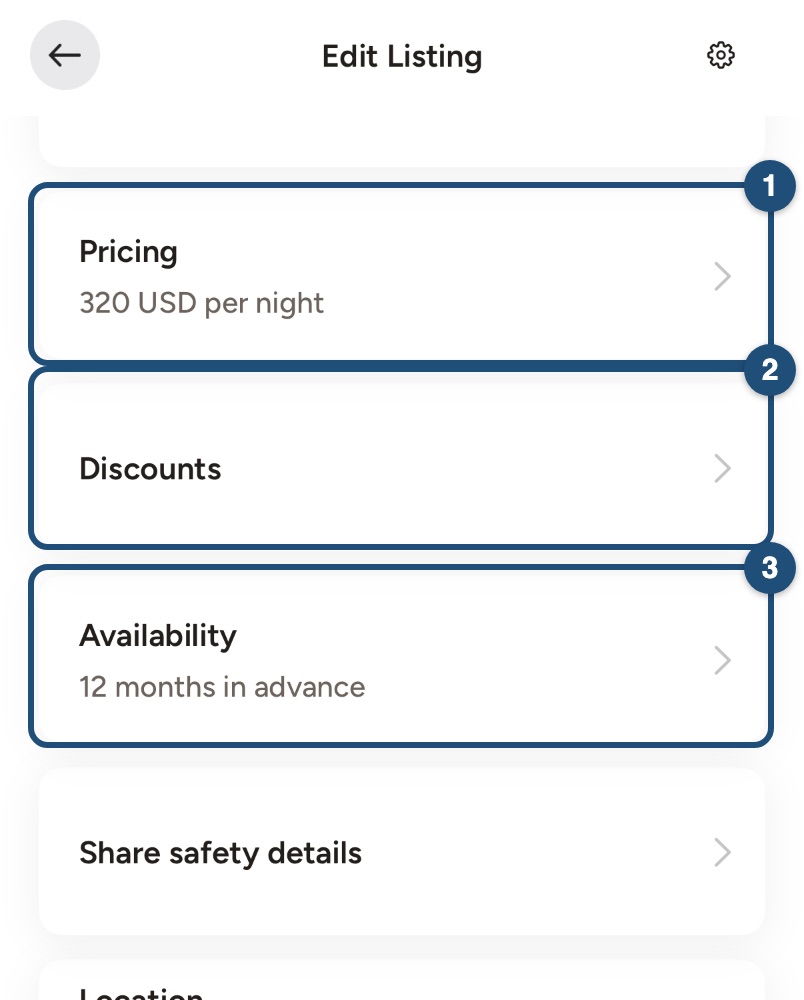
Open your listing: switch to hosting (Profile > Switch to Host), tap Listing in the bar at the bottom and tap your listing.
Open Pricing (1) further down the editor, then tap Price.
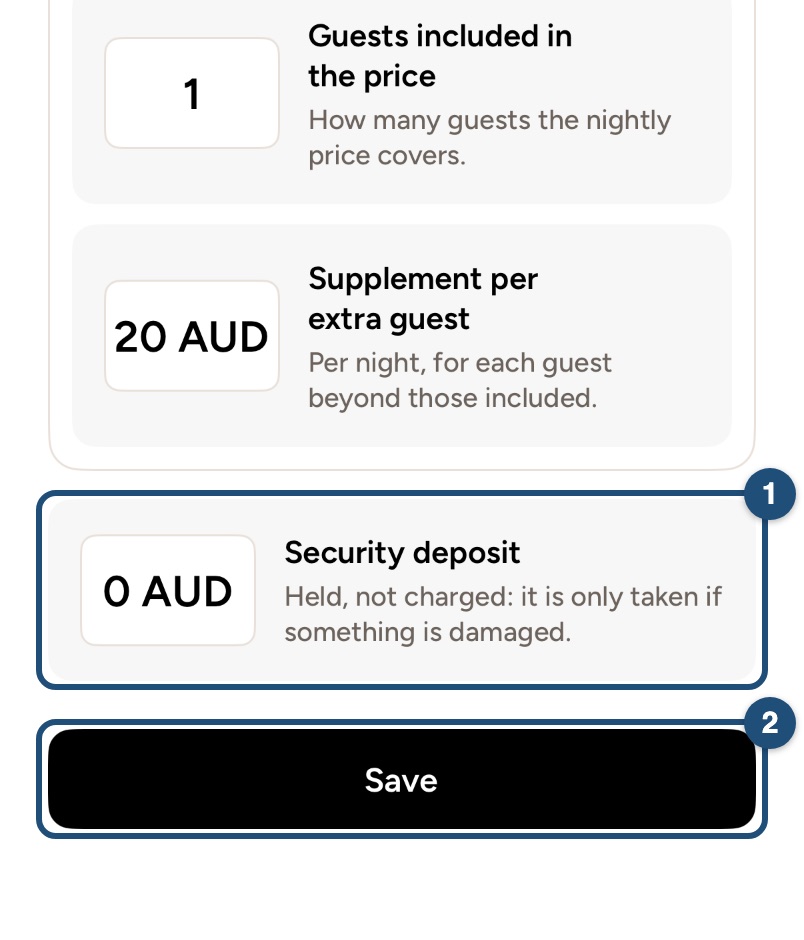
Set the amount: scroll down below the fees and tap the Security deposit card (1). Enter the amount and tap Save (2). Leave it at zero if you don't want a deposit.
Guests see the deposit on your listing page before they book.
How the deposit works
Stays of up to 7 days: the deposit is a temporary hold on the guest's card, not a charge. Card networks usually keep a hold for up to 7 days from check-in, then it expires automatically.
Stays longer than 7 days: choose one of these options:
- You manage the deposit directly with the guest (default option).
- JWguest manages the deposit: we charge it to the guest's card and refund it at the end of the stay if no damage is reported. A 7% processing fee is deducted from your payout. Request this option by emailing [email protected] at least 7 days before check-in.
Damage, missing items or extra cleaning
- Write to us within 24 hours after check-out: email [email protected], describe the problem and attach clear, dated photos.
- We try to secure the deposit: if your claim is on time, we will make reasonable efforts to withhold the deposit and carry out a preliminary assessment.
- The guest can respond: the guest has 48 hours to reply to the claim. The final outcome remains between you and the guest.
Related articles: Guest payment · Update your prices · Service fees for hosts
Android app
You can ask guests for a security deposit to protect your home. Here's how to set one, how it works, and how to report damage, missing items or extra cleaning within 24 hours after check-out.
Set a security deposit in the app
Here's a step-by-step guide:
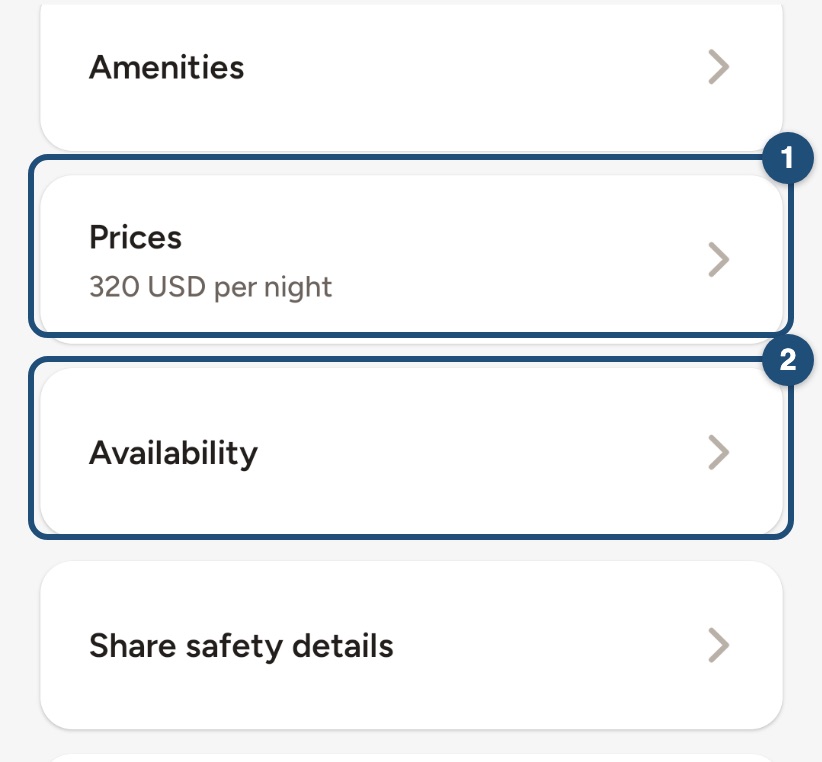
Open your listing: switch to hosting (Profile > Switch to Host), tap Listings in the bar at the bottom and tap your listing.
Open Prices (1) further down the editor, then tap Price.
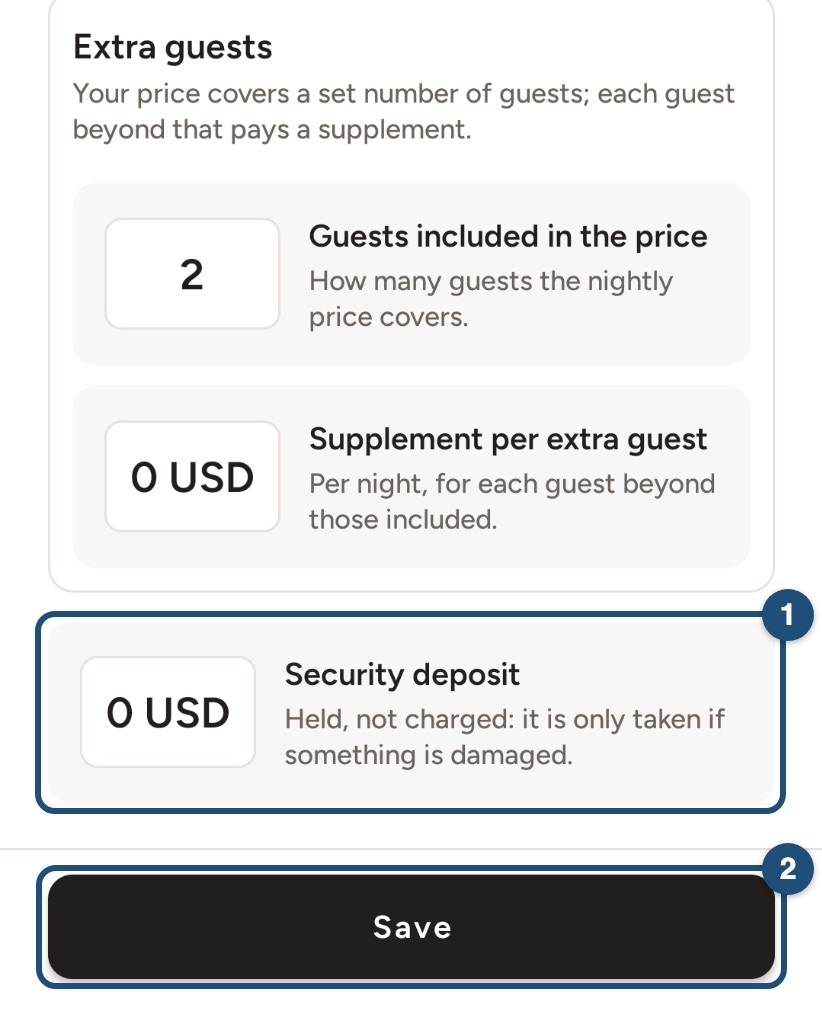
Set the amount: scroll down below the fees and tap the Security deposit card (1). Enter the amount and tap Save (2). Leave it at zero if you don't want a deposit.
Guests see the deposit on your listing page before they book.
How the deposit works
Stays of up to 7 days: the deposit is a temporary hold on the guest's card, not a charge. Card networks usually keep a hold for up to 7 days from check-in, then it expires automatically.
Stays longer than 7 days: choose one of these options:
- You manage the deposit directly with the guest (default option).
- JWguest manages the deposit: we charge it to the guest's card and refund it at the end of the stay if no damage is reported. A 7% processing fee is deducted from your payout. Request this option by emailing [email protected] at least 7 days before check-in.
Damage, missing items or extra cleaning
- Write to us within 24 hours after check-out: email [email protected], describe the problem and attach clear, dated photos.
- We try to secure the deposit: if your claim is on time, we will make reasonable efforts to withhold the deposit and carry out a preliminary assessment.
- The guest can respond: the guest has 48 hours to reply to the claim. The final outcome remains between you and the guest.
Related articles: Guest payment · Update your prices · Service fees for hosts