
Website
If your home is also listed on Airbnb, Vrbo or another site, or you keep your rental dates in Google Calendar, connect the calendars. Dates booked elsewhere then close on JWguest by themselves, and your JWguest bookings can close the same dates elsewhere. This works with iCal links: web addresses, usually ending in .ics, that one calendar publishes and another reads.
Import a calendar into JWguest
- Copy the iCal link of the other calendar (see "Where to find the link" below).
- Open your calendar: in the Personal Area bar, click Listings, then Manage Calendar next to the listing.
- Click Import Calendar (1) below the calendar.
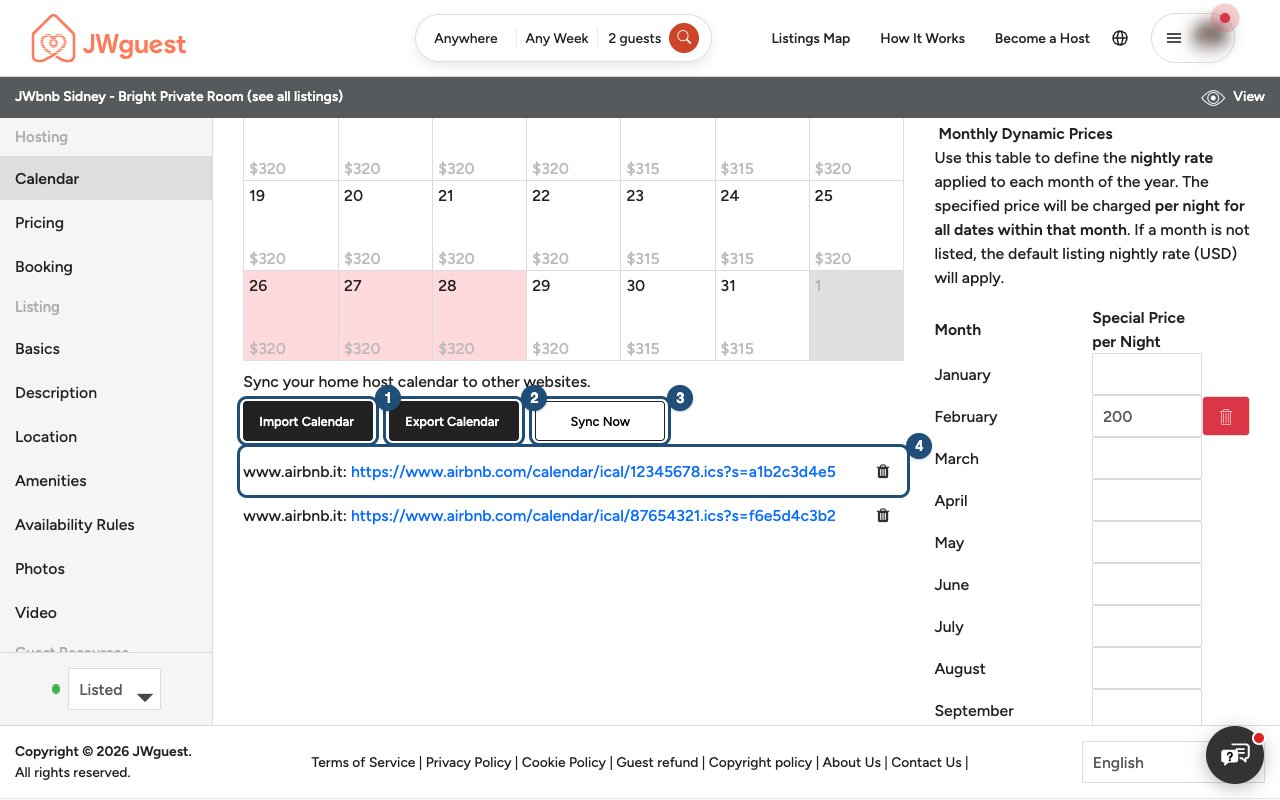
- Paste the link in Calendar Address (URL) (1) and give the calendar a name in Name Your Calendar (2), for example "Airbnb".
- Click Import Calendar (3).
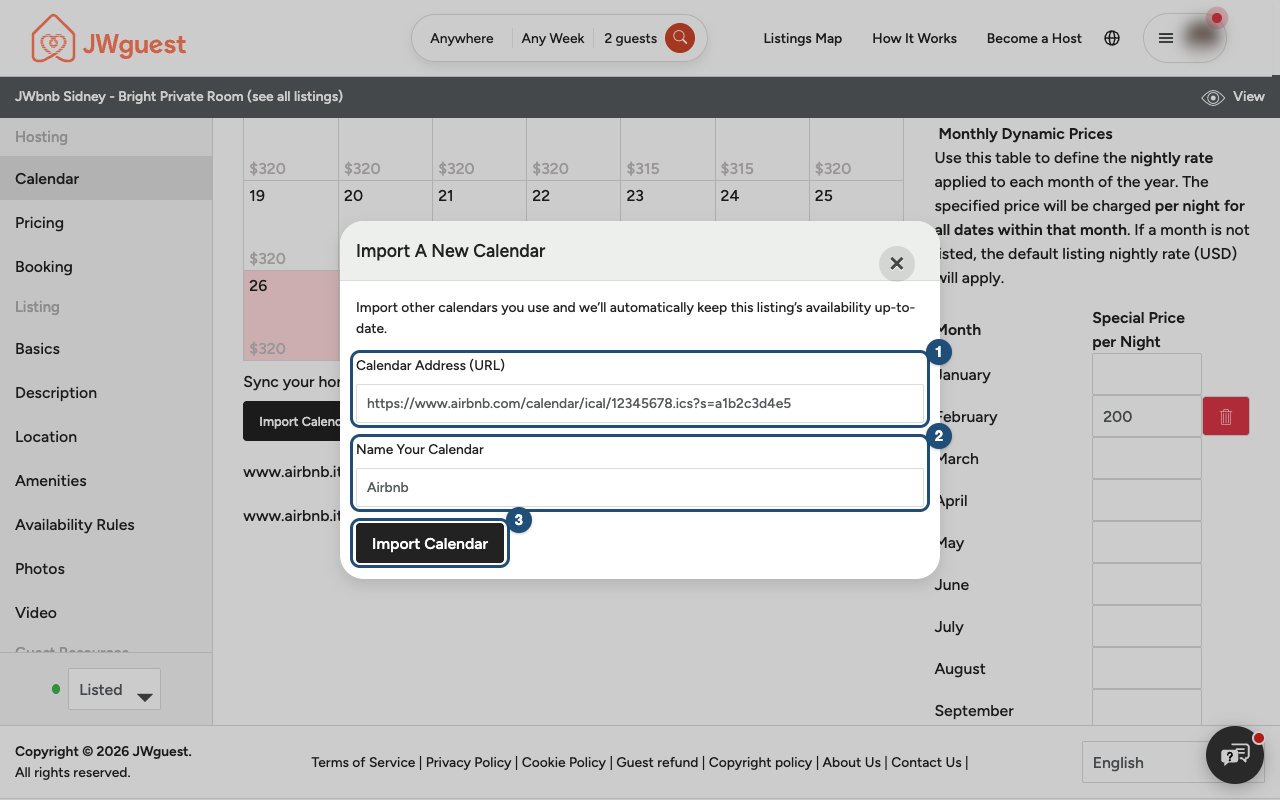
JWguest reads the calendar straight away: every date booked or blocked there becomes a blocked date on your listing. If the link opens a web page instead of a calendar, or can't be read, you see a message under the address and nothing is saved.
Show your JWguest bookings on another site
- On the same page, click Export Calendar (2).
- Select the link in the window (1) and copy it.
- Paste it into the other site's calendar import, or into Google Calendar (Other calendars > + > From URL).
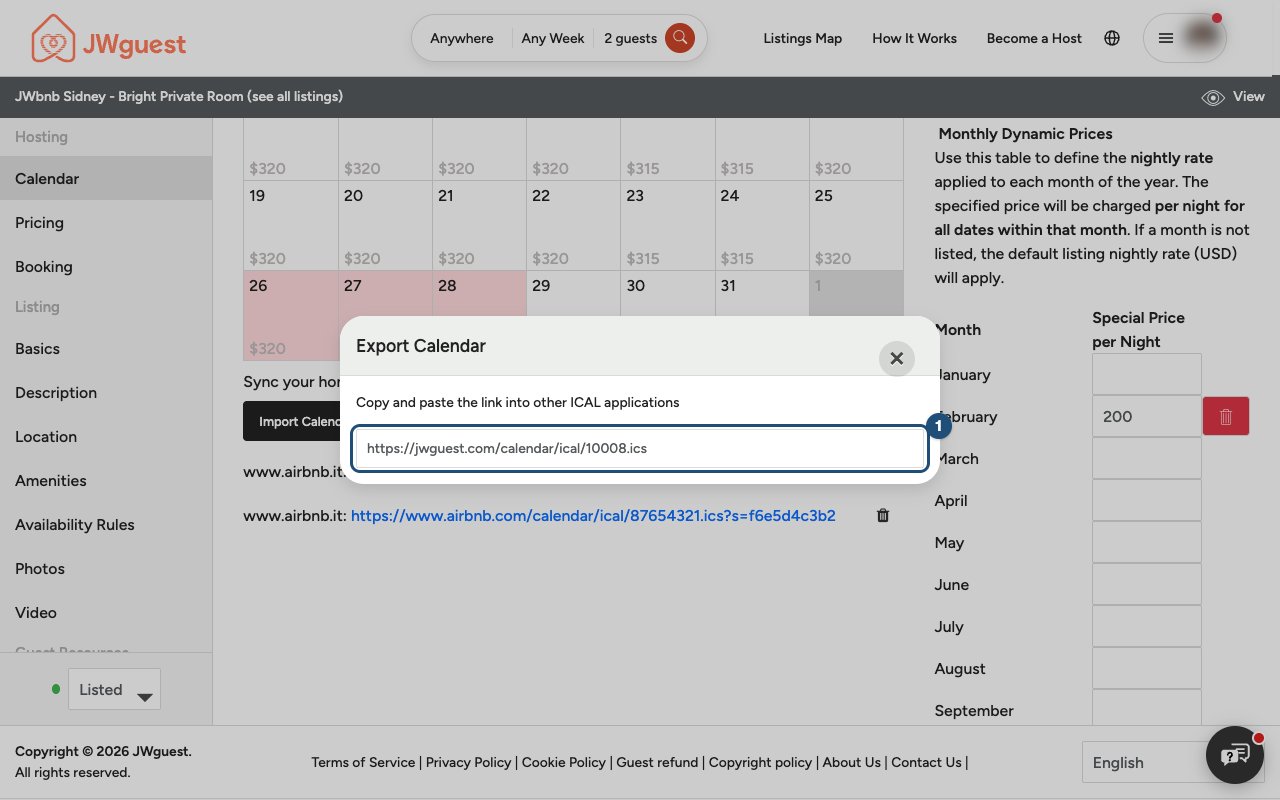
The JWguest link contains your JWguest bookings. Dates you blocked by hand, and dates imported from other sites, are not in it: if you block dates on JWguest for another reason, block them on the other site too.
How often calendars sync
- JWguest reads your imported calendars automatically twice a day.
- Sync Now (3) reads them again at once, for example right after you accepted a booking elsewhere.
- The other site reads your JWguest link on its own schedule, which can be a few hours.
Remove an imported calendar
Your imported calendars are listed under the buttons (4). Click the bin next to one and confirm with Delete. The dates it had blocked open again.
Where to find the link
- Airbnb: open the listing's calendar, find the availability settings and the option to connect or sync calendars, and choose to export. Copy the link Airbnb shows. To import JWguest into Airbnb, choose to connect another calendar in the same place.
- Vrbo: in your owner account, open the property's calendar and look for the import/export option. Export to get Vrbo's link; import to add the JWguest link.
- Google Calendar (on a computer): Settings, choose the calendar under "Settings for my calendars", then copy the Secret address in iCal format under "Integrate calendar". Use a calendar that holds only your rental dates.
- Other sites: look for "iCal", "ICS" or "calendar export". If you can't find it, ask that site's support.
The menus of other sites change from time to time; their own help pages describe the current steps.
Related articles: Update your calendar · Set a minimum and maximum stay · Steps for hosts to cancel a booking
Mobile browser
If your home is also listed on Airbnb, Vrbo or another site, or you keep your rental dates in Google Calendar, connect the calendars with iCal links (web addresses, usually ending in .ics). Dates booked elsewhere then close on JWguest by themselves, and your JWguest bookings can close the same dates elsewhere.
Import a calendar into JWguest
- Copy the iCal link of the other calendar (see "Where to find the link" below).
- Open your calendar: tap Listings in the black Personal Area bar, then Manage Calendar.
- Scroll below the calendar and tap Import Calendar (1).
- Paste the link in Calendar Address (URL), name the calendar (for example "Airbnb") and tap Import Calendar.
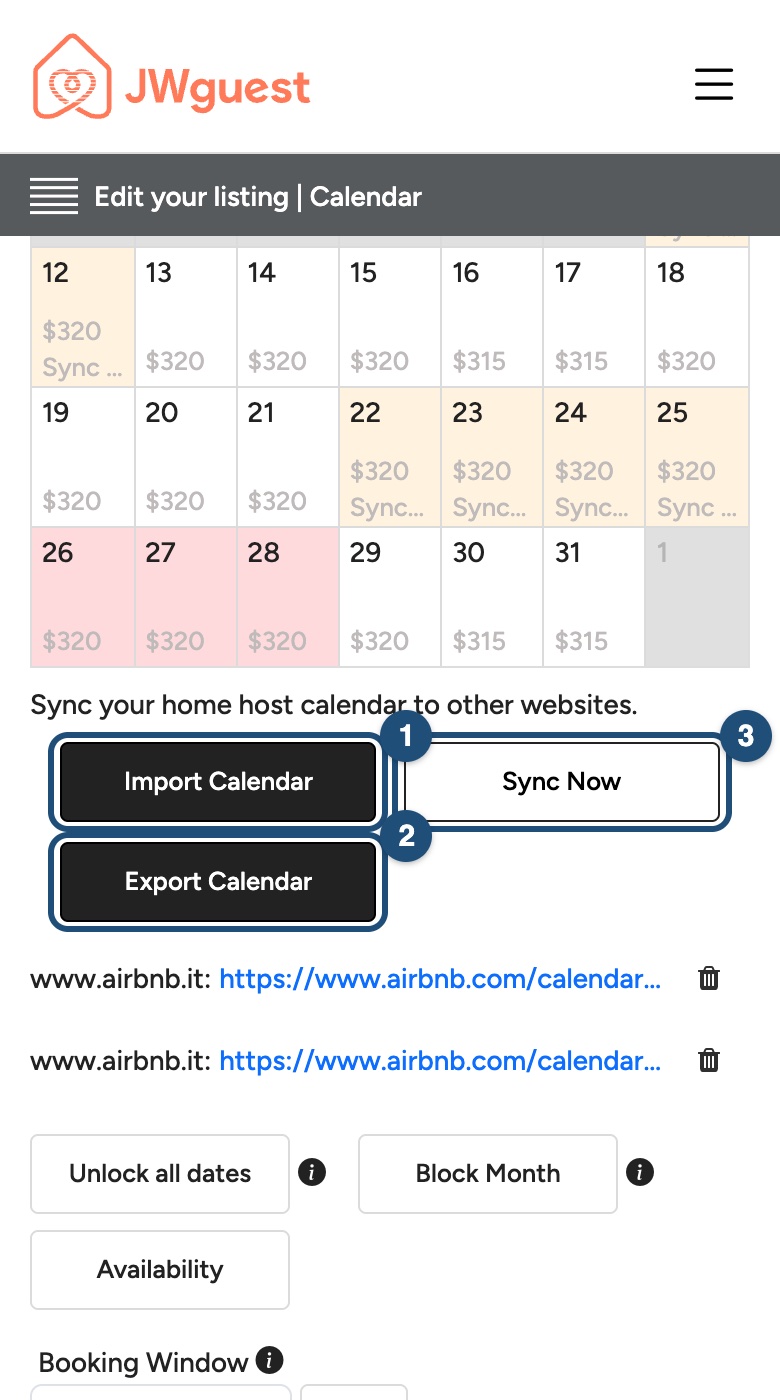
JWguest reads the calendar straight away and blocks the dates booked or blocked there.
Show your JWguest bookings on another site
Tap Export Calendar (2), copy the link and paste it into the other site's calendar import. The link contains your JWguest bookings; dates you blocked by hand are not in it, so block those on the other site too.
How often calendars sync
Imported calendars are read twice a day; Sync Now (3) reads them at once. Other sites read your JWguest link on their own schedule.
Remove an imported calendar
Tap the bin next to it in the list under the buttons and confirm with Delete. The dates it had blocked open again.
Where to find the link
- Airbnb: in the listing's calendar, the availability settings have an option to connect or sync calendars: export to copy Airbnb's link, connect another calendar to add JWguest's.
- Vrbo: in the property's calendar, use the import/export option.
- Google Calendar: the link is only in the settings of the computer version (open calendar.google.com in your browser in desktop view): copy the Secret address in iCal format of a calendar that holds only your rental dates.
Related articles: Update your calendar · Set a minimum and maximum stay
iOS app
If your home is also listed on Airbnb, Vrbo or another site, or you keep your rental dates in Google Calendar, import that calendar: dates booked elsewhere then close on JWguest by themselves. It works with iCal links, web addresses usually ending in .ics.
Import a calendar
- Copy the iCal link of the other calendar (see "Where to find the link" below).
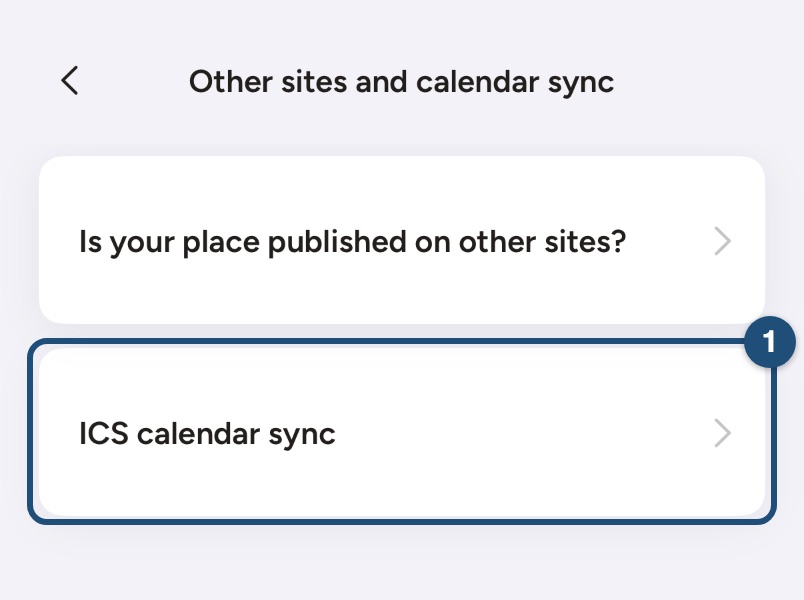
- Open the import screen: in Calendar, select any day and tap Custom settings > Import calendars. Or, in the listing editor, tap Availability > Other sites and calendar sync > ICS calendar sync (1).
- Paste the link in the field (1) and tap Add (2). The app names the calendar after the site, for example www.airbnb.com.
- Tap Sync (3) to read it straight away. Otherwise its dates arrive with the next automatic sync.
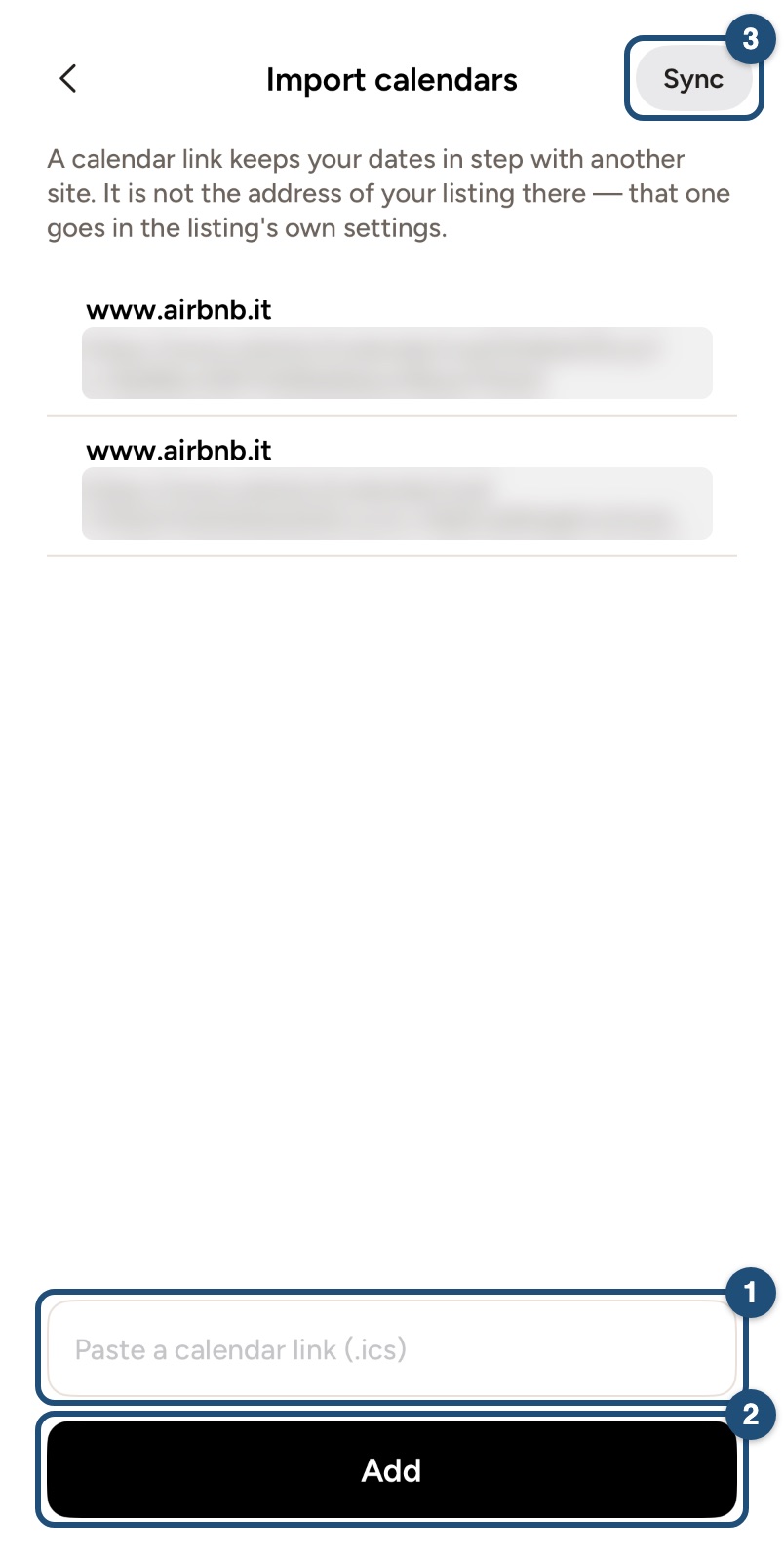
Every date booked or blocked in the other calendar becomes a blocked date on your listing.
How often calendars sync
JWguest reads your imported calendars automatically twice a day. Sync reads them at once and tells you whether every calendar could be read.
Remove an imported calendar
Swipe left on it and tap Remove. The dates it had blocked open again.
Show your JWguest bookings on another site
The JWguest calendar link is on the website: open Listings > Manage Calendar > Export Calendar in a browser, copy the link and paste it into the other site. It contains your JWguest bookings; dates you blocked by hand are not in it.
Where to find the link
- Airbnb: in the listing's calendar, the availability settings have an option to connect or sync calendars: export to copy Airbnb's link.
- Vrbo: in the property's calendar, use the import/export option.
- Google Calendar: on a computer, in the calendar's settings, copy the Secret address in iCal format of a calendar that holds only your rental dates.
Related articles: Update your calendar · Set a minimum and maximum stay
Android app
If your home is also listed on Airbnb, Vrbo or another site, or you keep your rental dates in Google Calendar, import that calendar: dates booked elsewhere then close on JWguest by themselves. It works with iCal links, web addresses usually ending in .ics.
Import a calendar
- Copy the iCal link of the other calendar (see "Where to find the link" below). It must start with https://.
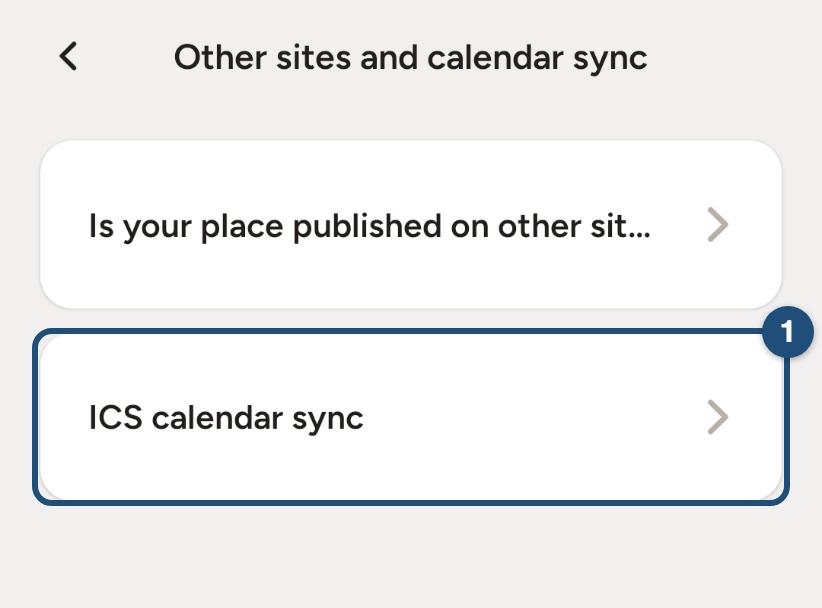
- Open the import screen: in Calendar, select any day and tap Custom settings > Import calendars. Or, in the listing editor, tap Availability > Other sites and calendar sync > ICS calendar sync (1).
- Paste the link in the field (1) and tap Add (2). The app names the calendar after the site, for example www.airbnb.com.
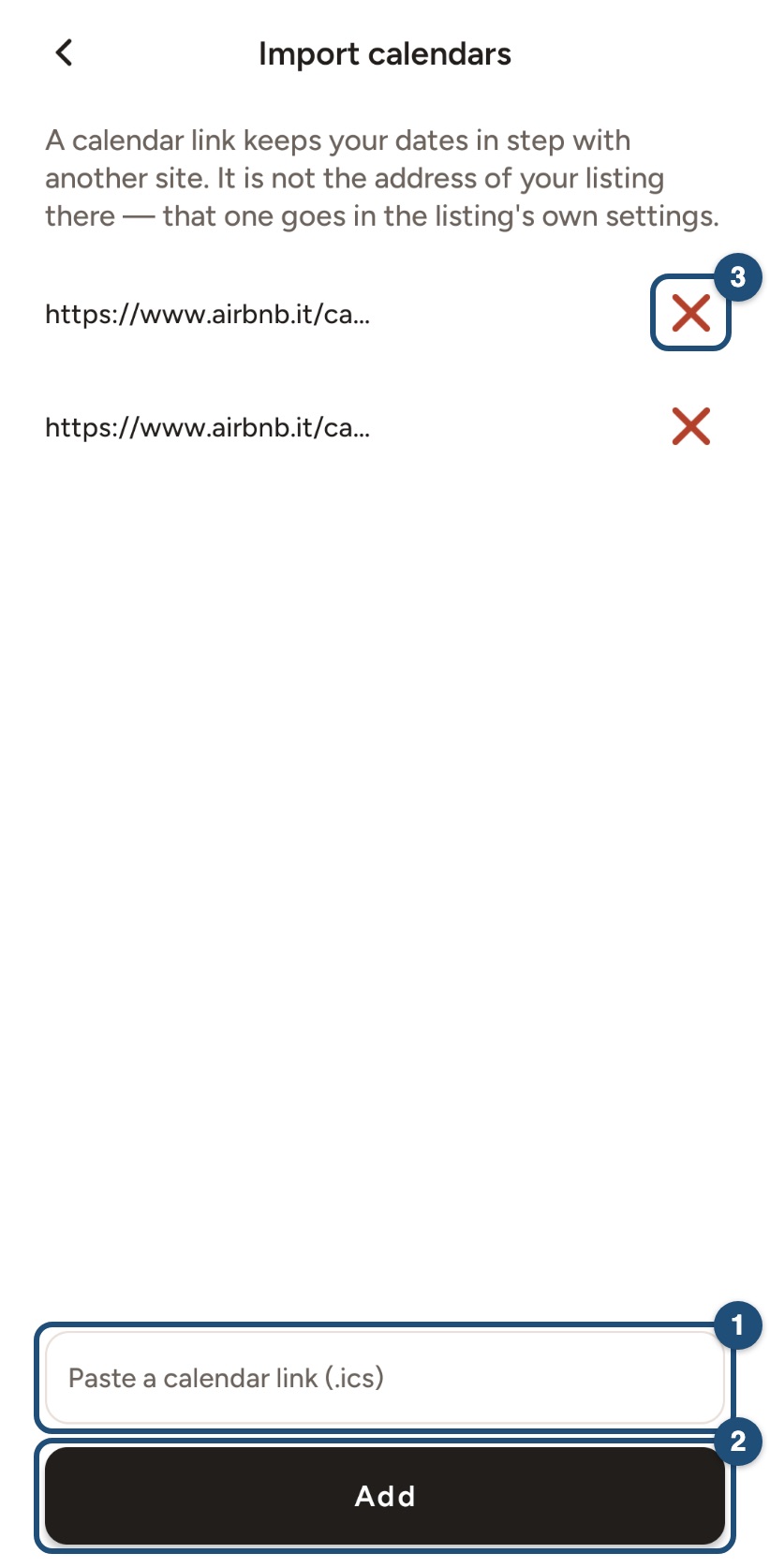
Its dates arrive with the next automatic sync, which runs twice a day. To read it at once, open your calendar on the website and click Sync Now. Every date booked or blocked in the other calendar becomes a blocked date on your listing.
Remove an imported calendar
Tap the X (3) next to it and confirm with Delete. The dates it had blocked open again.
Show your JWguest bookings on another site
The JWguest calendar link is on the website: open Listings > Manage Calendar > Export Calendar in a browser, copy the link and paste it into the other site. It contains your JWguest bookings; dates you blocked by hand are not in it.
Where to find the link
- Airbnb: in the listing's calendar, the availability settings have an option to connect or sync calendars: export to copy Airbnb's link.
- Vrbo: in the property's calendar, use the import/export option.
- Google Calendar: on a computer, in the calendar's settings, copy the Secret address in iCal format of a calendar that holds only your rental dates.
Related articles: Update your calendar · Set a minimum and maximum stay