

Website
Guests plan their trips around your confirmation, so a host cancellation is always hard for them. Sometimes, though, it can't be avoided. Here's what to do and what it means for you.
If you have to cancel
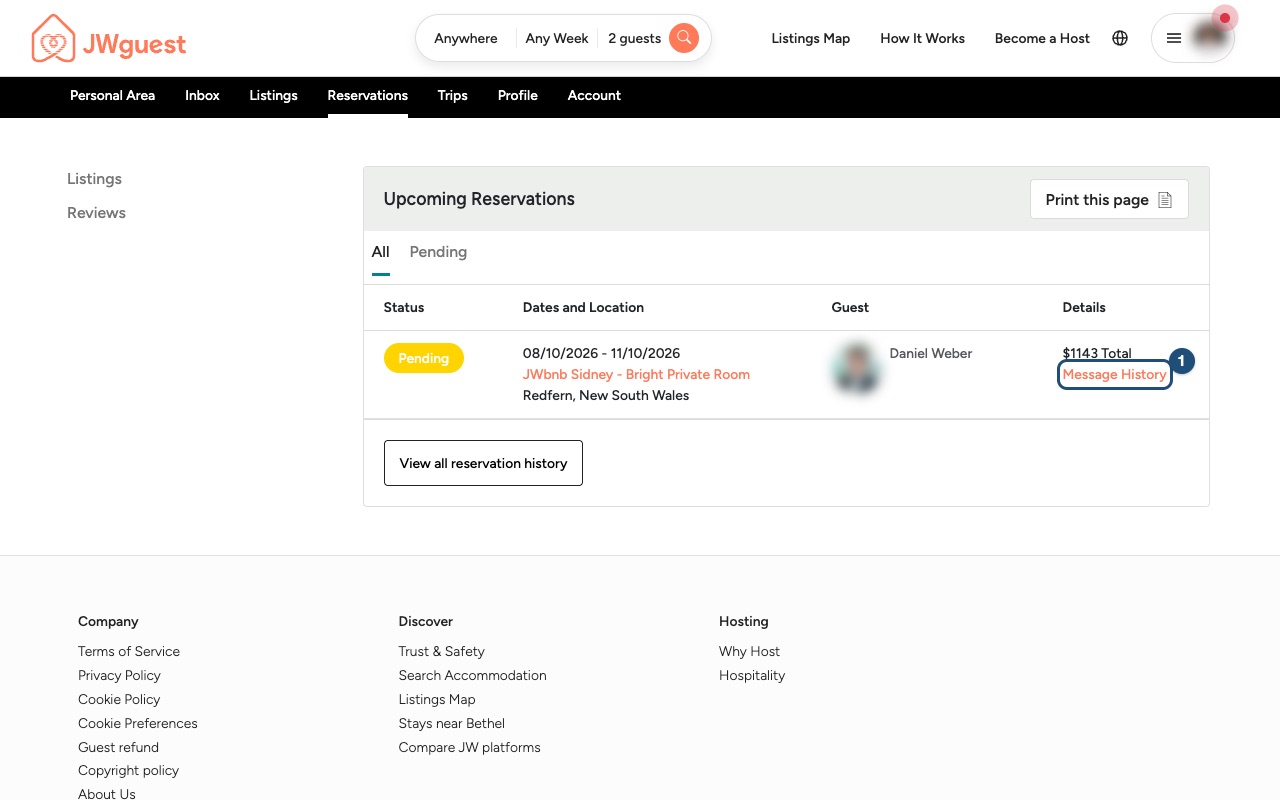
- Tell your guest straight away: in the Personal Area bar, click Reservations, then Message History (1) next to the booking. Explain the situation kindly and apologise.
- Write to us: email [email protected] with the booking details and the reason for the cancellation.
- We cancel and refund the guest: once we confirm the cancellation, the guest receives a full refund of everything they paid, Service Fee included, and we may suggest other listings to them.
What happens after a host cancellation
If you cancel a confirmed booking, JWguest may apply penalties, including:
- an automatic review on your listing noting the cancellation;
- your calendar kept blocked for the cancelled dates;
- a cancellation fee, withheld from your future payouts or charged to your card on file.
You will not receive a payout for the cancelled booking. If a payout was already made, it is deducted from your future payouts.
Cancellation fees
The fee is a percentage of the reservation amount, which is the nightly rate plus the cleaning fee, without the Service Fee, taxes or extra-guest fees. That percentage is at least CHF 60 and at most CHF 500, and the Service Fee of the booking is added to it once, as shown below. No cancellation fee applies if you cancel because of an Extraordinary Event (see section 8 of the Terms of Service).
| When you cancel | Fee |
|---|---|
| More than 30 days before check-in | 5% of the reservation amount, plus the Service Fee |
| Between 48 hours and 30 days before check-in | 15% of the reservation amount, plus the Service Fee |
| 48 hours or less before check-in, or after check-in | 50% of the reservation amount for the nights not stayed, plus the Service Fee |
The full rules are in our Terms of Service. They do not limit the legal rights of guests or hosts.
Mobile browser
Guests plan their trips around your confirmation, so a host cancellation is always hard for them. Sometimes, though, it can't be avoided. Here's what to do from your phone.
If you have to cancel
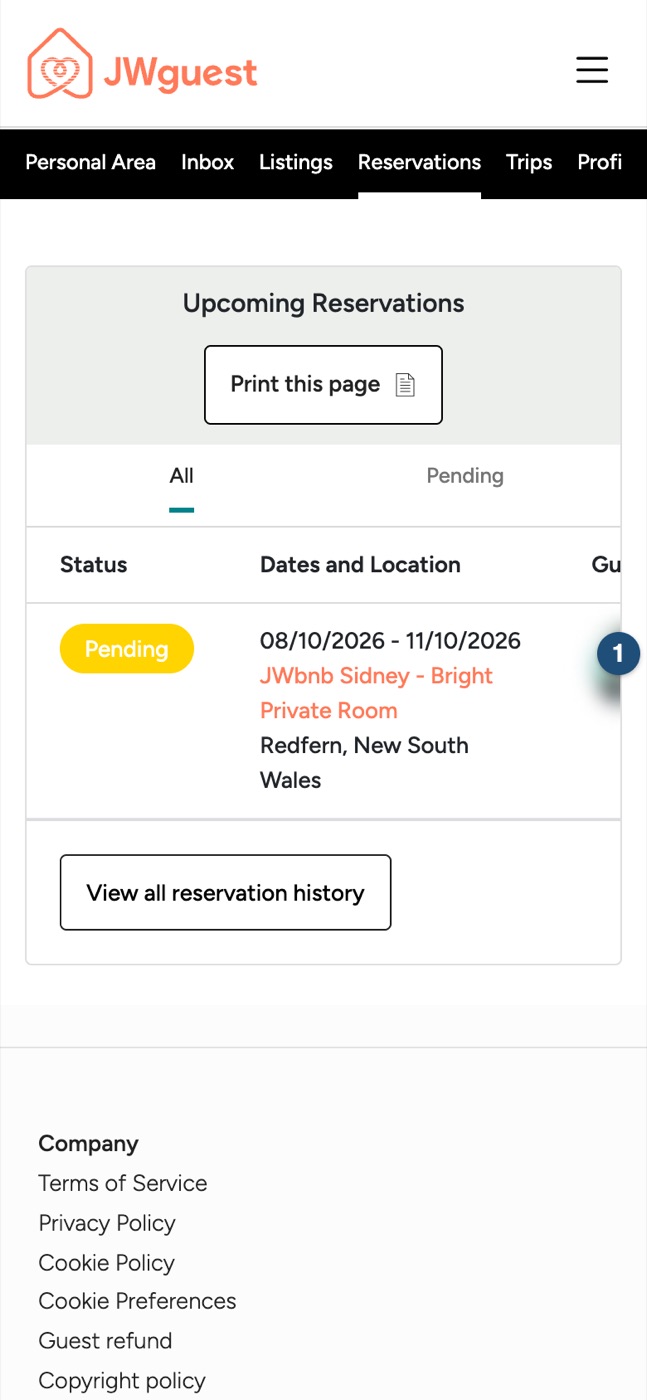
- Tell your guest straight away: tap Reservations in the black Personal Area bar. The table is wider than your screen: swipe it left until you see the Details column, then tap Message History (1). Explain the situation kindly and apologise.
- Write to us: email [email protected] with the booking details and the reason for the cancellation.
- We cancel and refund the guest: once we confirm the cancellation, the guest receives a full refund of everything they paid, Service Fee included, and we may suggest other listings to them.
What happens after a host cancellation
JWguest may apply penalties, including:
- an automatic review on your listing noting the cancellation;
- your calendar kept blocked for the cancelled dates;
- a cancellation fee, withheld from your future payouts or charged to your card on file.
You will not receive a payout for the cancelled booking. If a payout was already made, it is deducted from your future payouts.
Cancellation fees
The fee is a percentage of the reservation amount, which is the nightly rate plus the cleaning fee, without the Service Fee, taxes or extra-guest fees. That percentage is at least CHF 60 and at most CHF 500, and the Service Fee of the booking is added to it once, as shown below. No cancellation fee applies if you cancel because of an Extraordinary Event (see section 8 of the Terms of Service).
- More than 30 days before check-in: 5% of the reservation amount, plus the Service Fee.
- Between 48 hours and 30 days before check-in: 15% of the reservation amount, plus the Service Fee.
- 48 hours or less before check-in, or after check-in: 50% of the reservation amount for the nights not stayed, plus the Service Fee.
The full rules are in our Terms of Service.
iOS app
Guests plan their trips around your confirmation, so a host cancellation is always hard for them. Sometimes, though, it can't be avoided. Here's what to do in the app.
If you have to cancel
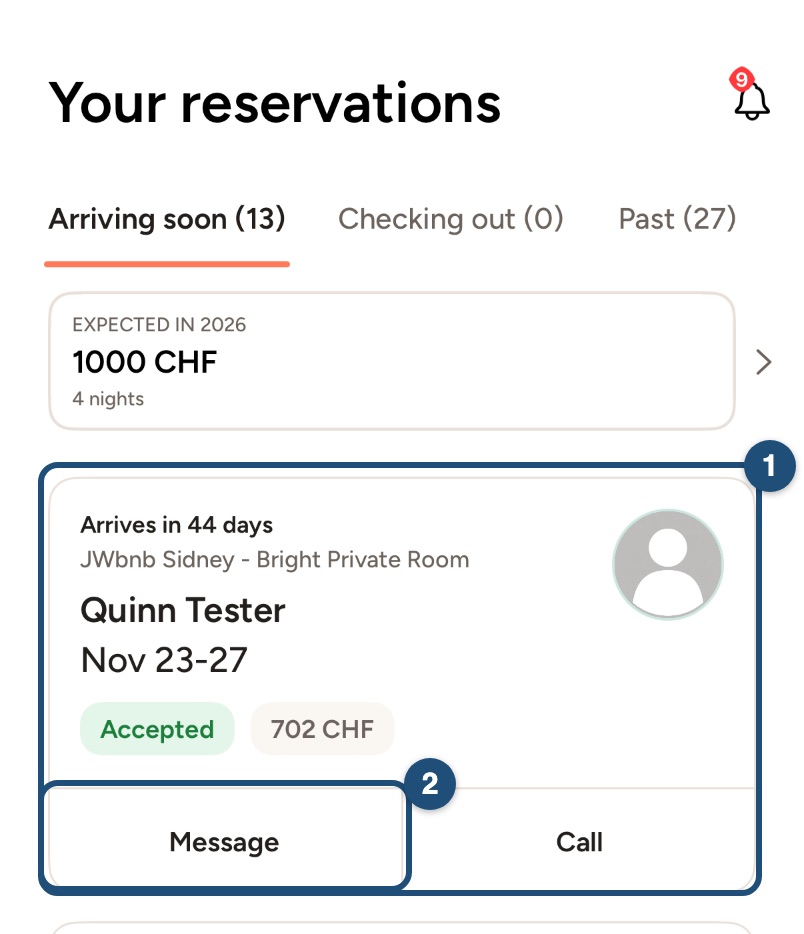
1. Tell your guest straight away: switch to hosting (Profile > Switch to Host) and tap Reservations in the bar at the bottom. Find the booking (1) and tap Message (2). Explain the situation kindly and apologise.
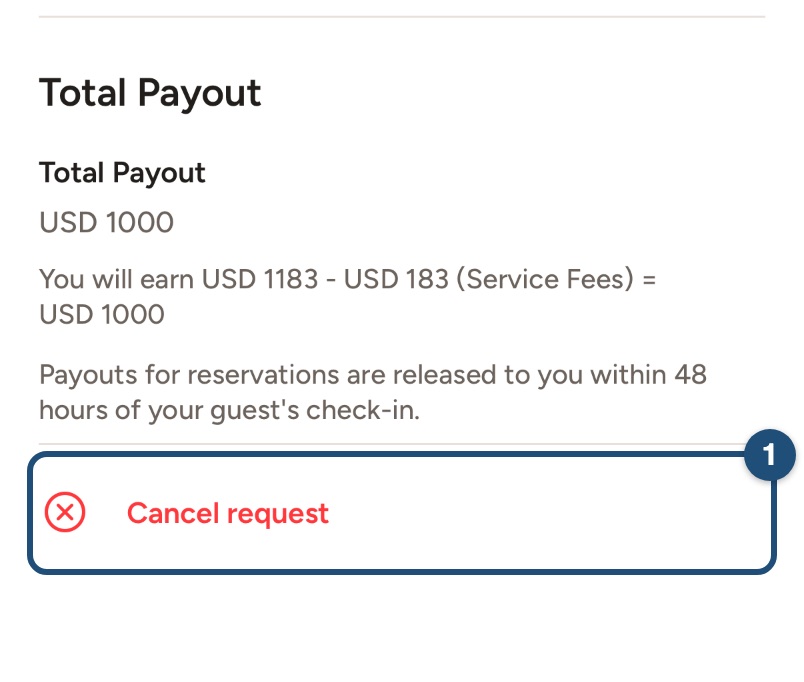
2. Cancel the booking: tap the booking to open it, scroll to the bottom and tap Cancel request (1).
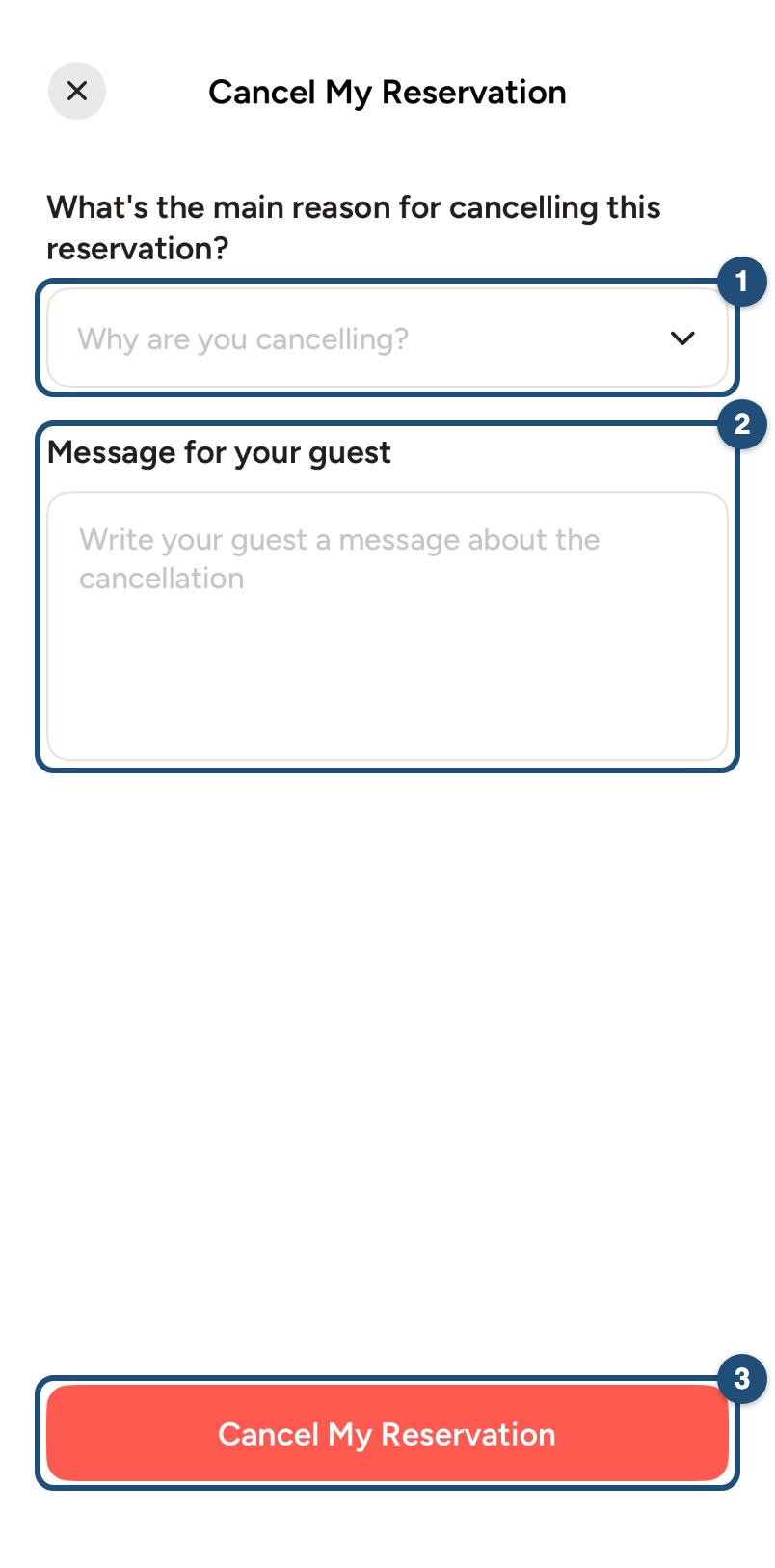
Then choose the main reason (1), write a Message for your guest (2) and tap Cancel My Reservation (3), then confirm.
3. Write to us: email [email protected] with the booking details and the reason for the cancellation, so we can help your guest. The guest receives a full refund of everything they paid, Service Fee included, and we may suggest other listings to them.
What happens after a host cancellation
JWguest may apply penalties, including:
- an automatic review on your listing noting the cancellation;
- your calendar kept blocked for the cancelled dates;
- a cancellation fee, withheld from your future payouts or charged to your card on file.
You will not receive a payout for the cancelled booking. If a payout was already made, it is deducted from your future payouts.
Cancellation fees
The fee is a percentage of the reservation amount, which is the nightly rate plus the cleaning fee, without the Service Fee, taxes or extra-guest fees. That percentage is at least CHF 60 and at most CHF 500, and the Service Fee of the booking is added to it once, as shown below. No cancellation fee applies if you cancel because of an Extraordinary Event (see section 8 of the Terms of Service).
- More than 30 days before check-in: 5% of the reservation amount, plus the Service Fee.
- Between 48 hours and 30 days before check-in: 15% of the reservation amount, plus the Service Fee.
- 48 hours or less before check-in, or after check-in: 50% of the reservation amount for the nights not stayed, plus the Service Fee.
The full rules are in our Terms of Service.
Android app
Guests plan their trips around your confirmation, so a host cancellation is always hard for them. Sometimes, though, it can't be avoided. Here's what to do in the app.
If you have to cancel
1. Tell your guest straight away: switch to hosting (Profile > Switch to Host) and tap Reservation in the bar at the bottom. Find the booking (1) and tap Message (2). Explain the situation kindly and apologise.
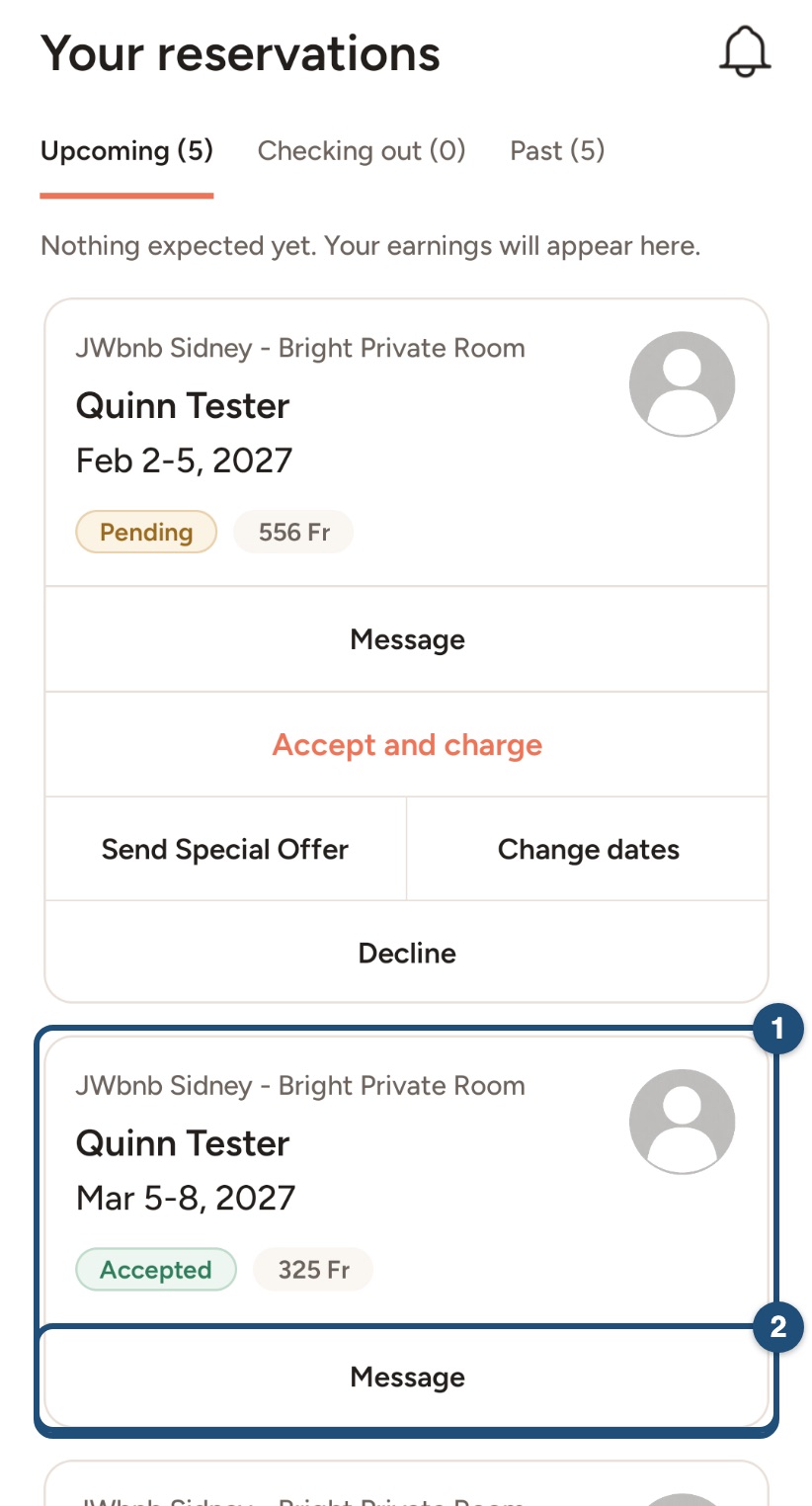
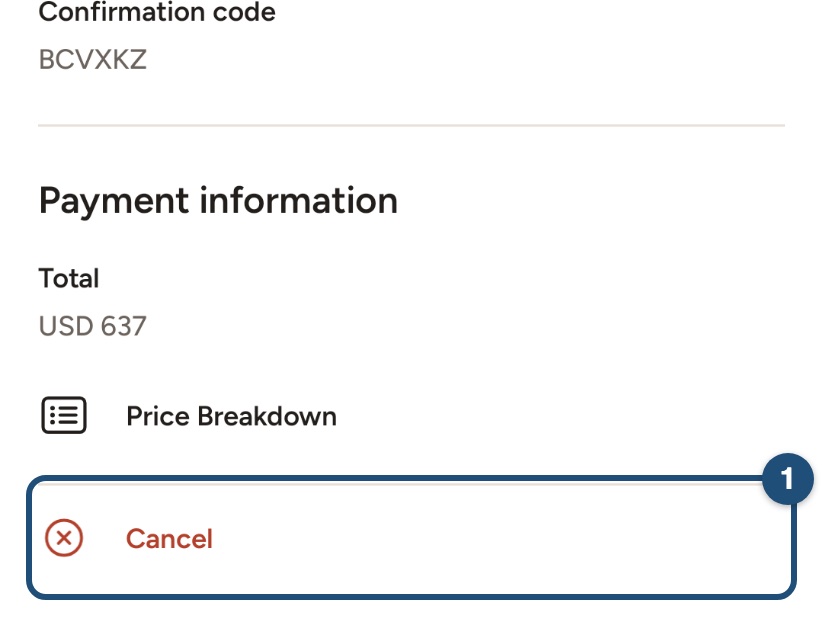
2. Cancel the booking: tap the booking to open it, scroll to the bottom and tap Cancel (1).
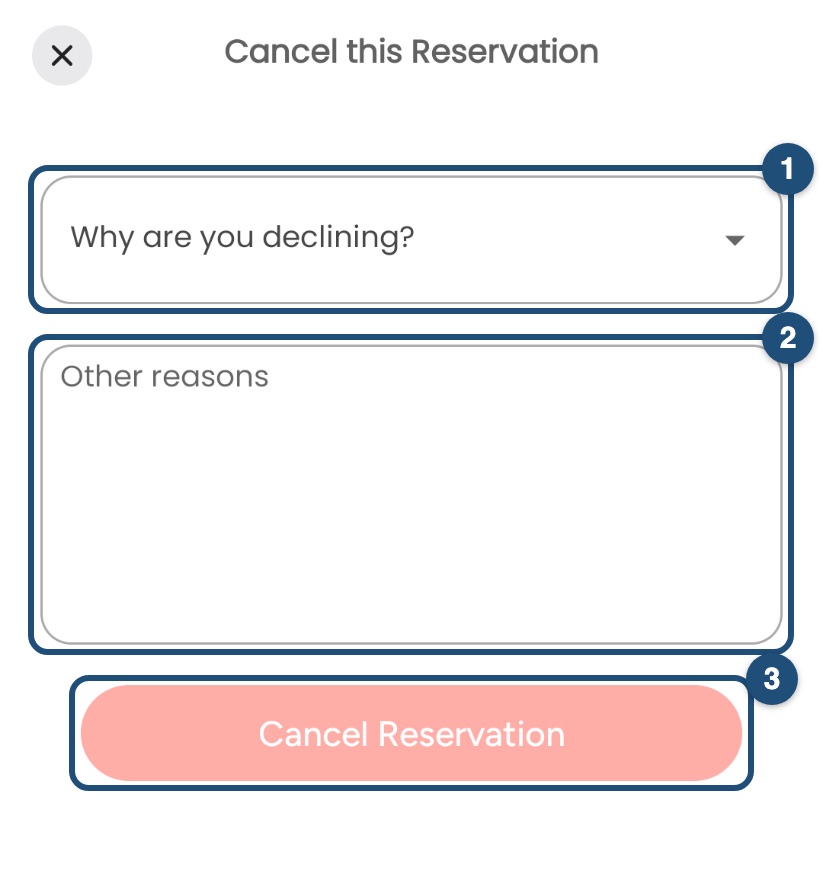
Then choose the reason (1), write a message for your guest (2) and tap Cancel Reservation (3), then confirm.
3. Write to us: email [email protected] with the booking details and the reason for the cancellation, so we can help your guest. The guest receives a full refund of everything they paid, Service Fee included, and we may suggest other listings to them.
What happens after a host cancellation
JWguest may apply penalties, including:
- an automatic review on your listing noting the cancellation;
- your calendar kept blocked for the cancelled dates;
- a cancellation fee, withheld from your future payouts or charged to your card on file.
You will not receive a payout for the cancelled booking. If a payout was already made, it is deducted from your future payouts.
Cancellation fees
The fee is a percentage of the reservation amount, which is the nightly rate plus the cleaning fee, without the Service Fee, taxes or extra-guest fees. That percentage is at least CHF 60 and at most CHF 500, and the Service Fee of the booking is added to it once, as shown below. No cancellation fee applies if you cancel because of an Extraordinary Event (see section 8 of the Terms of Service).
- More than 30 days before check-in: 5% of the reservation amount, plus the Service Fee.
- Between 48 hours and 30 days before check-in: 15% of the reservation amount, plus the Service Fee.
- 48 hours or less before check-in, or after check-in: 50% of the reservation amount for the nights not stayed, plus the Service Fee.
The full rules are in our Terms of Service.