
Do you manage your availability in Google Calendar, on your own website or on another booking platform? Connect it to JWguest so that your dates stay up to date everywhere and you avoid double bookings.
What you need
An iCal link: a web address (often ending in .ics) that other platforms can read to see which dates are booked. Almost every calendar and booking platform can give you one. If you can't find it, ask your website's or platform's support for the "iCal export" link.
How to get the iCal link from Google Calendar
- Open Google Calendar on a computer. The Google Calendar app cannot do this. On a phone, open calendar.google.com in your browser and switch to the desktop view.
- Open the settings: click the gear icon at the top right, then Settings.
- Choose the calendar: on the left, under "Settings for my calendars", click the calendar you use for your rental.
- Copy the link: scroll to "Integrate calendar" and copy the Secret address in iCal format.
How to import it into JWguest
- Open your calendar: in the Personal Area bar, click Listings, then Manage Calendar next to your listing.
- Click Import Calendar (1) and paste the link.
- Click Sync Now to update right away.
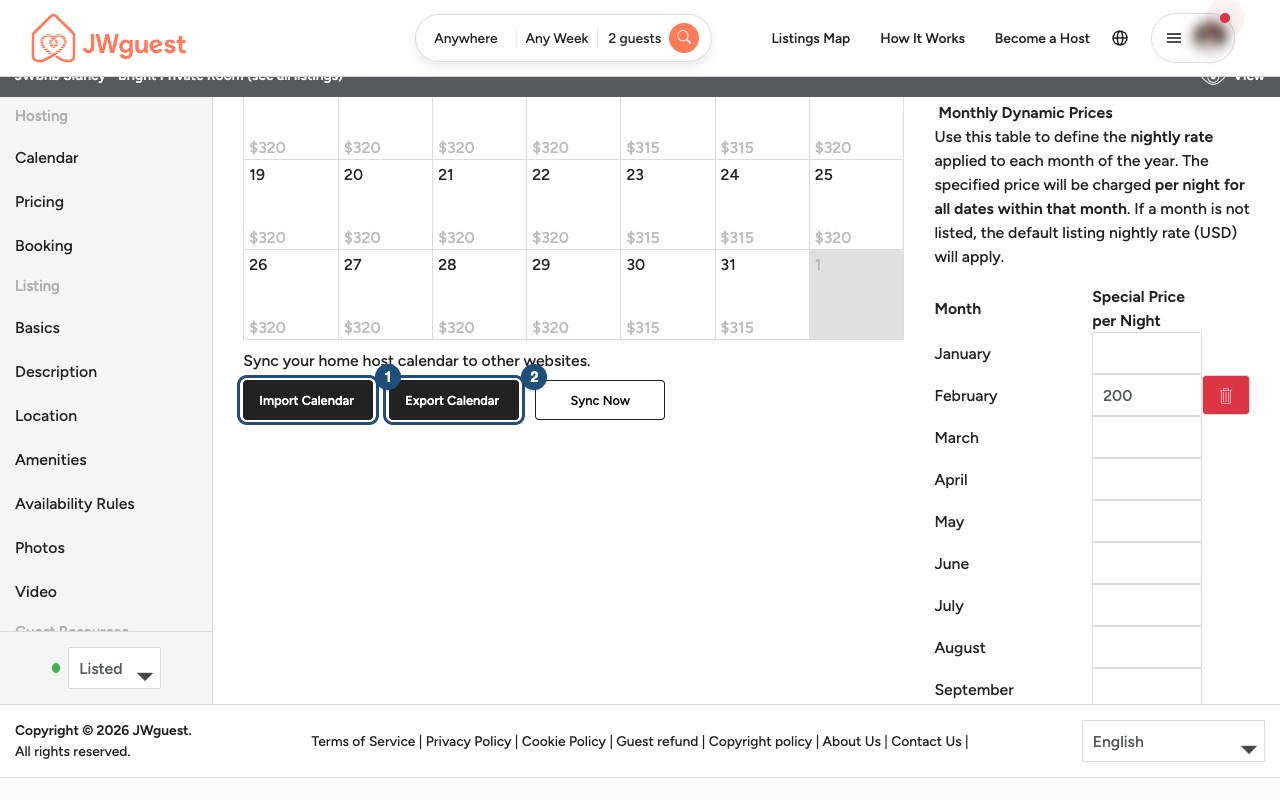
To show your JWguest bookings on the other calendar, click Export Calendar (2), copy the JWguest link and add it to the other calendar or platform (in Google Calendar: "Other calendars" > "+" > "From URL").
The calendars sync automatically twice a day. If you need help, email the link to [email protected] and we will connect it for you.
On a phone: open Edit your listing (the icon with lines at the top) and tap Calendar. See Update your calendar.
Related: How to sync your Airbnb calendar · How to sync your Vrbo calendar