
The ability to export Airbnb calendars using the iCal tool lets you automatically maintain your property's availability on multiple websites, such as JWguest.com and others. By syncing your Airbnb calendar with JWguest.com, you can prevent multiple guests from booking the exact dates.
iCal is free and saves you from having dreadful and expensive double bookings.
What is iCal?
iCal is an industry-standard format allowing users to share calendar and event information. The publisher of the data can choose what information will be shared; it can be as simple as just the booking name, start and end date OR as much as phone number and other personal details about the booking if configured.
How can I export my AirBnB calendar?
Log in on Airbnb and go to your Dashboard.
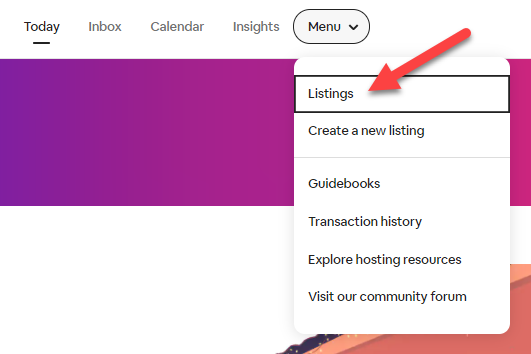
Click on Menu > Listings

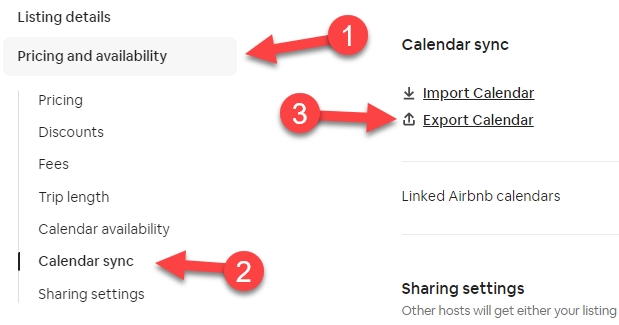
Go to Pricing and Availability (1) > Calendar sync (2)
Click Export Calendar (3)
In the Export Calendar window, copy the address, then send it through email to [email protected]
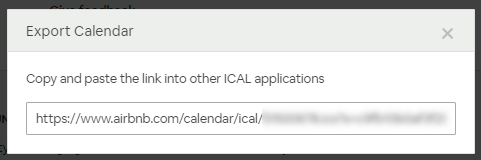
Click the X to close the Airbnb Export Calendar window.
How often will the Airbnb calendar be synchronized with JWguest.com?
We will sync the calendars two times per day. If you need to sync the calendar manually, just email us at [email protected].